Search Engine (Typesense) Monitoring
IOMETE uses Typesense to power full-text search across the data catalog. This page shows you what's indexed and how the Typesense process itself is holding up, so you can catch resource pressure before it turns into slow or failed searches.
Sign in with an account that has the Administration Manager role, then click Monitoring in the left sidebar and open the Search engine (Typesense) card. Every request this page makes requires that role, so any other admin role sees access-denied errors instead of data.
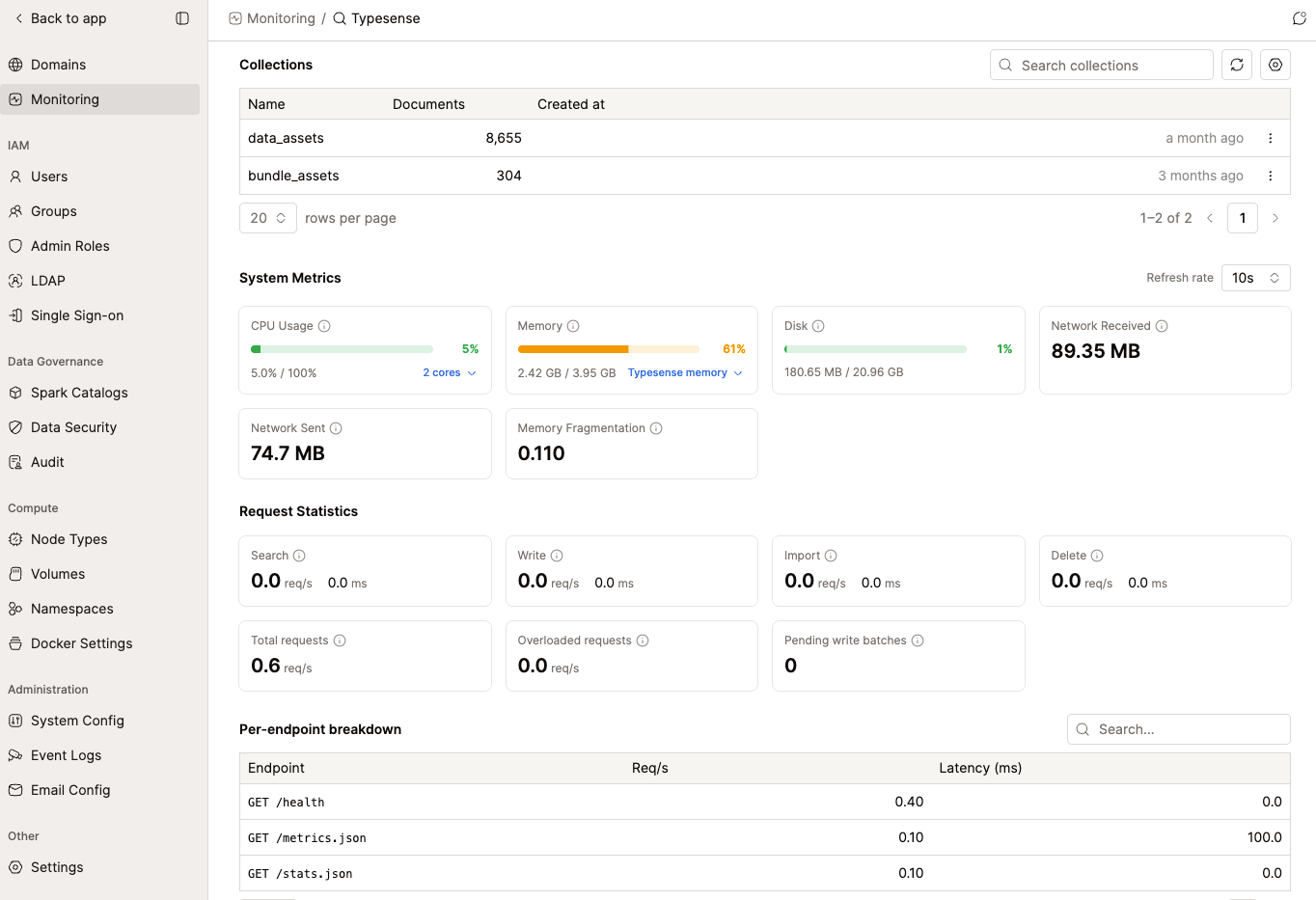
Collections
The Collections table lists every Typesense collection, the number of documents it holds, and when it was created. Use the search box above the table to filter by name, or click Refresh to pull the latest counts.
Each row has an actions menu with Delete collection. Deleting is permanent. A confirmation dialog names the collection and warns you the action can't be undone before it proceeds.
There's no undo. Make sure you have the right collection selected before confirming.
System Metrics
System Metrics reports resource usage for the machine running Typesense, refreshed on the interval you pick from the Refresh rate dropdown (1s, 2s, 5s, 10s, or 30s; 10s by default).
| Metric | What it shows |
|---|---|
| CPU Usage | Overall CPU utilization across all cores. Expand it to see per-core percentages. Sustained usage above 90% can degrade search performance. |
| Memory | System RAM used by the host. Expand it for a breakdown into Resident, Allocated, Active, Mapped, Retained, and Metadata bytes. Consistently above 80% is a sign to add RAM or reduce the number of collections. |
| Disk | Disk space used for storing indices. If it fills up, indexing fails. |
| Network Received / Sent | Total inbound and outbound traffic. A sudden spike in either can point to an unusually large import or a traffic surge. |
| Memory Fragmentation | Fraction of memory wasted due to fragmentation, from 0 (none) upward. Above 0.5 is significant fragmentation; restarting Typesense reclaims it. |
Each card's usage bar turns amber at 60% and red at 90%, so you can scan for trouble at a glance instead of reading every number.
Request Statistics
Request Statistics breaks down traffic by operation type over the last 10 seconds: Search, Write, Import, and Delete, each with requests per second and average latency. Below the four operation cards:
- Total requests: combined throughput across all four operation types.
- Overloaded requests: requests Typesense rejected because it was overloaded. Any value above zero means it's actively dropping traffic, so treat it as urgent.
- Pending write batches: batches queued but not yet processed. A number that keeps growing means writes are arriving faster than Typesense can keep up.
A Per-endpoint breakdown table below the summary cards lists request rate and latency for each underlying Typesense API endpoint (health checks, metrics, collection operations, and so on).
Danger Zone
The Danger Zone panel groups two destructive, admin-only operations. Both require clicking through a confirmation dialog before they run.
| Action | What it does | Confirmation |
|---|---|---|
| Compact database | Compacts the underlying RocksDB storage to reclaim disk space from deleted or updated records and reduce read latency. Non-blocking (search and indexing continue), but I/O intensive, so it's best run during off-peak hours. | "This will trigger a database compaction. It is safe but I/O intensive. Continue?" |
| Purge deleted catalog items | Permanently removes all soft-deleted catalog items (tables, views, and so on) that are currently visible under the catalog's "Deleted" filter and could otherwise still be restored. | "This will permanently delete all soft-deleted catalog items. This action cannot be undone. Continue?" |


Purging deleted catalog items is permanent. Once you confirm, those items can no longer be restored.
Access Permissions
Every part of this page requires the Administration Manager role: viewing collections, metrics, and stats; deleting a collection; and both Danger Zone actions.