Apache Iceberg Table Maintenance: What Iceberg Ships and What It Doesn't

Iceberg gives you the core maintenance operations, but not the scheduler, health checks, or orchestration around them. This post explains what each operation does at the file level, which tuning parameters matter most, and where a DIY setup starts to break down.
This is Part 2 of our Apache Iceberg Table Maintenance series. Explore the full series:
- Part 1: The Hidden Debt in Your Lakehouse Tables
- Part 2: What Iceberg Gives You for Table Maintenance
- Part 3: The Iceberg Table Maintenance Landscape
- Part 4: How We Built Automated Table Maintenance
- Part 5: Running Iceberg Maintenance in Production
- Part 6: Why We Rebuilt Orphan File Cleanup from Scratch
Every team running Apache Iceberg in production eventually hits the same wall. Queries get slower, storage costs go up, and someone opens a ticket. The engineer who looks into it finds that Iceberg includes the maintenance primitives, but not the automation or guidance for when to use them.
This post explains what Iceberg gives you out of the box, what each operation does at the file level, and where the DIY approach starts to fail. We worked through most of these options before building our own system, and the gaps cost us real time.
What Iceberg Ships Out of the Box
Iceberg exposes the same set of maintenance operations through three interfaces, each aimed at a different persona:
| # | Interface | Who uses it | When it fits |
|---|---|---|---|
| 1 | Spark SQL Procedures | Data engineers, platform engineers | Default for ad-hoc or scheduled SQL |
| 2 | Spark Actions API (Java/Scala) | Backend / platform engineers | Embedded in services, CI, custom orchestrators |
| 3 | Flink Maintenance Framework | Streaming teams | Already running Flink, no separate Spark cluster |
The underlying operations are the same. What changes is where the call comes from.
Spark SQL Procedures
Spark SQL Procedures are by far the most common. They're registered automatically when you configure an Iceberg catalog in Spark. Four procedures cover the core operations:
CALL catalog.system.rewrite_data_files('db.table');
CALL catalog.system.expire_snapshots('db.table');
CALL catalog.system.remove_orphan_files(table => 'db.table');
CALL catalog.system.rewrite_manifests('db.table');
Each procedure takes a long options map. rewrite_data_files alone has more than 15 tuning parameters for file selection, parallelism, failure recovery, and Merge-on-Read behavior. The other three follow the same pattern. Most teams run them with defaults and then wonder why compaction is slow, fails on large tables, or does not reclaim storage.
The parameters that matter are covered in What Each Operation Actually Does.
Spark Actions API
The Spark Actions API gives you programmatic access when a SQL CALL is not flexible enough. It still runs on Spark; you just call it from Java or Scala.
SparkActions.get().rewriteDataFiles(table) returns a builder where you add filters, set options, and execute. Same operations, same engine, but easier to embed in custom services and CI pipelines. From Java, the same procedure is a builder:
Table table = catalog.loadTable(TableIdentifier.of("ecommerce", "orders"));

RewriteDataFiles.Result result = SparkActions.get()
    .rewriteDataFiles(table)
    .filter(Expressions.equal("order_date", "2026-04-07"))
    .execute();
The builder takes the same options as the SQL CALL via .option(key, value), and Result exposes counters (files rewritten, bytes changed) you can log or alert on.
Flink Maintenance Framework
The Flink Maintenance Framework is newer and less familiar to most teams. It lets you run maintenance directly inside a Flink streaming job through the TableMaintenance API. You define a pipeline with ExpireSnapshots, RewriteDataFiles, and DeleteOrphanFiles as streaming operators, coordinated by a JDBC-backed TriggerLockFactory so concurrent runs do not collide.
This is useful if you already use Flink: you can compact files in the same job that writes them, without running a separate Spark cluster.
What Each Operation Actually Does Under the Hood
Calling an Iceberg maintenance procedure is usually a single line of SQL. Running those procedures reliably at scale is not. Every run involves operational decisions: how large file groups should be, when to enable partial progress, which sort order to use, how aggressively to expire snapshots, and when it is safe to clean up orphan files. The Iceberg maintenance documentation explains what the parameters do.
The next four sections focus on a different question: why these parameters matter in production. We’ll look at what each procedure reads and writes at the metadata and file level, how it behaves internally, and where the default behavior starts to break down as tables and workloads grow.
Compaction
If you only run one maintenance operation, run this one. rewrite_data_files is also the most resource-intensive of the four. It rewrites small data files into larger ones, which reduces metadata overhead and the per-file cost of opening files during queries.
To make this concrete, we’ll follow one example through every stage. ecommerce.orders is a Merge-on-Read Iceberg table that ingests one Parquet file per Spark Structured Streaming microbatch.
CREATE TABLE ecommerce.orders (
  order_id           BIGINT,
  customer_id        BIGINT,
  region             STRING,        -- US, EU, AS, ZA
  product_category   STRING,
  amount             DECIMAL(10,2),
  status             STRING,
  order_date         DATE           -- partition column
)
USING iceberg
PARTITIONED BY (order_date)
TBLPROPERTIES ('write.delete.mode' = 'merge-on-read');
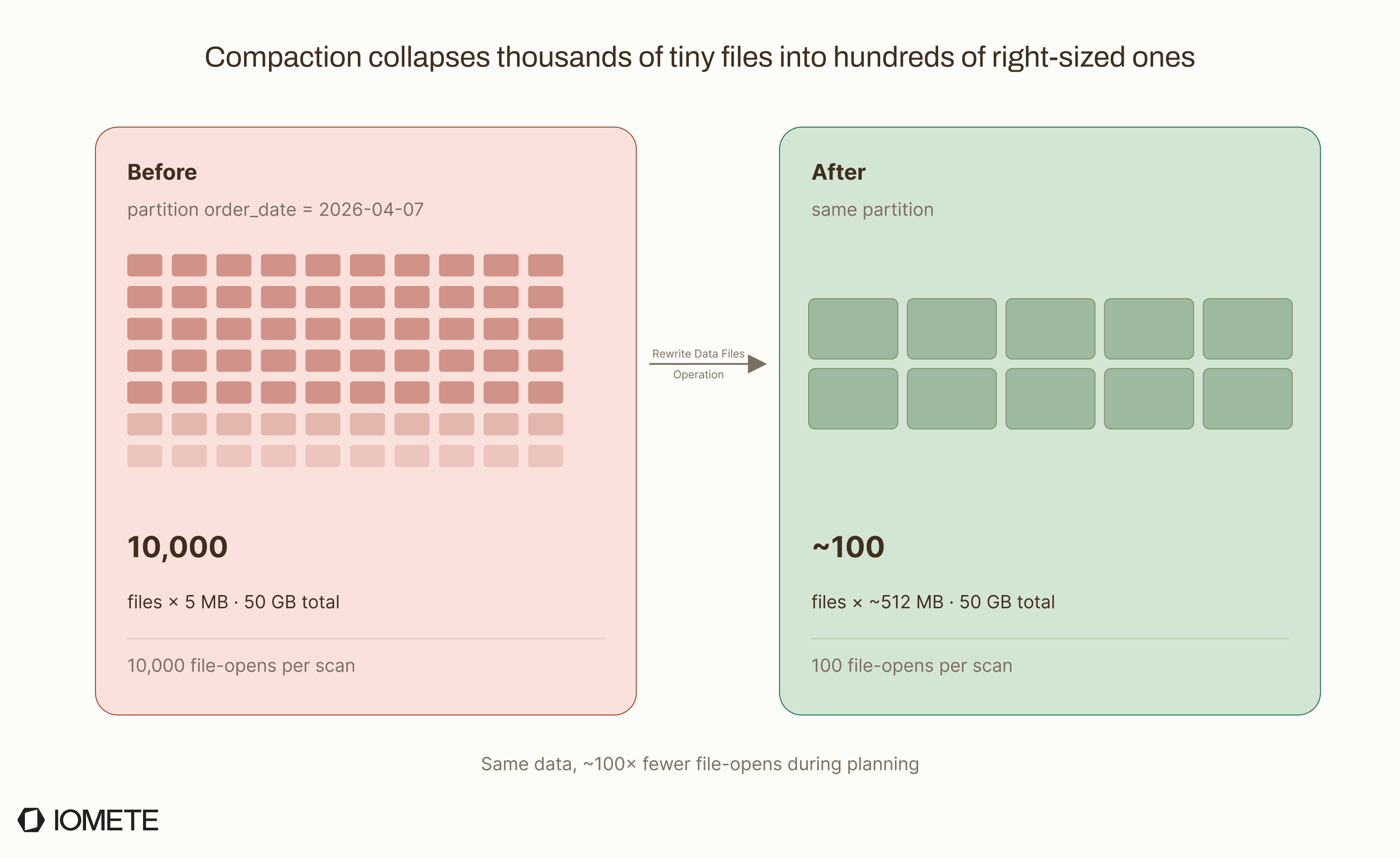
Here's what one day's partition looks like before and after compaction.
The next five subsections cover the key steps involved in compaction:
- File Selection: which files become candidates
- File Groups and Parallelism: how candidates get grouped into tasks
- Binpack vs Sort vs Z-Order: how rows get reordered
- Partial Progress and Recovery: what happens when a rewrite fails
- Merge-on-Read Compaction: how delete files get materialized
1. File Selection
Say your streaming pipeline writes one Parquet file per micro-batch to ecommerce.orders. After 24 hours, the partition order_date = 2026-04-07 holds 10,000 files averaging 5 MB each, totaling 50 GB.
An analyst runs:
SELECT * FROM ecommerce.orders WHERE order_date = '2026-04-07';
The query engine opens all 10,000 files, reads 10,000 Parquet footers, and evaluates 10,000 sets of column statistics. Each file open is a network round-trip to object storage, so a query that should take seconds can take minutes.
When you run compaction:
CALL catalog.system.rewrite_data_files('ecommerce.orders');
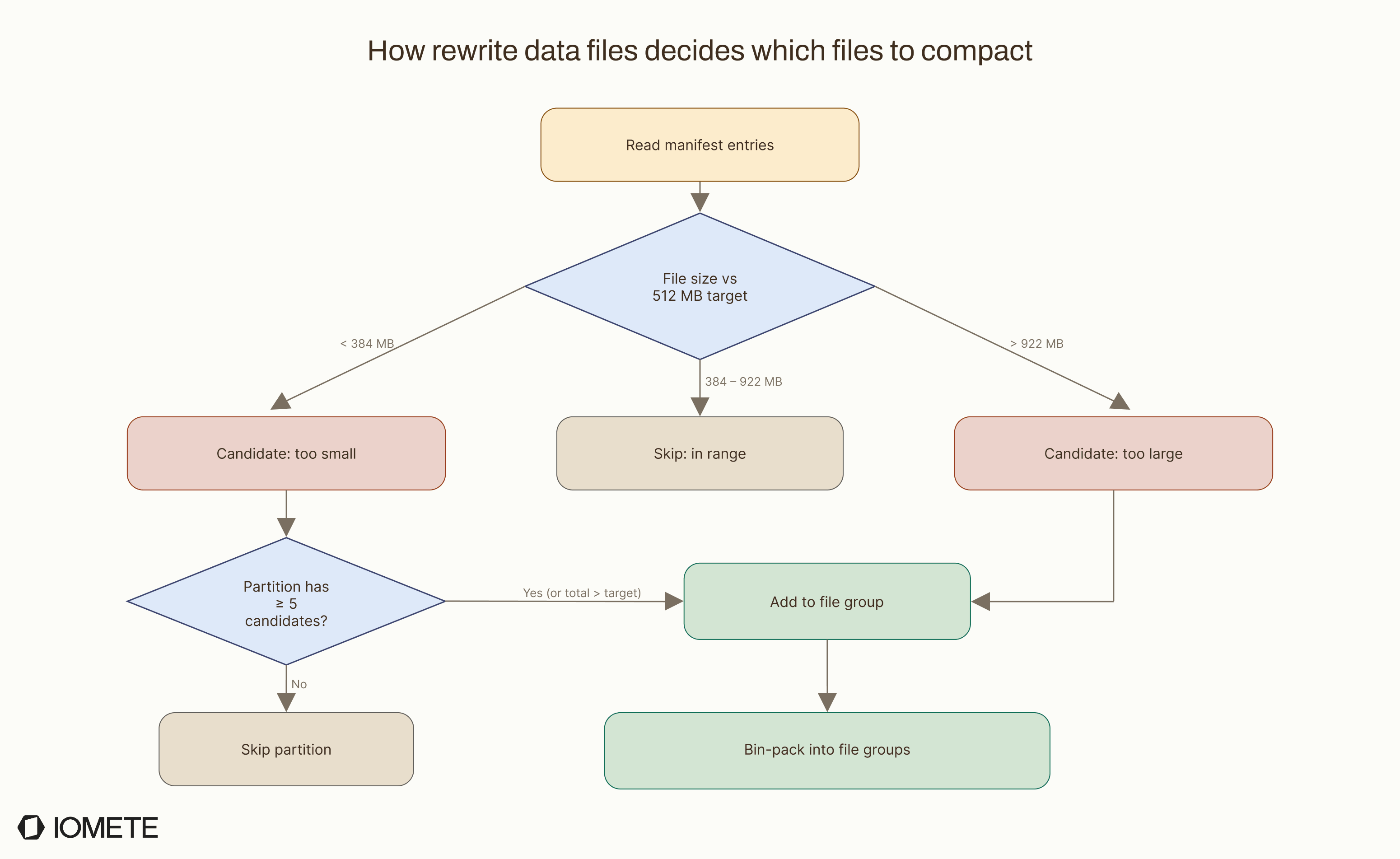
Iceberg does not read the data right away. It starts by scanning the table's metadata: manifest files that record each data file's path, size, partition, and column-level stats. From this metadata, it classifies each file:
| File Size | Classification | Action |
|---|---|---|
< 384 MB (75% of 512 MB target) | Too small | Candidate for merging |
384 MB – 922 MB | Within target range | Left unchanged |
> 922 MB (180% of 512 MB target) | Too large | Candidate for splitting |
These thresholds come from target-file-size-bytes, which defaults to 512 MB. The 75% and 180% boundaries are the default heuristics used by Iceberg’s bin-pack planner.
To customize this behavior, you can override the thresholds using min-file-size-bytes and max-file-size-bytes in the procedure options map.
Two checks decide whether a partition actually gets rewritten:
- Are there candidates? A file is a candidate if its size falls outside the in-range band: under 384 MB or over 922 MB. In our example every file is 5 MB, so all 10,000 are candidates.
- Is there enough work to be worth it? The
min-input-filesparameter (default: 5) requires at least 5 candidates per partition. There is one exception: if the candidates' total size already exceedstarget-file-size-bytes(512 MB), the rewrite proceeds even with fewer files. The goal is to skip partitions where compaction would barely help.
Our partition passes both. 10,000 candidates, 50 GB total. Both checks pass.
2. File Groups and Parallelism
This is where many teams get surprised.
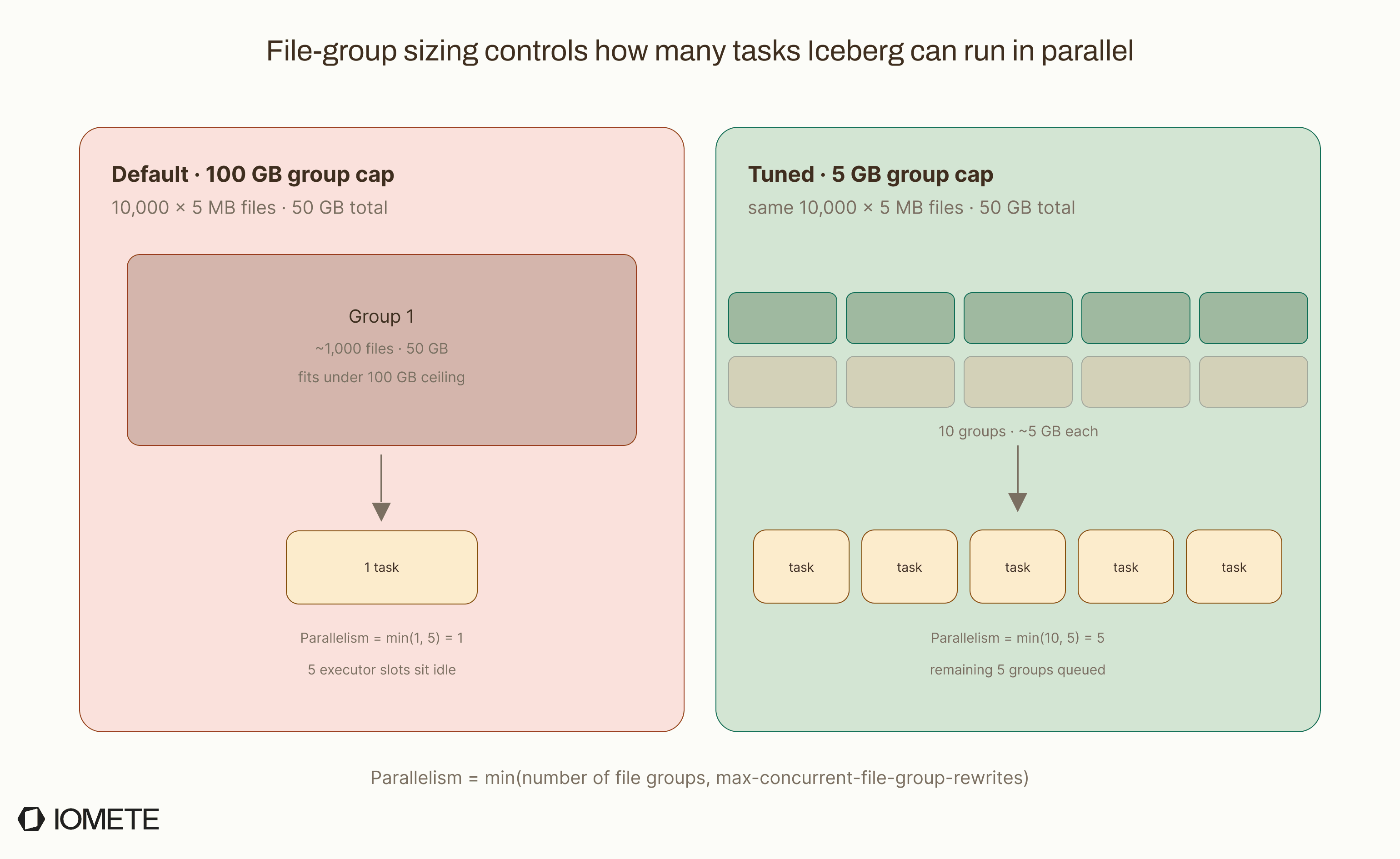
Iceberg doesn't parallelize over files. It parallelizes over file groups. A bin-packing algorithm bundles candidate files into groups up to max-file-group-size-bytes (default: 100 GB), and groups never span partitions.
In our example, only one group is created.
10,000 files × 5 MB = 50 GB, all in the same partition, fits comfortably under the 100 GB limit. One group means one rewrite task, no matter how many Spark executors are available.
Parallelism is calculated as: min(number_of_groups, max-concurrent-file-group-rewrites)
The max-concurrent-file-group-rewrites setting (default: 5) sets the maximum number of groups that can be rewritten at the same time. With only 1 group, only 1 task runs and the remaining slots sit idle. The total number of files does not directly affect parallelism.
To increase parallelism, shrink the group size:
CALL catalog.system.rewrite_data_files(
  table => 'ecommerce.orders',
  options => map(
    'max-file-group-size-bytes', '5368709120'  -- 5 GB per group
  )
);
Now 50 GB / 5 GB = 10 file groups. With the default concurrency of 5, Iceberg rewrites 5 groups in parallel, then the other 5. Each group reads its ~1,000 input files, merges the data, and writes ~10 output files of ~512 MB each.
The result: 10,000 files become about 100. The metadata swap is atomic, so readers see either the old files or the new files, never a partial state.
3. Binpack vs Sort vs Z-Order
The same rewrite_data_files procedure supports strategies that can produce very different outcomes from the same input.
Binpack (the default) merges files to reach the target size, without reordering rows. It is fast because it reads rows and writes them back without shuffling data across the cluster.
CALL catalog.system.rewrite_data_files('ecommerce.orders');
-- Strategy defaults to 'binpack'
-- 10,000 × 5 MB files → ~100 × 512 MB files
-- Rows stay in whatever order they arrived
After binpack compaction, the analyst's full-partition scan is fast: 100 file opens instead of 10,000. But a filtered query like WHERE region = 'US' still reads most files because region = 'US' rows are spread across all of them.
Sort merges files and physically reorders rows by the columns you choose. This groups related data together so queries with filters on those columns can skip entire files using min/max statistics in the metadata.
CALL catalog.system.rewrite_data_files(
  table => 'ecommerce.orders',
  strategy => 'sort',
  sort_order => 'region ASC NULLS LAST, order_date ASC NULLS LAST'
);
Now all region = 'US' rows sit physically adjacent. The query planner sees that files 1–12 have region_min = 'US' and region_max = 'US', while files 13–100 don't. It reads 12 files instead of 100.
For queries that filter on multiple columns at once, Z-order interleaves the sort keys so no single column dominates the clustering:
CALL catalog.system.rewrite_data_files(
  table => 'ecommerce.orders',
  strategy => 'sort',
  sort_order => 'zorder(region, product_category)'
);
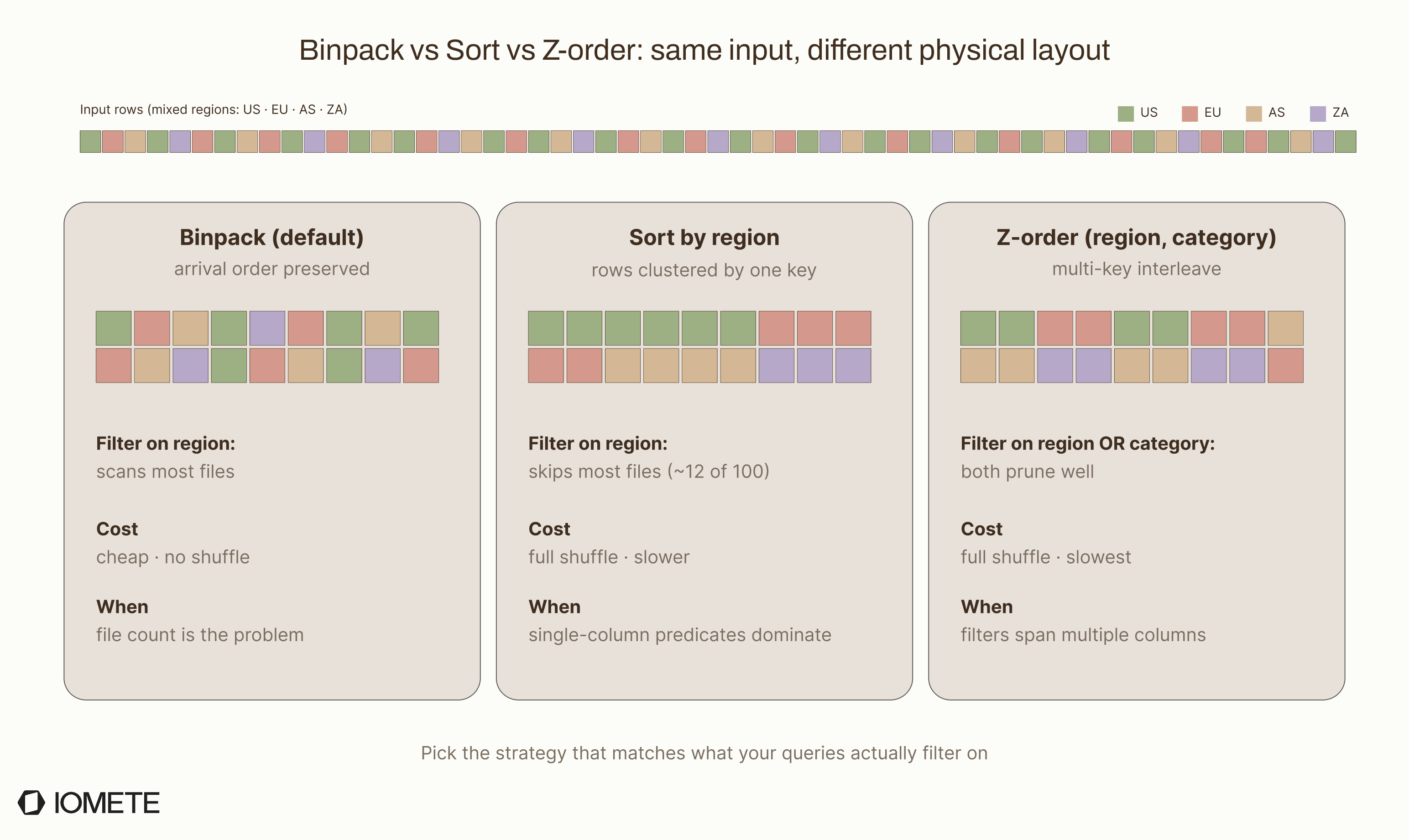
The tradeoff is simple: sort and z-order require a full shuffle across the cluster, so they are much slower than binpack.
When to pick what:
- Binpack: when file count is the problem
- Sort: when query performance on a single filter column matters
- Z-order: when filters span multiple columns equally
4. Partial Progress and Recovery
By default, compaction is all or nothing. If you have 10 file groups and group 8 fails after 4 hours, Iceberg aborts every completed rewrite.
The source code is explicit about this. Inside RewriteDataFilesSparkAction, a failure triggers cleanup of every finished group:
Cannot complete rewrite, partial-progress.enabled is not enabled and one of the
file set groups failed to be rewritten... Cleaning up N groups which finished being written.
For large tables, this is hard to accept. A 4-hour compaction that aborts on group 8 means 4 hours of compute are wasted, and the table is still not compacted when you come back to retry.
To avoid that, enable partial progress so each group can commit independently:
CALL catalog.system.rewrite_data_files(
  table => 'ecommerce.orders',
  options => map(
    'partial-progress.enabled', 'true',
    'partial-progress.max-commits', '10',
    'max-file-group-size-bytes', '5368709120'
  )
);
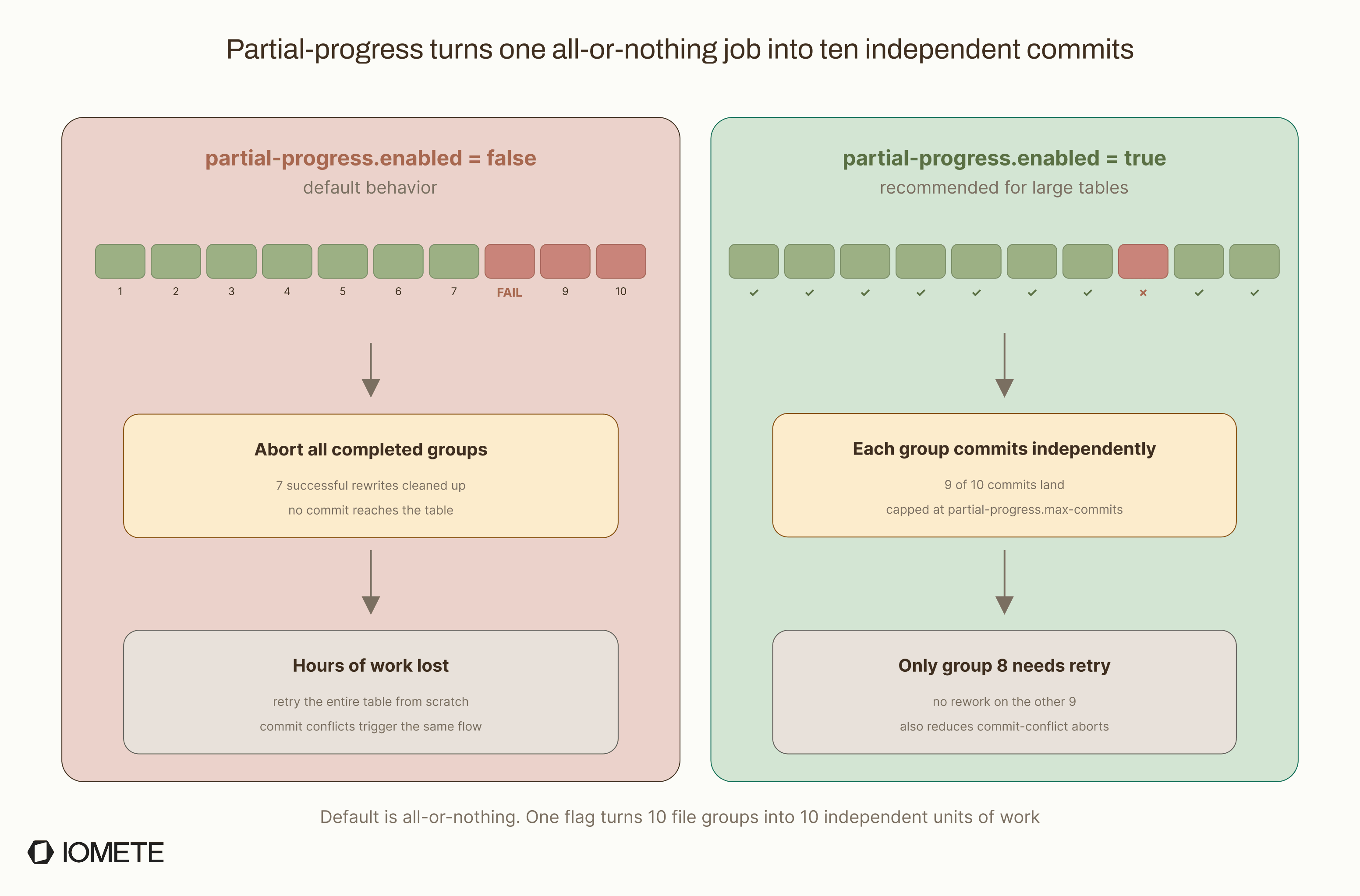
With this configuration, each of the 10 file groups commits as soon as it finishes. If group 8 fails, groups 1–7, 9, and 10 are already committed, so you only need to retry the failed range, not the whole table.
The max-commits parameter (default: 10) caps the number of separate commits produced. If you have 20 file groups and max-commits is 10, Iceberg batches 2 groups per commit. There is also partial-progress.max-failed-commits (default: 10), which controls how many commit failures are allowed before the whole job is marked as failed.
Without partial progress, a commit conflict (another writer touching the same files) also triggers a full abort.
More snapshots per job (one per commit), more work for expire_snapshots later, and success becomes partial instead of binary.
5. Merge-on-Read Compaction
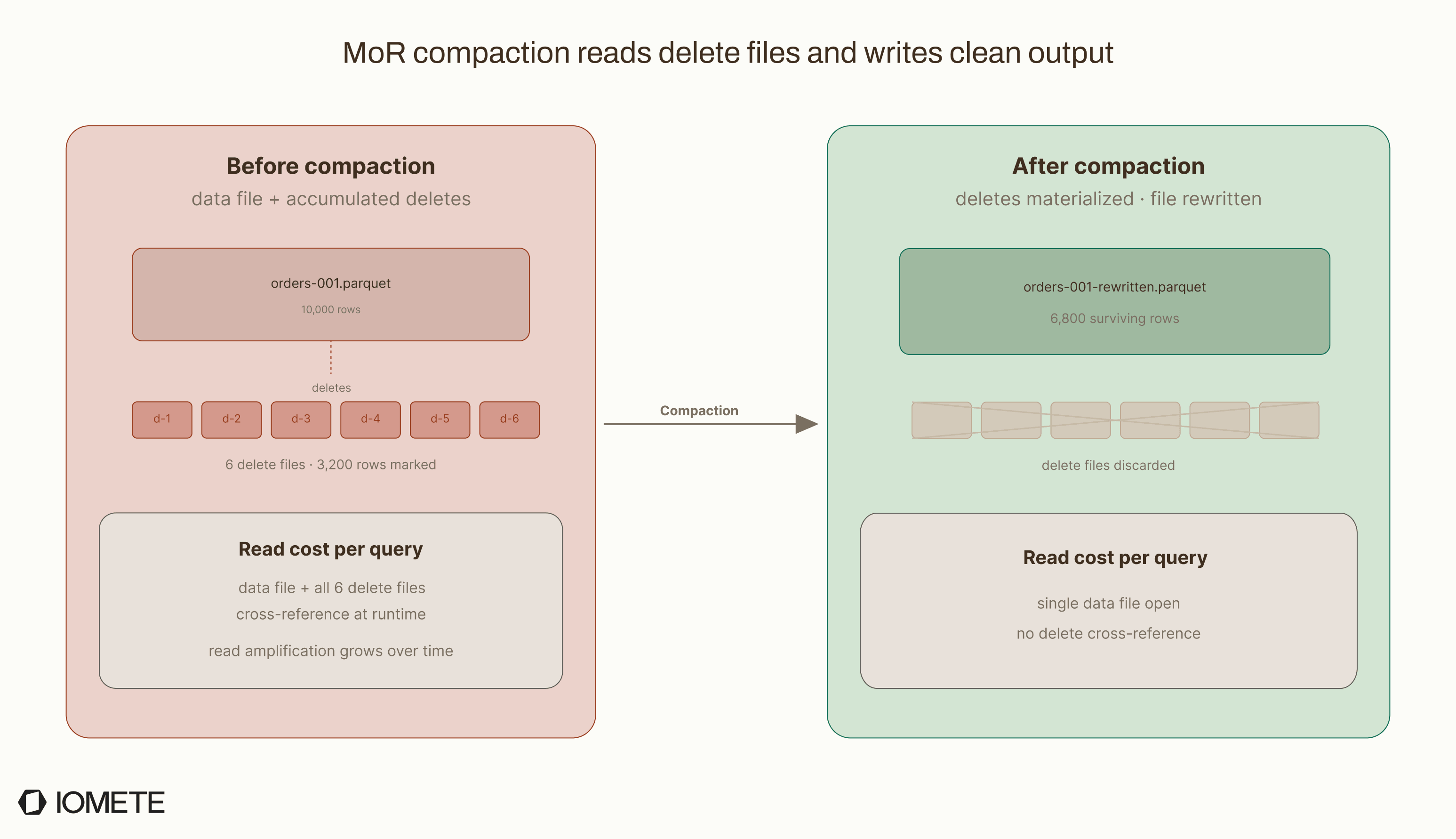
Tables using Merge-on-Read (MoR) do not rewrite data files when rows are deleted. Instead, they write separate delete files that record which rows to skip. Over time, these files build up and slow reads because the query engine has to cross-reference delete files against data files during query execution.
Compaction fixes this by applying the accumulated deletes: it reads the data file and its delete files, keeps only the surviving rows, and writes clean output files.
Two thresholds control when delete-heavy files get pulled into compaction even if their size is in range:
delete-file-threshold(default:Integer.MAX_VALUE, effectively disabled): rewrite a data file if it has this many or more associated delete filesdelete-ratio-threshold(default:0.3): rewrite a data file if 30% or more of its rows are marked deleted
CALL catalog.system.rewrite_data_files(
  table => 'ecommerce.orders',
  options => map(
    'delete-file-threshold', '5',
    'delete-ratio-threshold', '0.1',
    'remove-dangling-deletes', 'true'
  )
);
The remove-dangling-deletes option (default: false) adds a cleanup step after compaction. It removes delete files that no longer point to any live data files, which often happens after compaction rewrites the original target files.
delete-file-threshold is effectively disabled by defaultThe default value of Integer.MAX_VALUE means compaction does not trigger based on delete-file accumulation alone. Out of the box, rewrites are driven almost entirely by file size thresholds.
On high-write Merge-on-Read (MoR) tables, this can become a major operational issue. Delete files continue accumulating while reads gradually become more expensive, often without obvious visibility until query latency noticeably degrades.
Expire Snapshots
Most teams think of expire_snapshots as cleanup, but it does two jobs.
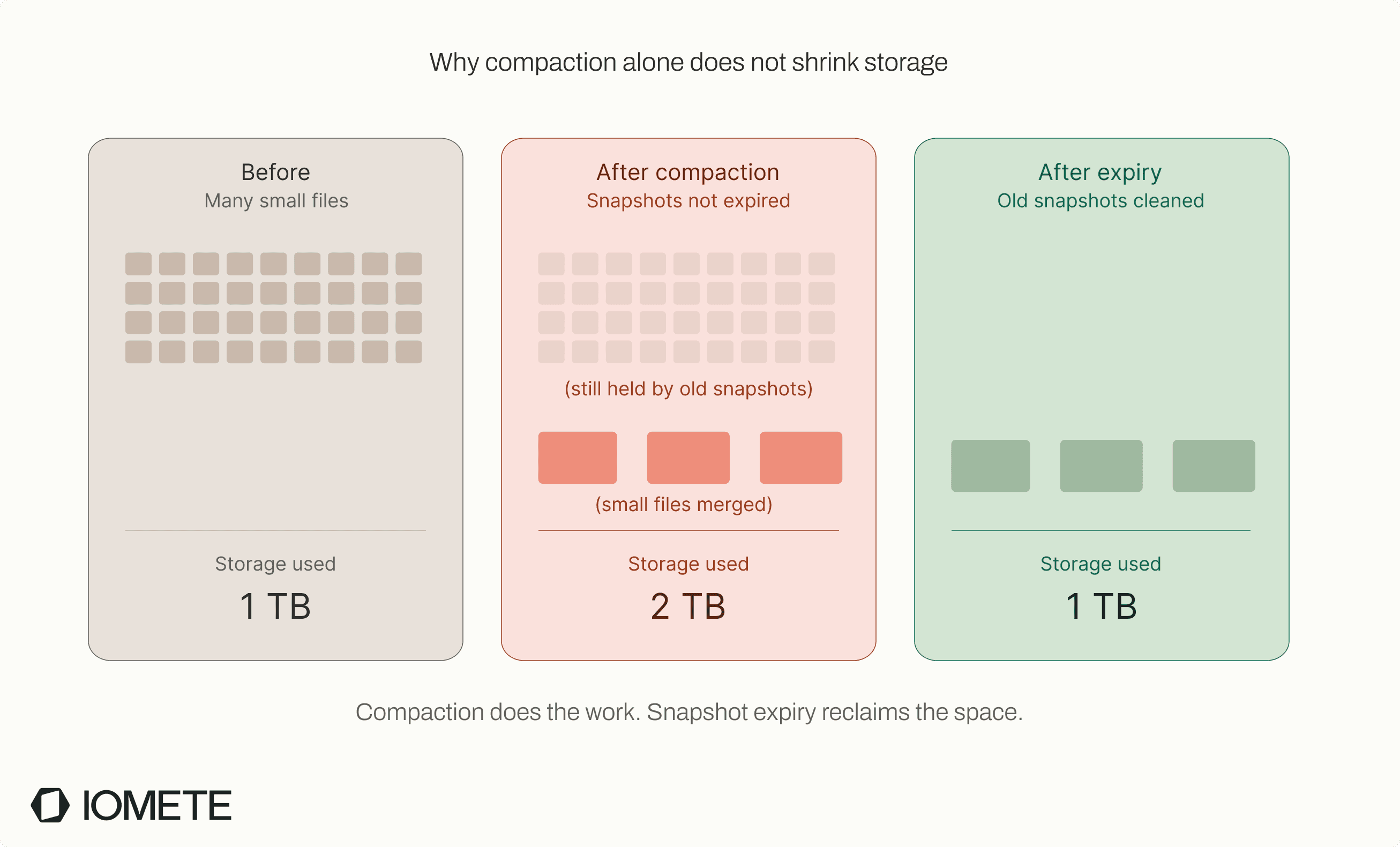
The first is storage cleanup. Every snapshot pins the data files it references, so old files from compaction still take up space until expiry runs.
The second job, which many teams miss, is compliance. Iceberg's DELETE is a soft delete: time travel can bring back any deleted row until the snapshot that contains it expires. For GDPR, CCPA, and similar requirements, expire_snapshots is what turns a logical delete into a real one.
These parameters control how the expiry runs:
older_than(default: 5 days ago): the cutoff timestampretain_last(default: 1): minimum snapshots to keep regardless of age
CALL catalog.system.expire_snapshots(
  table       => 'ecommerce.orders',
  older_than  => TIMESTAMP '2026-04-02 00:00:00.000',
  retain_last => 10
);
The defaults are conservative for streaming tables and aggressive for quiet tables. A pattern that works well for both is 7-day retention with retain_last => 10. That gives enough history for time travel and rollback debugging on quiet tables, while still releasing storage on busy ones.
Compliance-driven workloads often run tighter (for example, 24 hours after a delete commit) to limit the window where deleted data is recoverable.
Orphan File Cleanup
Orphan files are files that still exist in storage but are no longer referenced by the Iceberg table. Over time, failed writes, aborted jobs, and metadata churn can leave behind a lot of unused data. The real operational question is when and how to run remove_orphan_files without breaking the table or running up your storage bill.
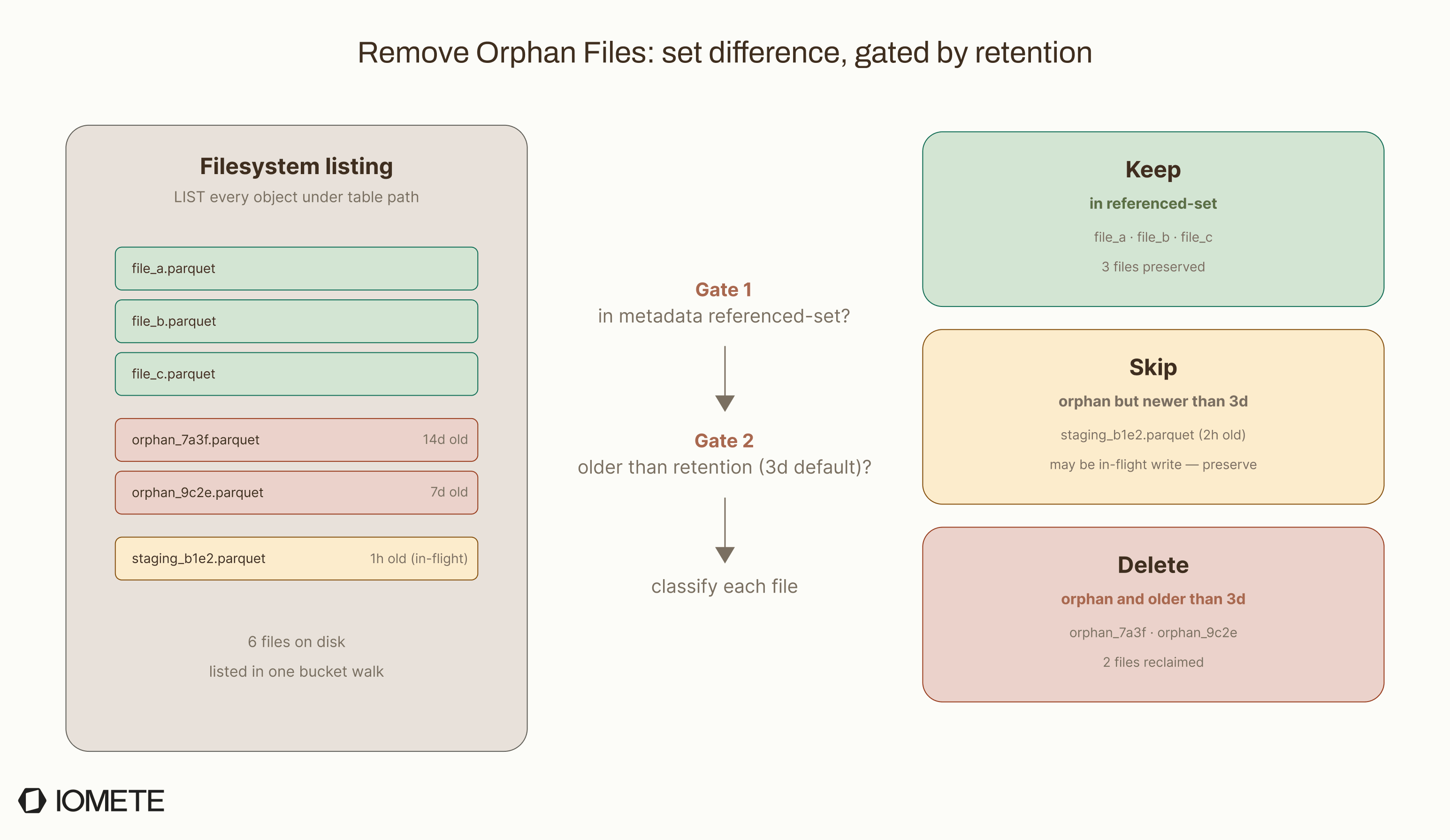
It is usually the most expensive maintenance operation. The procedure scans the table's storage location, then compares that listing against every file referenced in metadata. On a small table, that takes seconds. On a table with tens of millions of objects, the LIST calls alone can take hours and incur real S3 cost. Most teams run this weekly or monthly, not on every write.
Two operational risks:
- The 3-day retention is a safety window, not a cleanup tunable. It exists so in-flight writes that haven't committed yet aren't mistaken for orphans. Shorten it below your longest expected write duration and you'll corrupt the operation it interrupts, including any concurrent compaction still mid-flight.
- URI scheme mismatches create false orphans. If table metadata uses
s3a://but the filesystem listss3://, every legitimate file looks orphaned. Theequal_schemesparameter (default:map('s3a,s3n','s3')) handles the common case; opt in explicitly forgs://orabfss://.
Tuning knobs:
older_than: retention window (default: 3 days)max_concurrent_deletes: parallelism for the deletes (default: 4)equal_schemes/equal_authorities: URI aliases for cross-scheme compatibilitydry_run: returns the list of files that would be deleted, without deleting them
CALL catalog.system.remove_orphan_files(
  table       => 'ecommerce.orders',
  older_than  => TIMESTAMP '2026-04-02 00:00:00.000',
  dry_run     => true
);
dry_run FirstThe first time you run remove_orphan_files on a new table, pass dry_run => true. It returns the list of files that would be deleted without actually deleting anything, so you can audit the result before any data leaves the bucket.
Manifest Rewrite
Manifest files are the metadata index Iceberg uses to track data files. As tables evolve, these manifests can become fragmented and inefficient, which increases query planning overhead. This section explains when rewrite_manifests becomes useful, what performance problems it solves, and how to identify tables that would benefit.
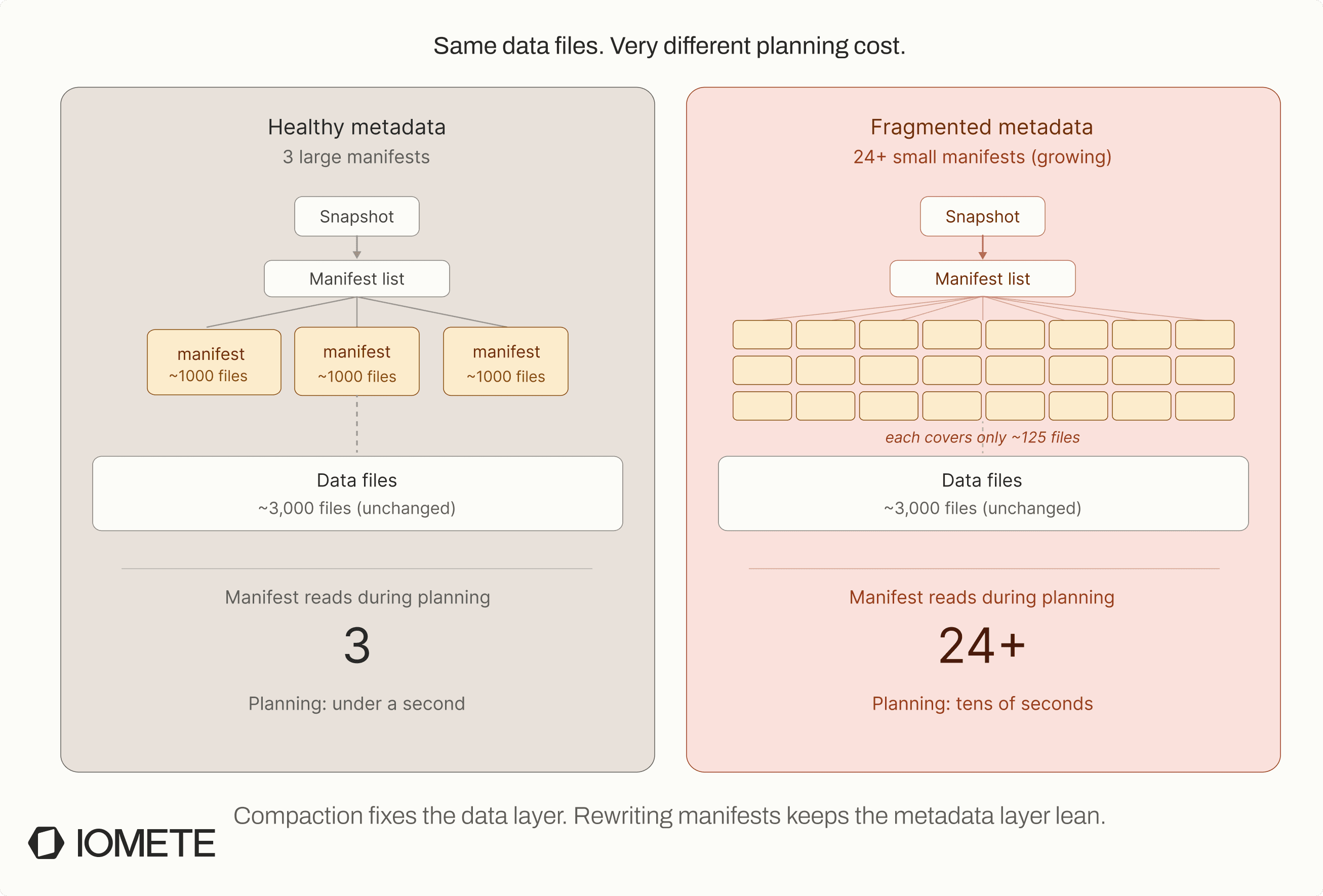
The impact shows up during query planning, not query execution. If queries are slow to start but fast once they begin running, manifest fragmentation is often the reason. Before scanning any data files, Iceberg has to open and parse every manifest to decide which files matter. With hundreds of fragmented manifests, planning alone can take tens of seconds. We have seen tables where a manifest rewrite reduced planning time from 45 seconds to under 2 seconds.
Before running the procedure, check whether the table is actually fragmented. The manifests metadata table gives a good signal:
SELECT count(*), avg(length), sum(added_data_files_count)
FROM ecommerce.orders.manifests;
A table with hundreds or thousands of small manifests (for example, a few hundred KB each) is usually a strong candidate for rewrite. If the table already has a small number of large manifests, the procedure is unlikely to help much.
Manifest rewrites are especially useful after compaction. Compaction creates new manifest entries grouped by write activity, while rewrite_manifests reorganizes metadata by partition spec. That restructuring improves partition pruning and reduces planning overhead.
Common tuning options include:
use_caching(default: true): caches manifest entries during rewrite to improve performancespec_id: rewrites manifests for a specific partition spec only, useful when multiple specs coexist after schema or partition evolution
CALL catalog.system.rewrite_manifests(
  table       => 'ecommerce.orders',
  use_caching => true,
  spec_id     => 1
);
This procedure is relatively cheap compared to compaction because it only rewrites metadata and does not touch data files. Even on large production tables, running it daily is usually safe from an operational standpoint.
How the Four Operations Interact
These operations are designed to work together as a maintenance pipeline:
rewrite_data_files  →  rewrite_manifests  →  expire_snapshots  →  remove_orphan_files
    (data)               (metadata)            (storage)            (debris)
Running only part of the pipeline usually leaves either performance or storage problems unresolved.
- Compact without expiring snapshots and your storage doubles. Compaction creates new larger files; the old small files stay referenced by old snapshots and keep using disk. Until snapshots are expired, storage usage can temporarily double because both generations of files coexist.
- Compact without rewriting manifests and planning stays slow. Each compaction commit produces fresh manifest entries, but grouped by write time, not partition. Manifest rewriting is what gives you partition-clustered manifests for fast pruning.
- Expire snapshots without orphan cleanup and partial-failure debris stays. If a compaction job dies mid-write, its output files are unreferenced by any snapshot. Expiry won't touch them. Only
remove_orphan_filesdoes, and only after the retention window.
In practice, the four procedures solve different layers of table maintenance:
rewrite_data_filesoptimizes data layoutrewrite_manifestsoptimizes metadata layoutexpire_snapshotsremoves obsolete table historyremove_orphan_filescleans up untracked storage debris
Skipping one step weakens the effectiveness of the others.
What You Still Have to Build Around Iceberg
So far, we have focused on how the four maintenance operations work internally. Running them once is straightforward. Running them reliably across hundreds of tables is the hard part, and that is where Iceberg stops helping.
The Gaps
Iceberg provides the core maintenance procedures, but operating them reliably across hundreds of tables introduces a different class of problems. You need to decide:
- which tables actually need maintenance
- which operation should run
- when it should run
- how to prioritize workloads
- how to avoid overwhelming the Spark cluster
Iceberg also provides very little operational visibility. Procedures return result rows, but there is no centralized history, dashboard, alerting, or monitoring. If a maintenance job fails overnight, teams often find out only after query performance gets worse or storage costs go up.
Resource management is another major gap. Large compaction jobs can consume a lot of cluster capacity without any built-in governance, scheduling, or fairness controls. Failure handling is also difficult. A rewrite may partially complete, commit some file groups, and leave others unfinished, which then requires manual investigation and reruns.
In practice, most organizations eventually end up building a maintenance orchestration layer around Iceberg rather than just calling the procedures directly.
| Capability | Open-source Iceberg | What you need in production |
|---|---|---|
| Maintenance procedures | ✅ Four procedures | ✅ Same |
| Scheduling | ❌ | Cron, Airflow, or event-driven |
| Health detection | ❌ | Per-table metrics + thresholds |
| Multi-table prioritization | ❌ | Queue with cost-aware ordering |
| Resource isolation | ❌ | Quotas per pool / tenant |
| Run history & observability | ❌ | Per-run logs, metrics, audit |
| Partial-failure recovery | ❌ | Tracked, resumable jobs |
| Alerting | ❌ | PagerDuty, Slack, or monitoring integrations |
Iceberg is a table format, not a platform, so this is not a complaint. But the gap between "table format with maintenance primitives" and "production-ready maintenance system" is bigger than it looks on day one.
The DIY Pattern
Most teams bridge that gap with cron and scripts. The pattern usually looks like this:
- A Python script that iterates over tables in a catalog
- Calls Spark procedures via
spark-submitor a Spark session - Scheduled via cron, Airflow, or Dagster
- Logs piped to a file or a monitoring tool
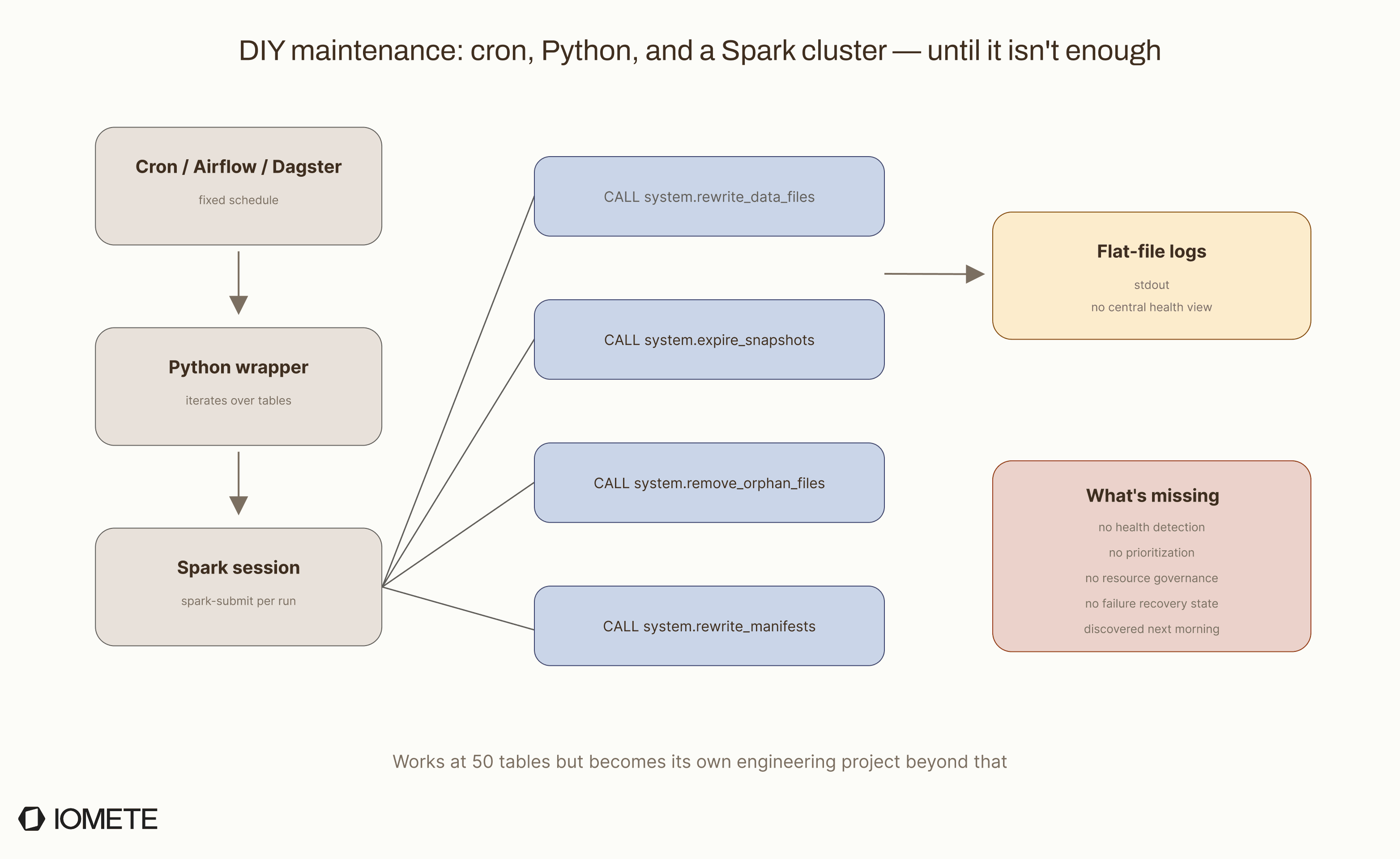
Engineers in the community have shared Python classes on Medium for multi-table maintenance with configurable thresholds. One such approach wraps compaction, snapshot expiration, and orphan cleanup in a class that iterates over tables and applies size-based defaults. It is a solid starting point.
We started there at IOMETE, using our built-in Spark scheduler with a Data Compaction Job from our marketplace. That removed the need for an external orchestrator like Airflow, but the core limits of scheduled maintenance remained:
- Fixed schedules are wasteful — running compaction on a table that does not need it wastes compute.
- Detecting which tables actually need maintenance requires reading metadata, so your scheduler needs catalog access and evaluation logic.
- Retries are risky — re-running a compaction job that partially committed can create duplicate data if you are not careful.
- Multi-engine catalogs break the abstraction — a table written by Flink and read by Trino still has to be maintained by Spark, so your scheduler has to understand all three engines.
That experience is what pushed us toward building fully automated table maintenance, which we will cover in a later part of this series.
For smaller deployments with a handful of tables, cron jobs and scripts are usually enough. Once you get past a few hundred tables, the DIY approach quietly turns into its own operational platform that someone has to own.
Resources & Further Reading
Official Iceberg Docs
- Apache Iceberg Maintenance Guide: official guide covering all four maintenance operations, recommended schedules, and caveats
- Iceberg Spark Procedures: full parameter reference for
rewrite_data_files,expire_snapshots,remove_orphan_files, andrewrite_manifests - Iceberg Flink Maintenance: embedding maintenance tasks inside Flink streaming jobs with
TableMaintenanceAPI - Iceberg Spark Actions API: programmatic Java/Scala access to the same maintenance operations
- Iceberg Table Spec, Snapshot Retention Policy: how the format defines snapshot expiration at the spec level
- Iceberg Table Spec, Delete Formats: Merge-on-Read delete file mechanics
- Iceberg Configuration Properties: table-level and write properties that affect maintenance behavior
Source References
RewriteDataFilesSparkAction: partial-progress and abort logic- Iceberg release notes: maintenance-related improvements per version
Community & DIY
- IOMETE Data Compaction Job: open-source Spark job for scheduled Iceberg compaction
- Automating Apache Iceberg Maintenance with Spark and Python: Python class approach with size-based table classification