The Hidden Debt in Your Lakehouse Tables (And Why You Should Care)

Every Iceberg table you're not maintaining is likely getting slower and more expensive. This post explains the mechanics of why, with real production numbers.
This is Part 1 of our Apache Iceberg Table Maintenance series. Explore the full series:
- Part 1: The Hidden Debt in Your Lakehouse Tables
- Part 2: What Iceberg Gives You for Table Maintenance
- Part 3: The Iceberg Table Maintenance Landscape
- Part 4: How We Built Automated Table Maintenance
- Part 5: Running Iceberg Maintenance in Production
- Part 6: Why We Rebuilt Orphan File Cleanup from Scratch
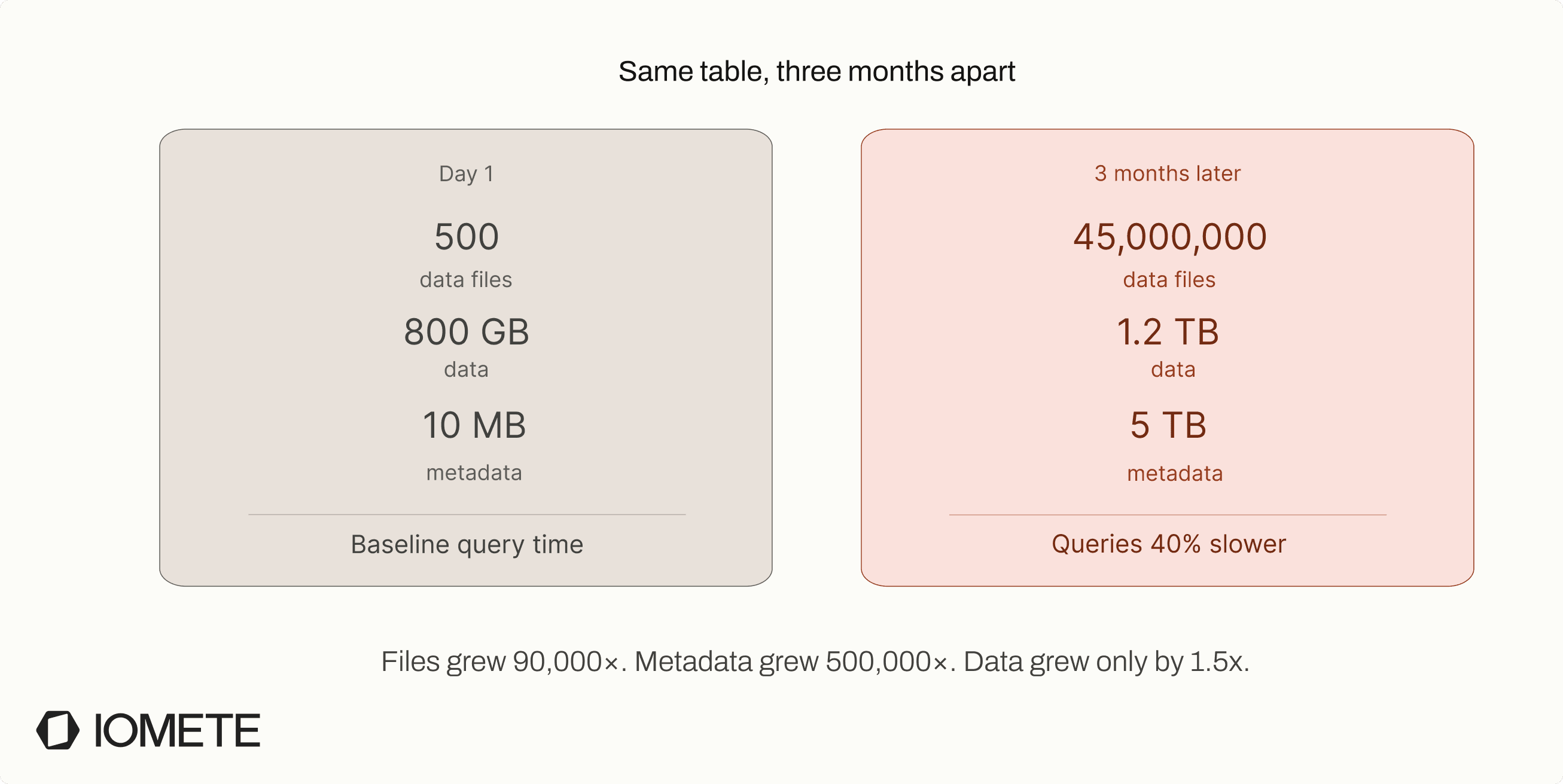
Last year, a customer running a streaming CDC pipeline on our platform came to us with a problem. Their queries were taking 40% longer than they had three months ago. No schema changes. No new data sources. Same queries, same cluster size. Just... slower.
The culprit wasn't a bad query plan or a misconfigured cluster. It was 45 million tiny data files and roughly 5 TB of accumulated metadata. The metadata had grown larger than the actual data. Their drivers were running out of memory just trying to figure out which files to read, before reading a single row.
This is what table debt looks like. And if you're running Iceberg tables in production without automated maintenance, it's accumulating right now.
What actually happens when you write data
When you write to an Iceberg table, you're not just adding rows. You're creating state that has to be tracked, preserved, and eventually cleaned up.
Every write produces two things: data files (Parquet on object storage) and metadata (the catalog that tracks schema, snapshots, file locations, and statistics). Every commit updates both.
This is what makes ACID transactions, time travel, and concurrent reads possible. But it's also where table debt begins.
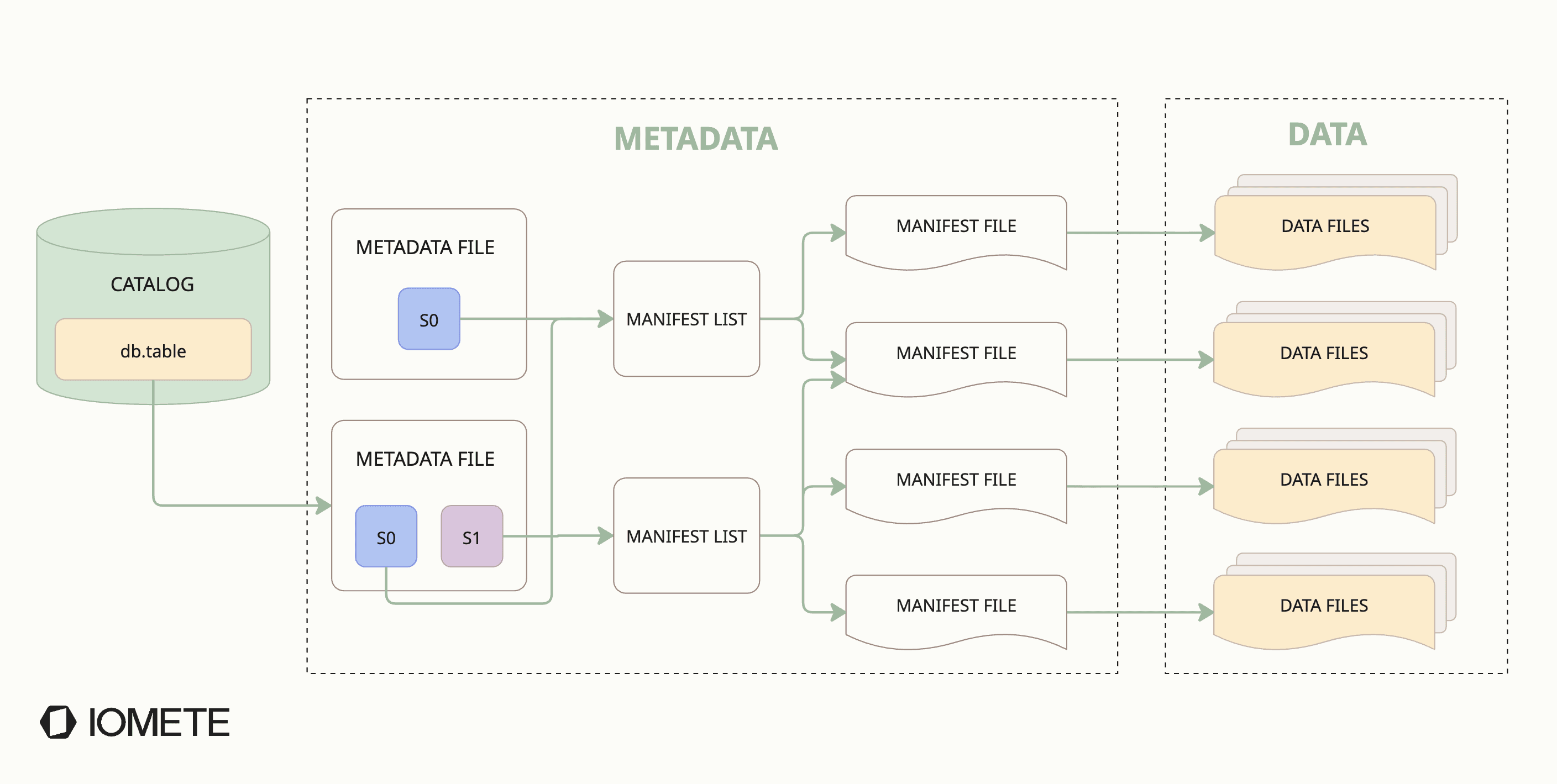
Every commit creates new metadata:
- metadata.json: the table's current schema, partition spec, and snapshot history
- snapshot: an immutable pointer to the table's state at that moment
- manifest list: the index of all manifest files for this snapshot
What gets written at the data layer depends on the operation and the write mode:
- Copy-on-Write (COW) applies changes at write time. Every update or delete rewrites the full affected data file. The old copy stays until its snapshot expires. Writes are slower, reads stay clean. See our Iceberg COW deep dive for more info.
- Merge-on-Read (MOR) defers work to read time. Instead of rewriting files, it writes small delete files that mark removed rows. Reads merge data files with delete files at query time. Writes are fast, but reads get progressively slower as delete files pile up.
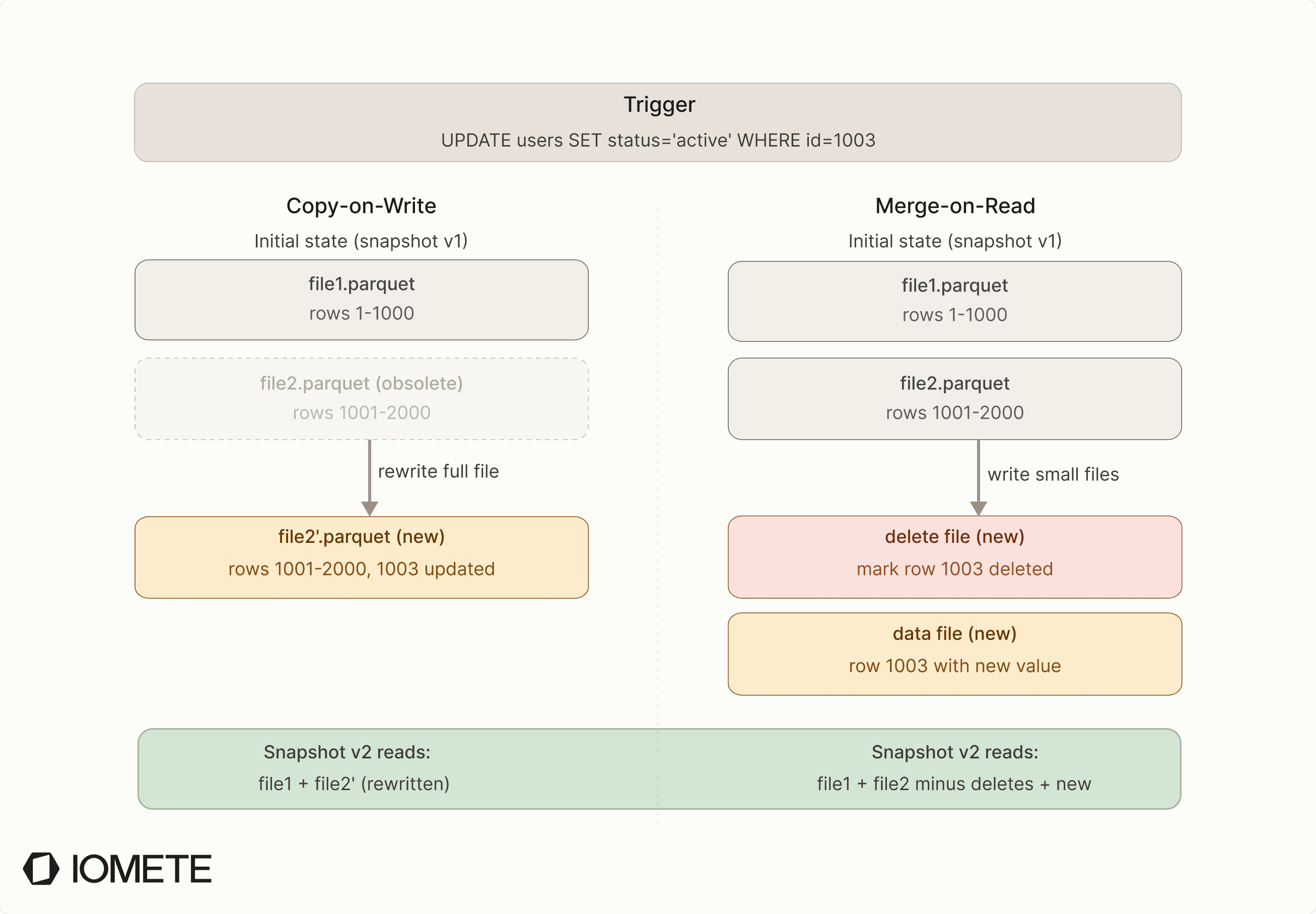
In practice:
| Operation | Copy-on-Write (COW) | Merge-on-Read (MOR) |
|---|---|---|
| INSERT | New data files | New data files |
| UPDATE | Rewrites affected data files entirely | Delete files + new data files |
| DELETE | Rewrites affected files minus deleted rows | Delete files only |
Iceberg is append-only at the storage layer. Nothing gets modified, nothing gets deleted. This is how Iceberg provides ACID transactions, time travel, and concurrent reads, and it's also the root cause of table debt.
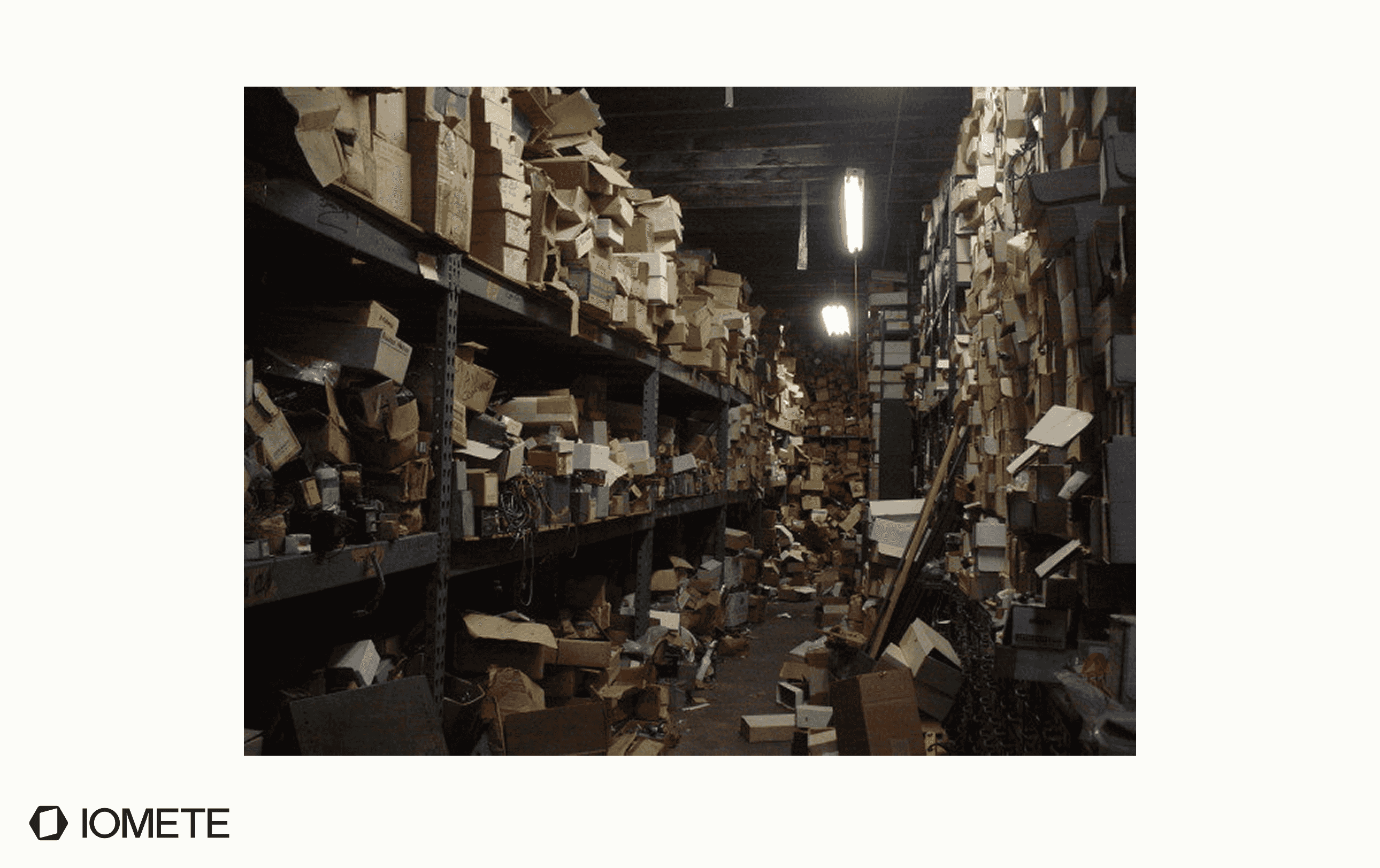
Your table is a warehouse. Nobody's cleaning the aisles.
Now that you know what every write produces, think of an Iceberg table as a warehouse that never throws anything away.
Every write is a delivery truck dropping off new boxes (data files), while a clerk updates the inventory system (metadata). Nothing gets replaced or removed. Everything accumulates.
In a well-run warehouse, someone periodically consolidates small boxes into larger pallets, discards outdated inventory logs, and clears out debris. In most Iceberg deployments, none of that happens.
Deliveries keep arriving, small boxes pile up, and old inventory records are never removed. Over time, the catalog turns into a massive filing system that must be consulted before finding anything.
At some point, the problem isn’t storage. It’s navigation.
In Iceberg terms, query planning, not data scanning, becomes the bottleneck.
Every query slows down because the engine must resolve metadata, scan manifest lists, and determine file locations before reading any data. The warehouse is still full of useful information, but it’s buried under layers of history, fragmentation, and unused files.
This is table debt.
The four types of table debt
Table debt is not one problem. It is a set of connected problems that make each other worse. Small inefficiencies pile up and slowly turn into system-wide degradation. All of them come from the same design tradeoff. Iceberg avoids in-place mutation and instead tracks table state through metadata. That makes transactions and time travel possible, but it also means state accumulates unless you actively clean it up.
In practice, almost every Iceberg table degradation can be traced back to four categories. If you understand these, you can reason about performance, cost, and failure modes without guessing.
The four types of table debt:
- Small file proliferation
- Snapshot accumulation
- Orphan files
- Metadata bloat (manifest fragmentation)
1. Small file proliferation
Let’s start with the one that shows up first in production.
Small files don’t just affect storage. They amplify cost at every stage of a query.
Streaming microbatches, small INSERTs, CDC events. They all create new data files. If your pipeline commits every second, that’s 86,400 commits per day. With even 5 files per commit, you’re adding 432,000 files per day. In a month, that’s 13 million files for a single table.
At that scale, the problem shows up before you even read data.
Query planning breaks first.
The engine has to read metadata, scan manifest lists, and resolve every data file before applying pruning. At millions of files, planning grows from sub-second to tens of seconds, before reading a single row.
Then I/O becomes inefficient.
Every file open on object storage has a fixed cost (TCP setup, TLS handshake, HTTP round trip). A 1 MB file costs roughly the same to open as a 512 MB file, but delivers 500x less data.
Then cost shows up.
All those file opens are API calls. On S3, GET requests cost $0.0004 per 1,000. A query scanning 1 million files costs ~$0.40 in GETs alone. At 100 queries/day, that’s ~$1,200/month for a single table.
Then the system starts to break.
The driver holds file-level metadata in memory: statistics, partition values, file paths. At millions of files, drivers hit OOM. Scheduling also degrades. Work is split per file, so millions of tiny tasks shift overhead from execution to coordination.
All of this compounds quickly.
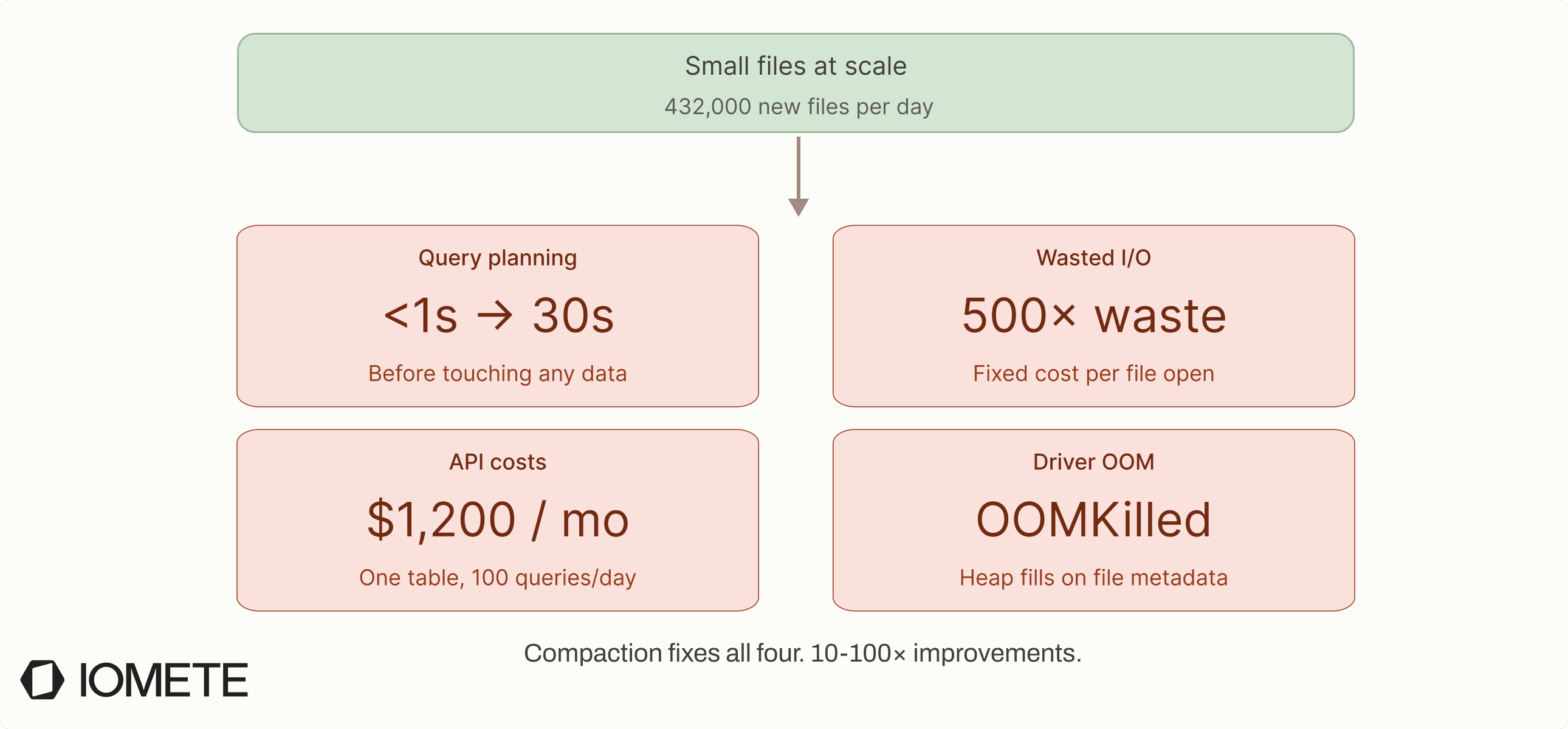
Compaction fixes all of it. Bring file count down to a few thousand and the same queries plan in under a second, scan efficiently, and cost a fraction of the API calls.
We’ve seen 10–100x improvements from this alone.
2. Snapshot accumulation
Every commit creates a snapshot.
Snapshots enable time travel and rollback, which are genuinely useful. But each snapshot also holds references to data files, and those references prevent files from being removed from storage.
Snapshots are the gatekeepers of cleanup. As long as a snapshot references a file, that file stays in storage.
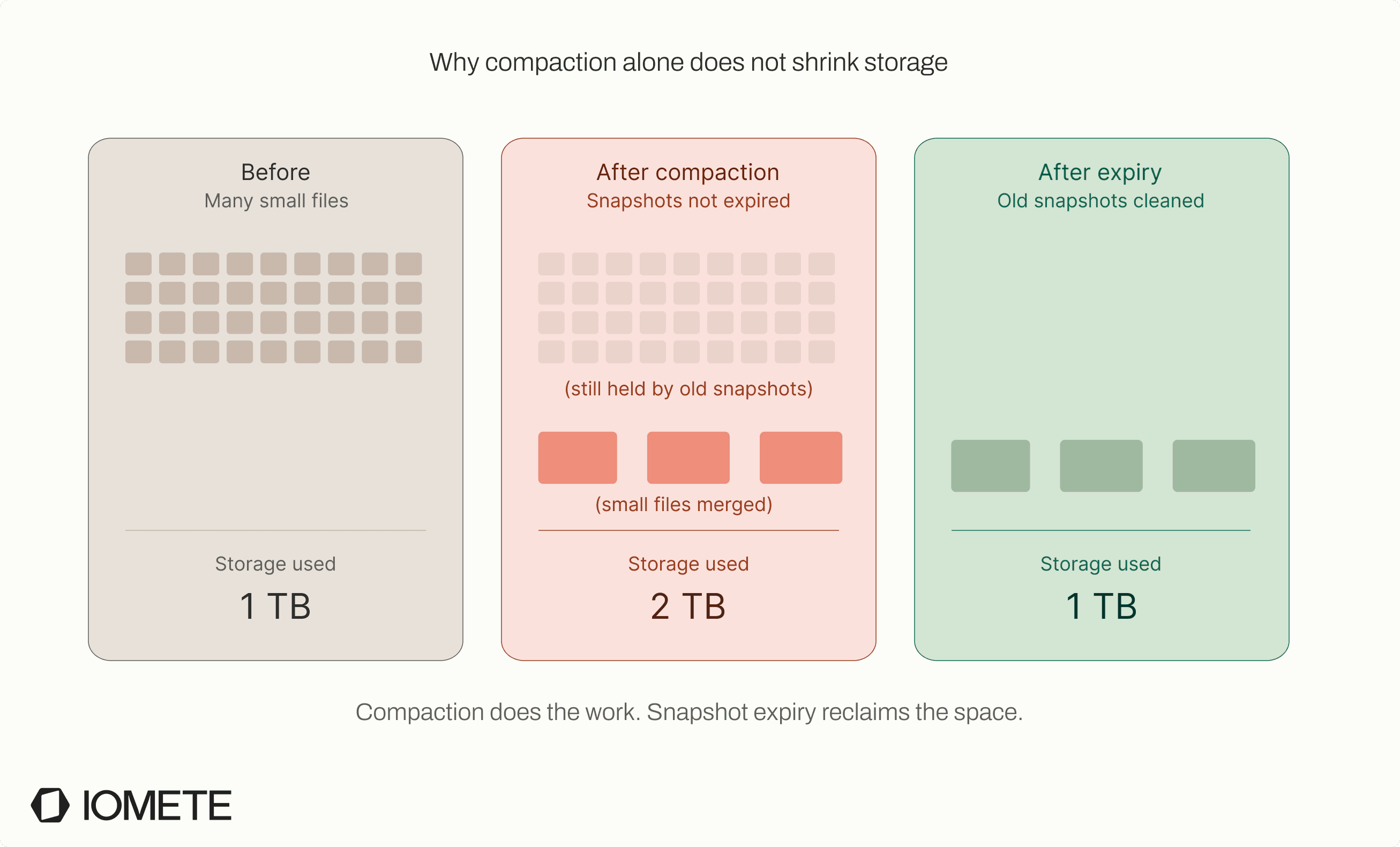
This creates a hard constraint. Storage cannot shrink until snapshots expire. You can compact files or delete data, but the old files remain if any snapshot still points to them.
This is where things get unintuitive. You run compaction, create larger and more efficient files, but the old files continue to exist because their snapshots haven’t expired. You’ve done the work, but you haven’t reclaimed the space, which directly blocks the fix for small files.
Over time, this leads to silent storage growth. Even if your data volume stays flat, the amount of data stored keeps increasing because older versions are still retained through snapshots.
The symptoms are subtle. Storage costs creep up without a clear reason, and compaction never frees the space you expect.
Unless you schedule snapshot expiration, Iceberg keeps every snapshot indefinitely.
3. Orphan files
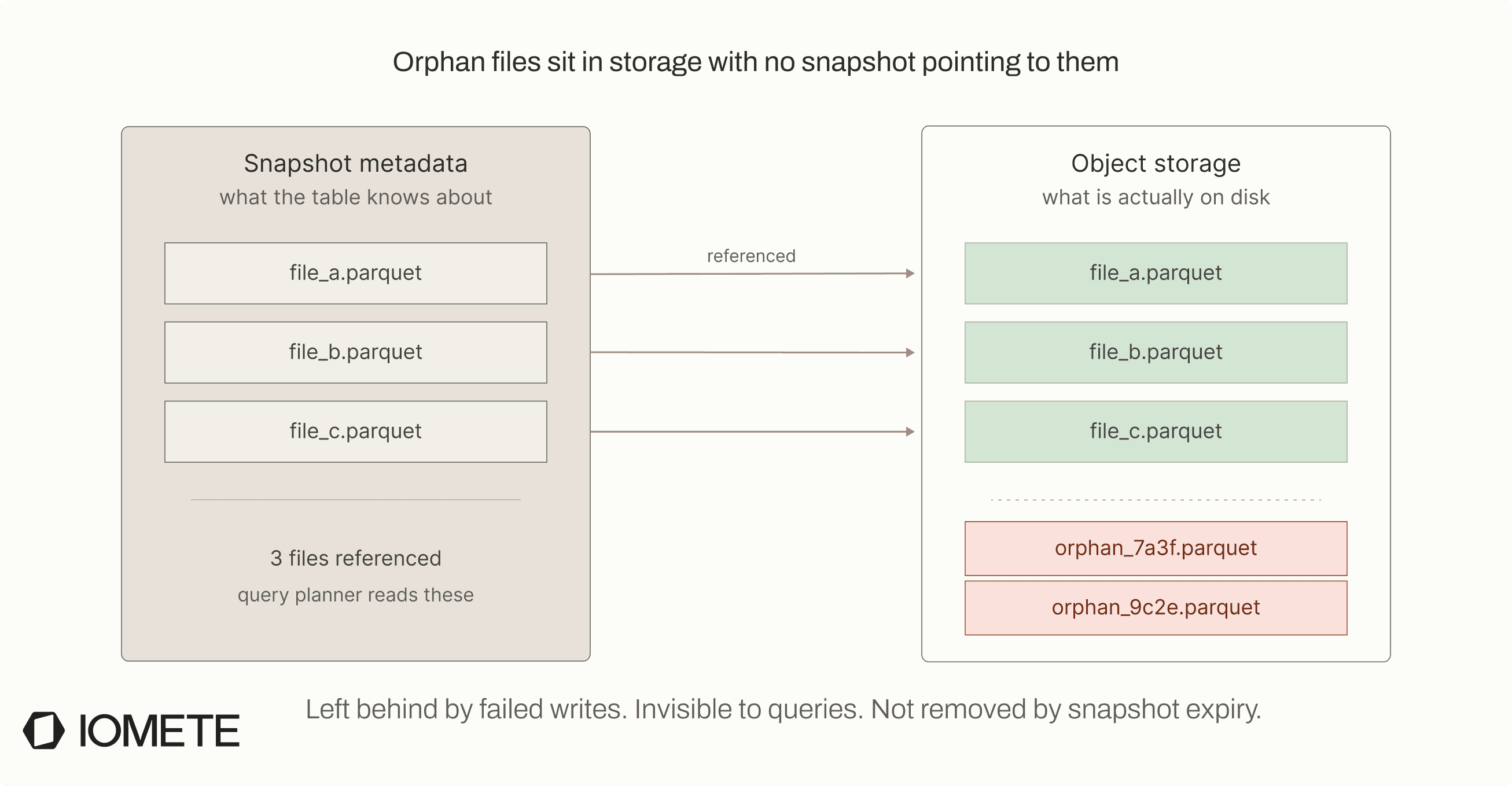
Orphan files are data files that exist in storage but are not referenced by any snapshot. They are not part of the table state, so the query engine never sees them, but they still incur storage cost.
They are created when writes fail between file creation and commit. Iceberg writes data files first and commits metadata afterward. If anything fails in between, the files remain in storage but are never linked to a snapshot.
This typically happens in real-world failure scenarios. A Spark job may crash after writing files but before commit, compaction may produce new files but fail before completing, or retries may leave behind duplicate or unused files.
Orphan files don’t affect query performance because they are not referenced by metadata. The system simply ignores them during query execution.
However, they still accumulate in storage over time.
They are pure storage waste. Nothing cleans them up automatically, so unless you explicitly run orphan file cleanup, they remain until you clean them up.
4. Metadata bloat (manifest fragmentation)
To understand metadata bloat, you need to understand how Iceberg reaches your data.
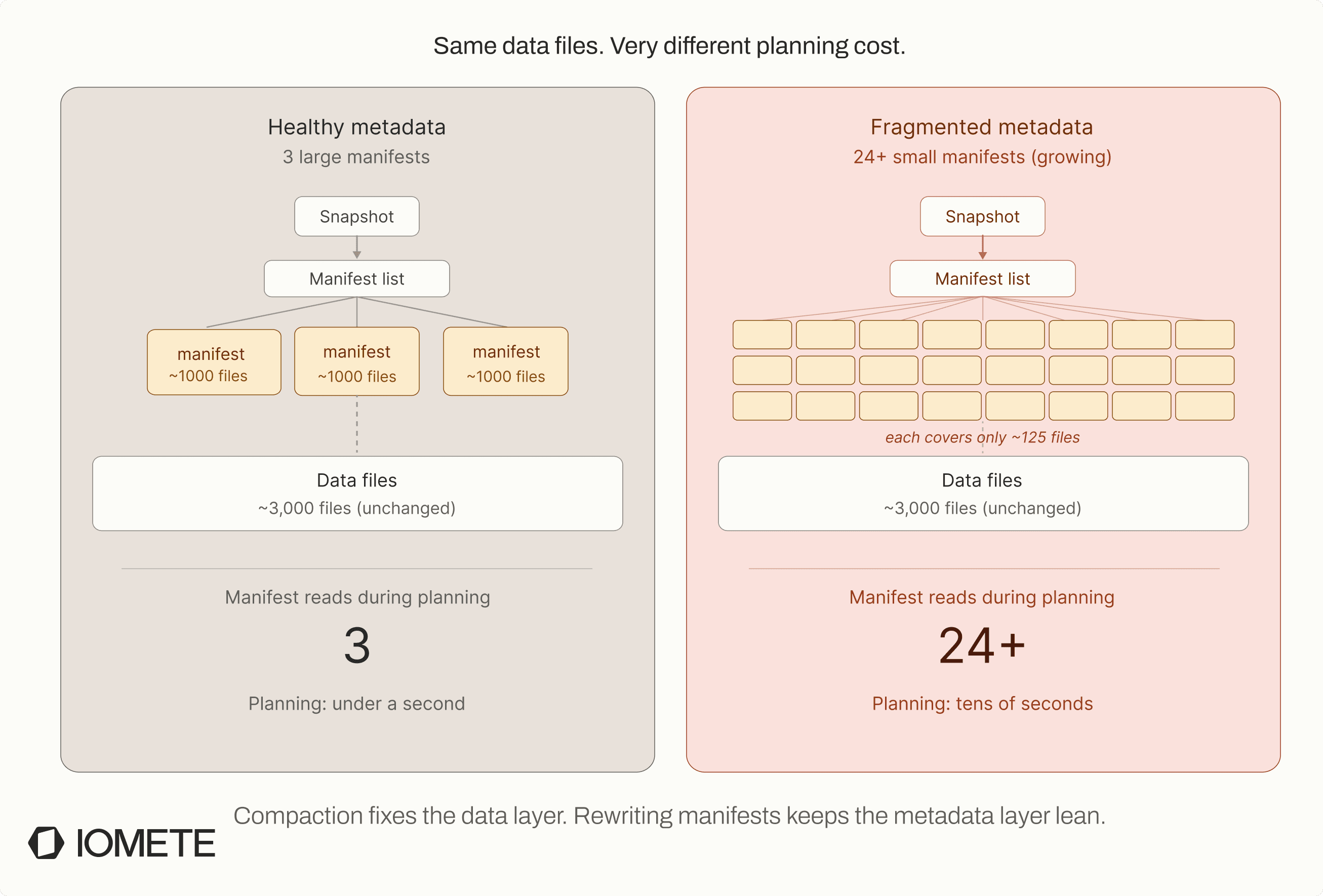
Iceberg doesn’t scan data files directly. It first reads metadata, which is hierarchical. The top-level metadata points to snapshots, snapshots point to manifest lists, and manifest lists point to manifest files. These manifests are what map queries to data files, each listing a subset of files along with partition values and statistics used for pruning.
At small scale, this works efficiently. But over time, manifests fragment. Every write adds entries, and every compaction rewrites them. Instead of a few large manifests, you gradually end up with hundreds or thousands of smaller ones, each covering only a small subset of files.
At that point, the problem shows up before scanning data.
Query planning slows down. The engine now has to open and parse many manifest files before it can determine which data files to read. On object storage, each of these reads is a network call with latency, so the overhead adds up quickly.
The bottleneck shifts to metadata, and planning becomes expensive even if the number of data files is stable. This is where things get confusing.
It looks like a small file problem, but it isn’t. Queries get slower and planning time increases, even though file count may not have changed significantly. The difference is where the bottleneck is. Small files overwhelm the data layer, while manifest fragmentation slows down the metadata layer.
That’s why compaction alone often doesn’t fix the issue. You reduce the number of data files, but the manifest layer remains fragmented, so query planning is still slow. To fix this properly, both layers need maintenance. Compacting data files reduces file count, and rewriting manifests keeps the metadata layer efficient.
The compounding effect
Across these four areas, the pattern is consistent.
Files keep accumulating, metadata grows, snapshots retain old state, and failed operations leave behind unused files. Over time, query planning slows, storage keeps increasing, and cleanup becomes harder.
None of these problems fix themselves. And fixing one in isolation is not enough.
To keep tables healthy, you need all four maintenance operations running regularly:
- Compact data files: merges small files into larger ones for better read performance
- Expire snapshots: removes old references, frees storage
- Remove orphan files: cleans up files not tracked by any metadata
- Rewrite manifests: consolidates fragmented metadata so query planning stays fast
Skip any one and the debt compounds in a different dimension.
Why streaming makes it 10x worse
Everything above applies to batch workloads. Streaming follows the same mechanics, just at a much higher rate.
A batch pipeline running hourly creates 24 commits per day. A streaming pipeline with 1-second microbatches creates 86,400.
| Batch (hourly) | Streaming (per-second) | |
|---|---|---|
| Commits/day | 24 | 86,400 |
| New files/day (5 per commit) | 120 | 432,000 |
| Snapshots/month | 720 | 2,592,000 |
| Files/month (no compaction) | 3,600 | 12,960,000 |
At this velocity, the maintenance window shrinks dramatically. Issues that take months in batch pipelines can appear within weeks.
This is why streaming tables become problematic so quickly. By the time performance issues show up, the table is already dealing with millions of files and significant metadata overhead.
With Merge-on-Read, the effect is stronger.
Each batch produces both data files and delete files. Over time, reads must merge more state, increasing overhead on every query. Without compaction that rewrites deletes, read latency continues to degrade.
So how do you know if your table has debt?
If you’re running Iceberg in production, start with a few simple checks:
-
Average file size
RunSELECT avg(file_size_in_bytes) FROM <table>.files. If it’s consistently below ~128 MB, compaction isn’t running or isn’t keeping up -
Snapshot count
CheckSELECT count(*) FROM <table>.snapshots. If this keeps growing beyond your retention window, snapshots aren’t being expired -
Manifest count
Look atSELECT count(*) FROM <table>.manifests. If it grows faster than your data volume, metadata is fragmenting -
Planning vs scan time
Check query profiles in your engine. If planning dominates while scan bytes stay flat, the bottleneck is metadata -
Orphan file cleanup cadence
If you’ve never runremove_orphan_files, you likely have storage waste from failed writes
If more than one of these shows up, your table already has debt.
So what do you do about it?
Iceberg gives you the tools to fix this. But it doesn’t run them for you.
Compaction, snapshot expiration, orphan cleanup, manifest rewriting. They work. But there’s no scheduler, no health checks, no monitoring, and no signal for when to run them or how often.
Most teams wire up cron jobs. Some rely on managed platforms. Plenty don’t think about it until queries start slowing down.
To fix this properly, you need to understand how Iceberg handles maintenance. The four operations, how they work, and where the DIY approach starts to break down. We’ll go deeper into this in the next post.
Resources & Further Reading
- Apache Iceberg Documentation: official docs covering table format, configuration, and APIs
- Iceberg Table Spec: the full specification for snapshots, manifests, metadata files, and the append-only model
- Iceberg Maintenance Procedures: official guide to compaction, snapshot expiration, orphan cleanup, and manifest rewriting
- Iceberg Table Inspection Queries: how to query metadata tables (data_files, snapshots, manifests) for table health diagnostics
- Apache Parquet Format: columnar storage format used by Iceberg data files