Copy-on-Write Tables in Apache Iceberg

Apache Iceberg has emerged as a powerful table format for managing large analytic datasets in data lakes. Unlike traditional file formats that simply organize data, Iceberg provides a rich metadata layer that enables ACID transactions, schema evolution, partition evolution, and time travel capabilities — features traditionally associated with data warehouses rather than data lakes.
In this first part of our two-part series, we'll take a deep dive into Iceberg's Copy-on-Write (CoW) table format. We'll explore the structure of Iceberg's metadata and see how it evolves as we perform common operations like inserts, updates, and deletes.
Iceberg Metadata Structure
Before diving into practical examples, let's understand Iceberg's metadata hierarchy.
Metadata Hierarchy
Iceberg's metadata follows a tiered structure:
- Table Metadata File: The entry point to an Iceberg table, containing references to the current snapshot, schema, partition spec, and other table properties.
- Snapshots: Point-in-time views of the table, each representing a table state after a transaction.
- Manifest Lists: Files that organize related manifests created in a single operation.
- Manifest Files: Files that track the data files belonging to a snapshot, including add/delete operations.
- Data Files: The actual files containing table data (typically Parquet, Avro, or ORC).
This hierarchy forms a tree structure where each level points to the level below it, ultimately leading to the data files. This approach enables Iceberg to efficiently track changes and provide ACID guarantees without scanning all data files.
Copy-on-Write (CoW) Table Format
Now, let's explore how Iceberg's metadata evolves as we perform operations on a Copy-on-Write table. We'll create a table, perform various operations, and observe the changes to both the file system and metadata structure.
Creating a Table
CREATE DATABASE IF NOT EXISTS demo_db;
CREATE TABLE demo_db.cow_table (
    id        BIGINT,
    name      STRING,
    age       INT,
    zipcode   STRING,
    timestamp TIMESTAMP
) TBLPROPERTIES (
    'write.update.mode' = 'copy-on-write',
    'write.merge.mode' = 'copy-on-write',
    'write.delete.mode' = 'copy-on-write'
);
After running this command, let's examine what files were created in the file system:
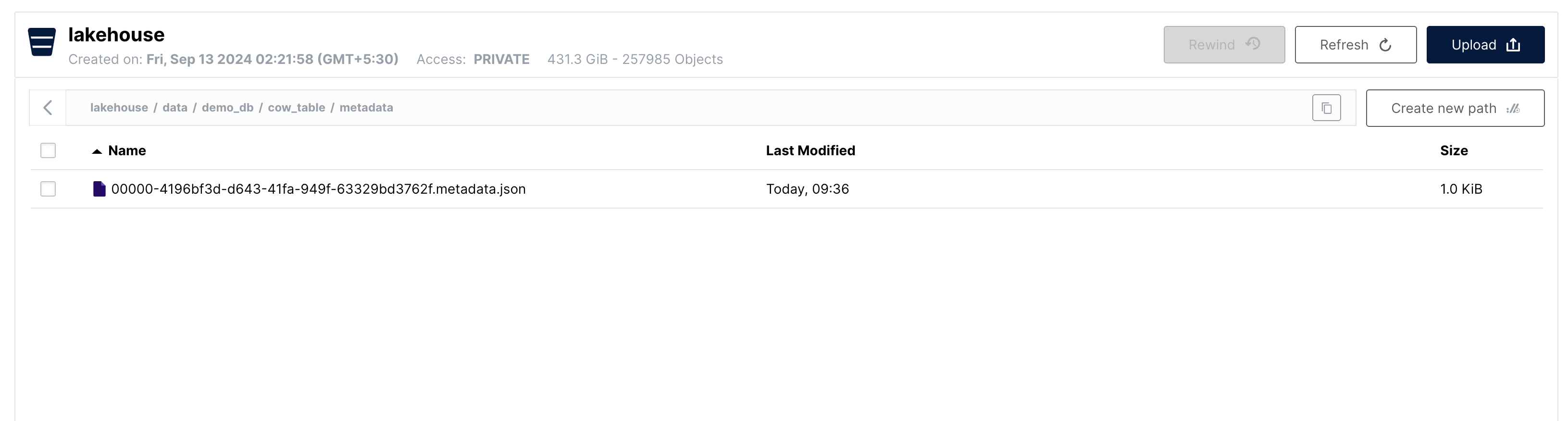
The metadata.json file is the initial table metadata file. No snapshots, manifests, or data files exist yet because we haven't inserted any data.
Inserting Data
INSERT INTO demo_db.cow_table (id, name, age, zipcode, timestamp)
VALUES (1, 'Alice', 30, '111111', CAST('2023-10-10 10:00:00' AS TIMESTAMP)),
       (2, 'Bob', 25, '111111', CAST('2023-10-11 11:00:00' AS TIMESTAMP)),
       (3, 'Charlie', 35, '111111', CAST('2023-10-12 12:00:00' AS TIMESTAMP)),
       (4, 'David', 28, '111111', CAST('2023-10-13 13:00:00' AS TIMESTAMP)),
       (5, 'Eve', 32, '111111', CAST('2023-10-14 14:00:00' AS TIMESTAMP)),
       (6, 'Frank', 40, '111111', CAST('2023-10-15 15:00:00' AS TIMESTAMP)),
       (7, 'Grace', 22, '111111', CAST('2023-10-16 16:00:00' AS TIMESTAMP)),
       (8, 'Hank', 45, '111111', CAST('2023-10-17 17:00:00' AS TIMESTAMP)),
       (9, 'Ivy', 38, '111111', CAST('2023-10-18 18:00:00' AS TIMESTAMP)),
       (10, 'Jack', 29, '111111', CAST('2023-10-19 19:00:00' AS TIMESTAMP));
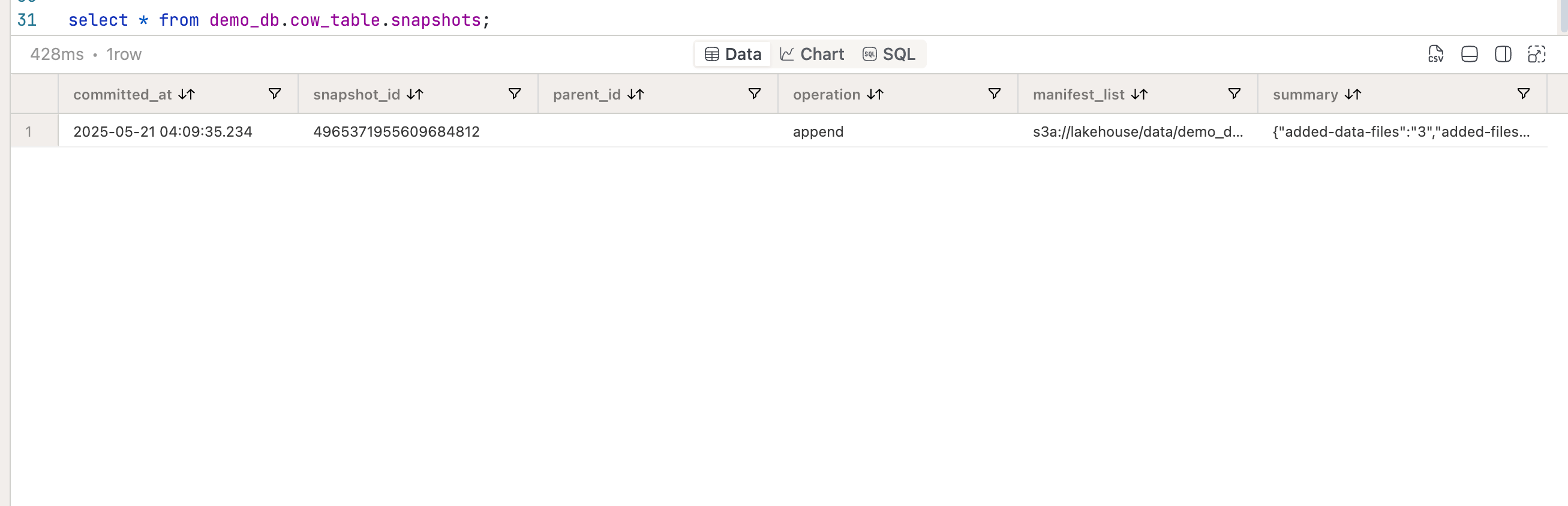
Let's look at the current state of the table:
SELECT * FROM demo_db.cow_table.snapshots;
{
  "added-data-files": "3",
  "added-files-size": "4473",
  "added-records": "10",
  "total-data-files": "3",
  "total-delete-files": "0",
  "total-equality-deletes": "0",
  "total-files-size": "4473",
  "total-position-deletes": "0",
  "total-records": "10"
}
As we can see, a new snapshot has been created after the insert operation. It points to a manifest list file, and from the summary we learn that the operation added 3 data files to the table.
Let's look at the metadata folder:
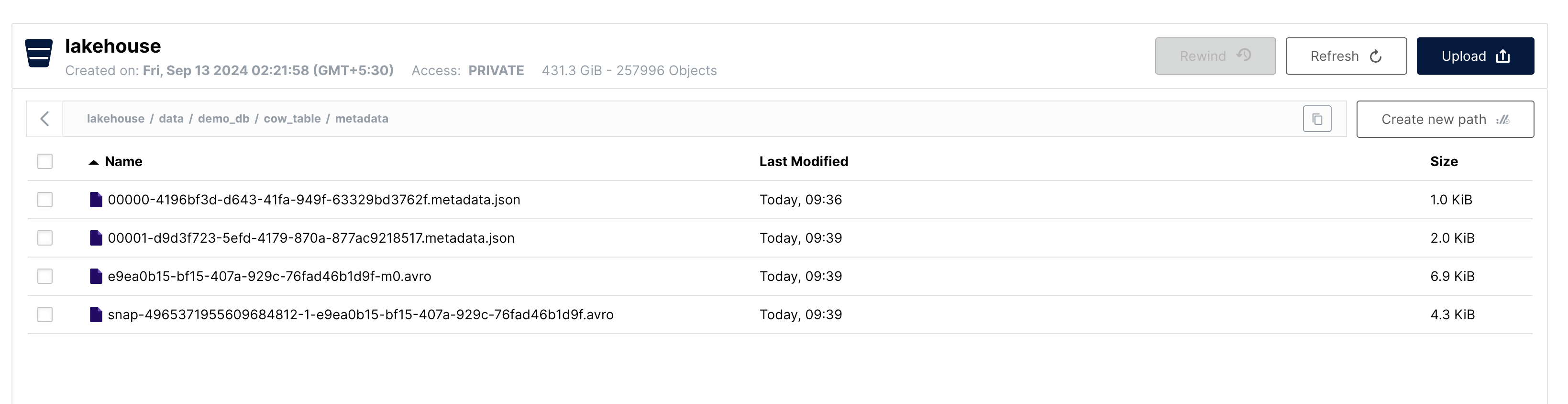
We can see that there are 3 new metadata files created after the insert operation:
00001-....metadata.json→ Updated Table Metadatasnap....avro→ New Manifest List....-m0.avro→ New Manifest File
Let's look at the data folder now:
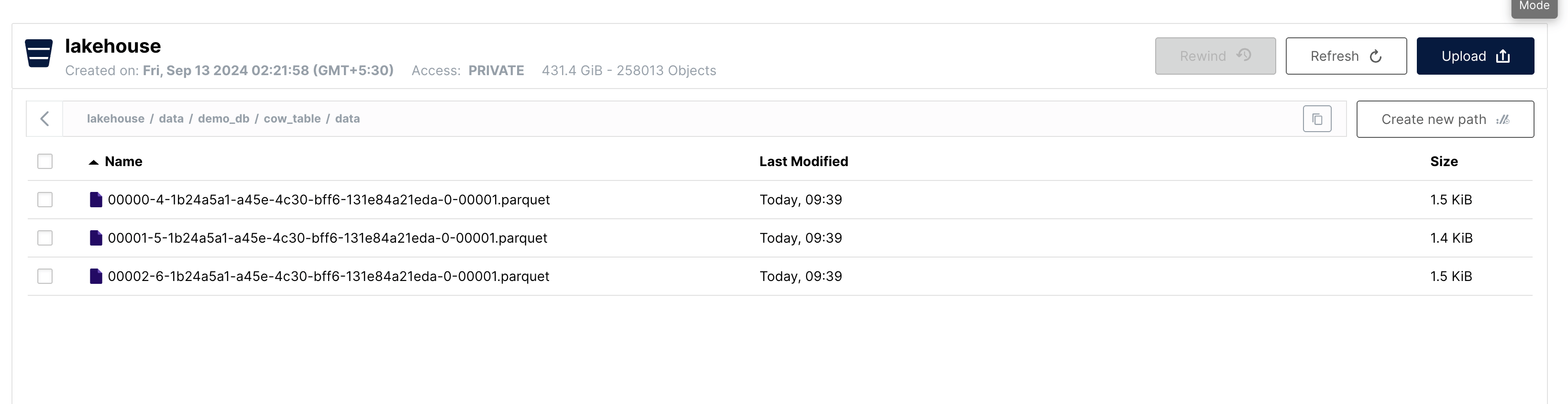
As we can see, there are 3 new data files created after the insert operation, consistent with the snapshot summary.
The current state of the table can be represented as below:
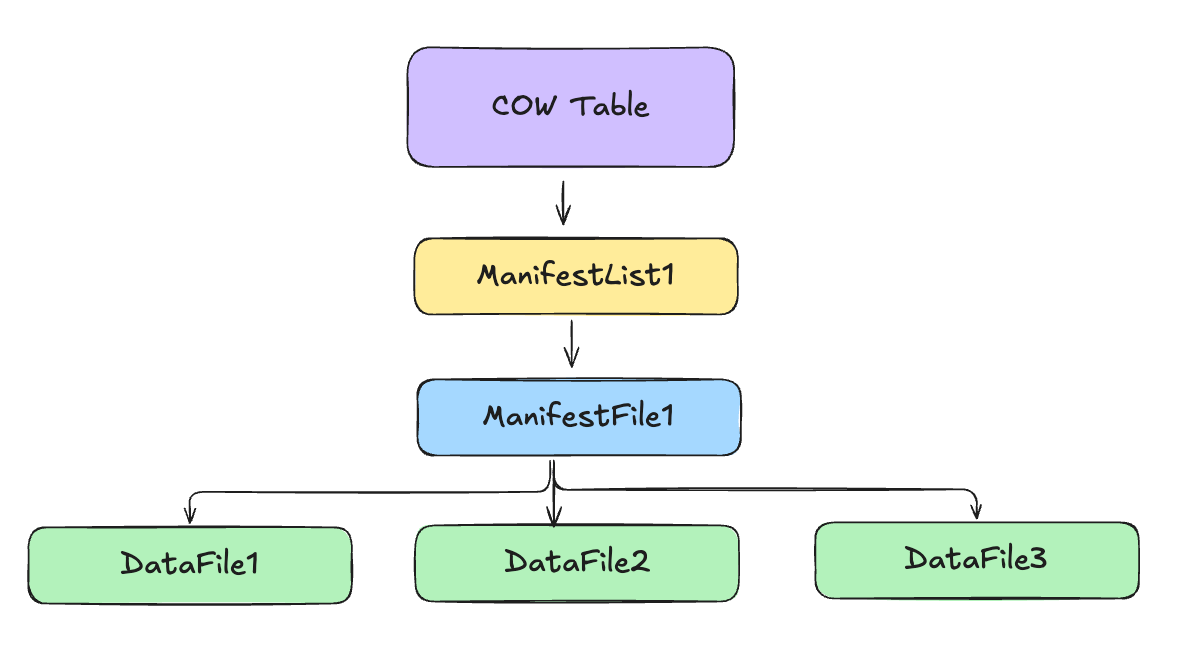
To summarize:
- 3 new data files are created in the data folder which contains the 10 rows of data we inserted.
- 1 new manifest file is created in the metadata folder which points to the 3 new data files.
- 1 new manifest list is created in the metadata folder which points to the new manifest file.
- The table metadata file is updated to point to the new manifest list.
Updating Data
UPDATE demo_db.cow_table
SET age = age + 1
WHERE id IN (1, 2);
After running the command, let's look at the current state of the table:
SELECT * FROM demo_db.cow_table.snapshots;

{
  "added-data-files": "1",
  "added-files-size": "1522",
  "added-records": "3",
  "deleted-data-files": "1",
  "deleted-records": "3",
  "removed-files-size": "1488",
  "total-data-files": "3",
  "total-delete-files": "0",
  "total-equality-deletes": "0",
  "total-files-size": "4507",
  "total-position-deletes": "0",
  "total-records": "10"
}
As we can see, a new snapshot has been created after the update operation. It points to a manifest list file, and from the summary we learn that the operation added 1 data file and deleted 1 data file from the table.
Let's look at the metadata folder:
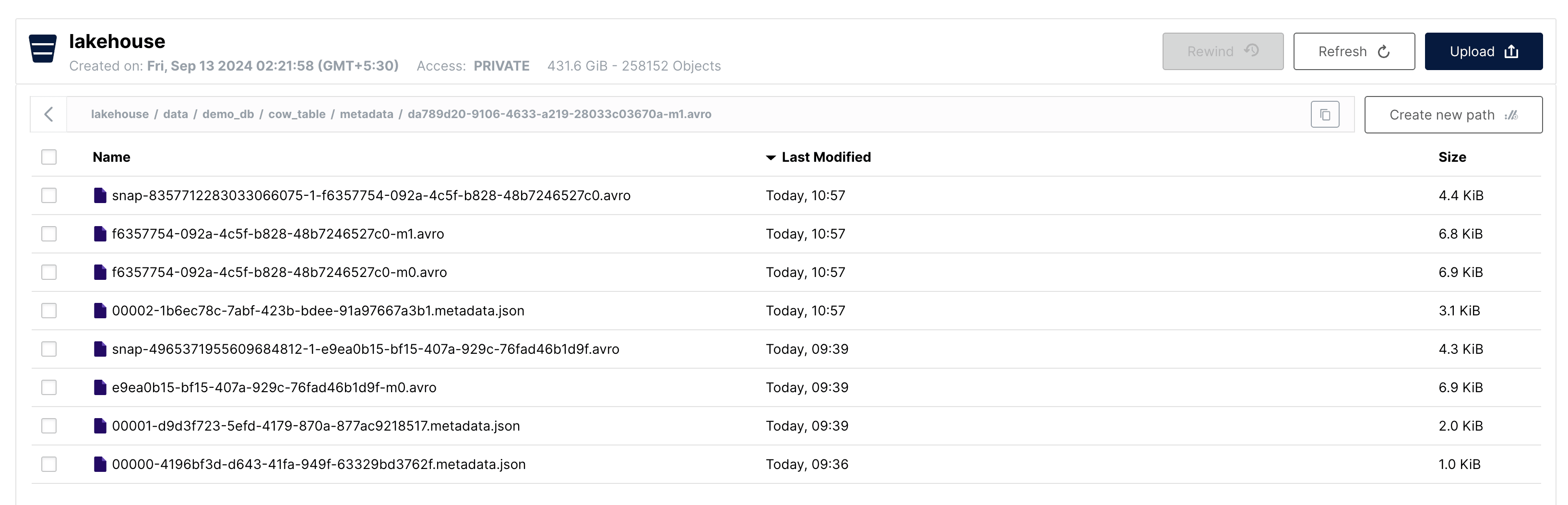
We can see that there are 4 new metadata files created after the update operation:
00002-....metadata.json→ Updated Table Metadatasnap....avro→ New Manifest List....-m0.avro→ New Manifest File....-m1.avro→ New Manifest File
Let's look at the data folder now:
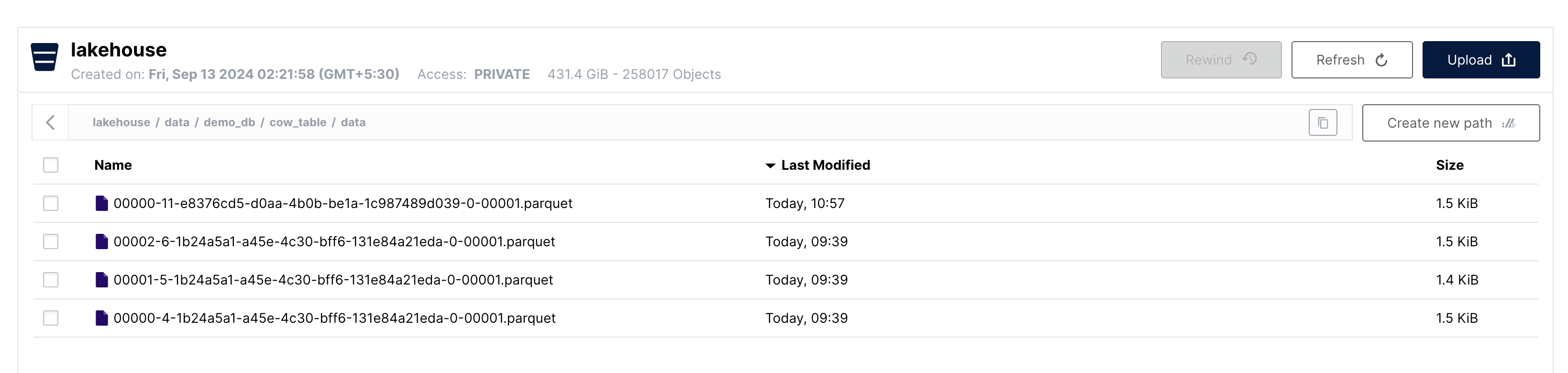
As we can see, there is 1 new data file created after the update operation. This data file contains 3 records, 2 of which were updated by the update operation. All 3 records which were part of this file were rewritten to the new data file since we are using copy-on-write mode.
We can still see the older data file in the data folder. This is because Iceberg does not delete old data files until the snapshot that points to them is deleted. We still have a snapshot that represents the state of the table before the update operation.
The current state of the table can be represented as below:
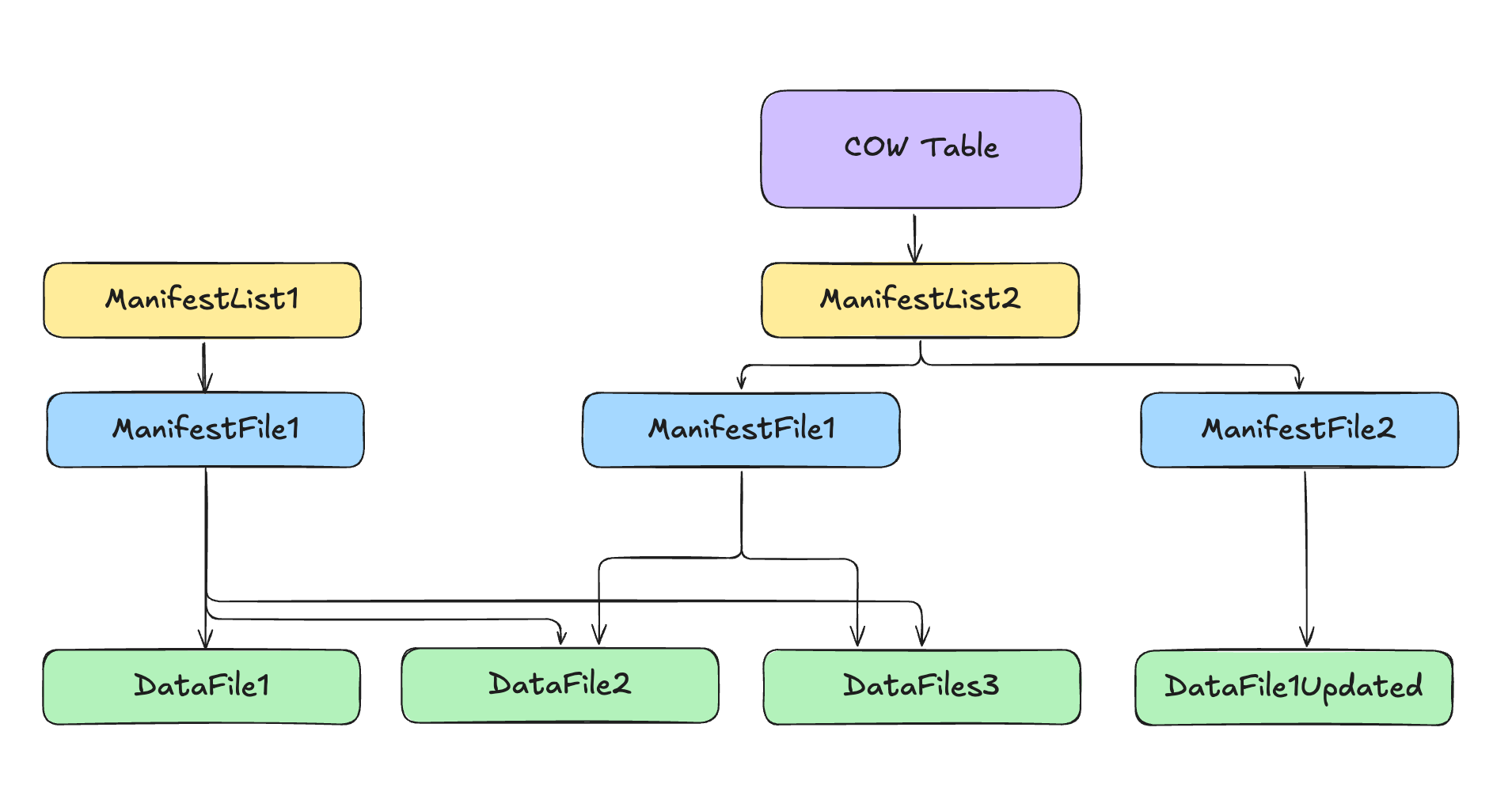
To summarize:
- A new copy of the data file containing the records that were updated is created.
- Two new manifest files are created in the metadata folder: one that points to the new data file and one that points to the older 2 datafiles that were untouched.
- A new manifest list is created in the metadata folder that points to the two new manifest files.
- The table metadata file is updated to point to the new manifest list.
Deleting Data
DELETE FROM demo_db.cow_table WHERE id IN (1, 2);
After running the command, let's look at the current state of the table:
SELECT * FROM demo_db.cow_table.snapshots;

{
  "added-data-files": "1",
  "added-files-size": "1449",
  "added-records": "1",
  "deleted-data-files": "1",
  "deleted-records": "3",
  "removed-files-size": "1522",
  "total-data-files": "3",
  "total-delete-files": "0",
  "total-equality-deletes": "0",
  "total-files-size": "4434",
  "total-position-deletes": "0",
  "total-records": "8"
}
As we can see, a new snapshot has been created after the delete operation. It points to a manifest list file, and from the summary we learn that the operation added 1 data file to the table and deleted 1 data file from the table.
Let's look at the metadata folder:
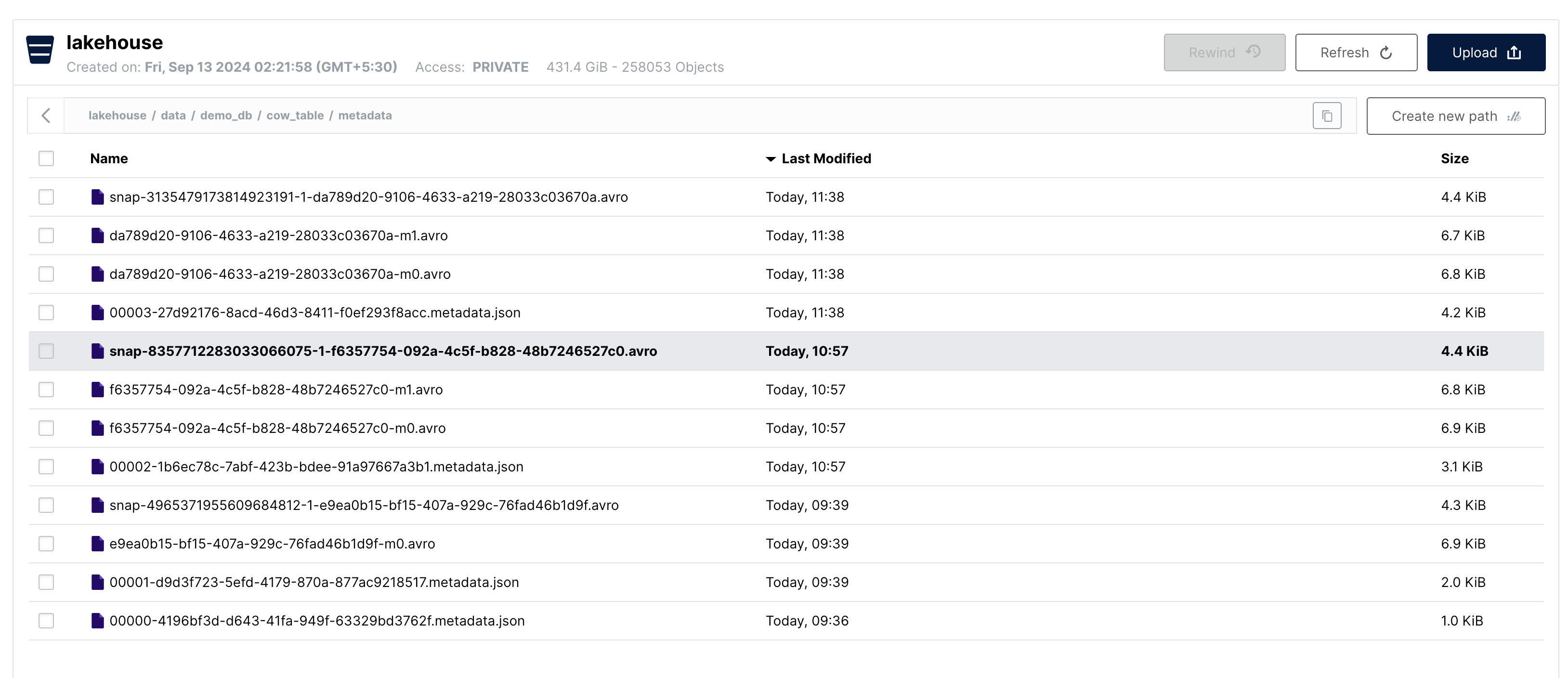
We can see that, similar to the update operation, there are 4 new metadata files created after the delete operation.
00003-....metadata.json -> Updated Table Metadata
snap....avro -> New Manifest List
....-m0.avro -> New Manifest File
....-m1.avro -> New Manifest File
Let's look at the data folder now.
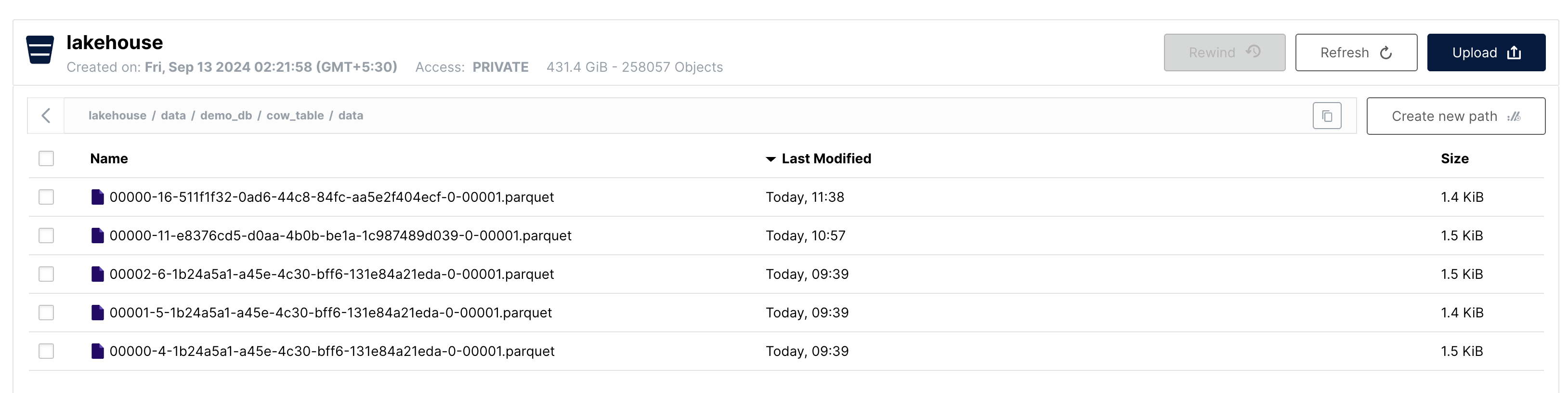
As we can see there is 1 new data file created after the delete operation. This data file contains 1 record, which was left after we deleted the 2 records from the data file containing the 3 records.
The current state of the table can be represented as below:
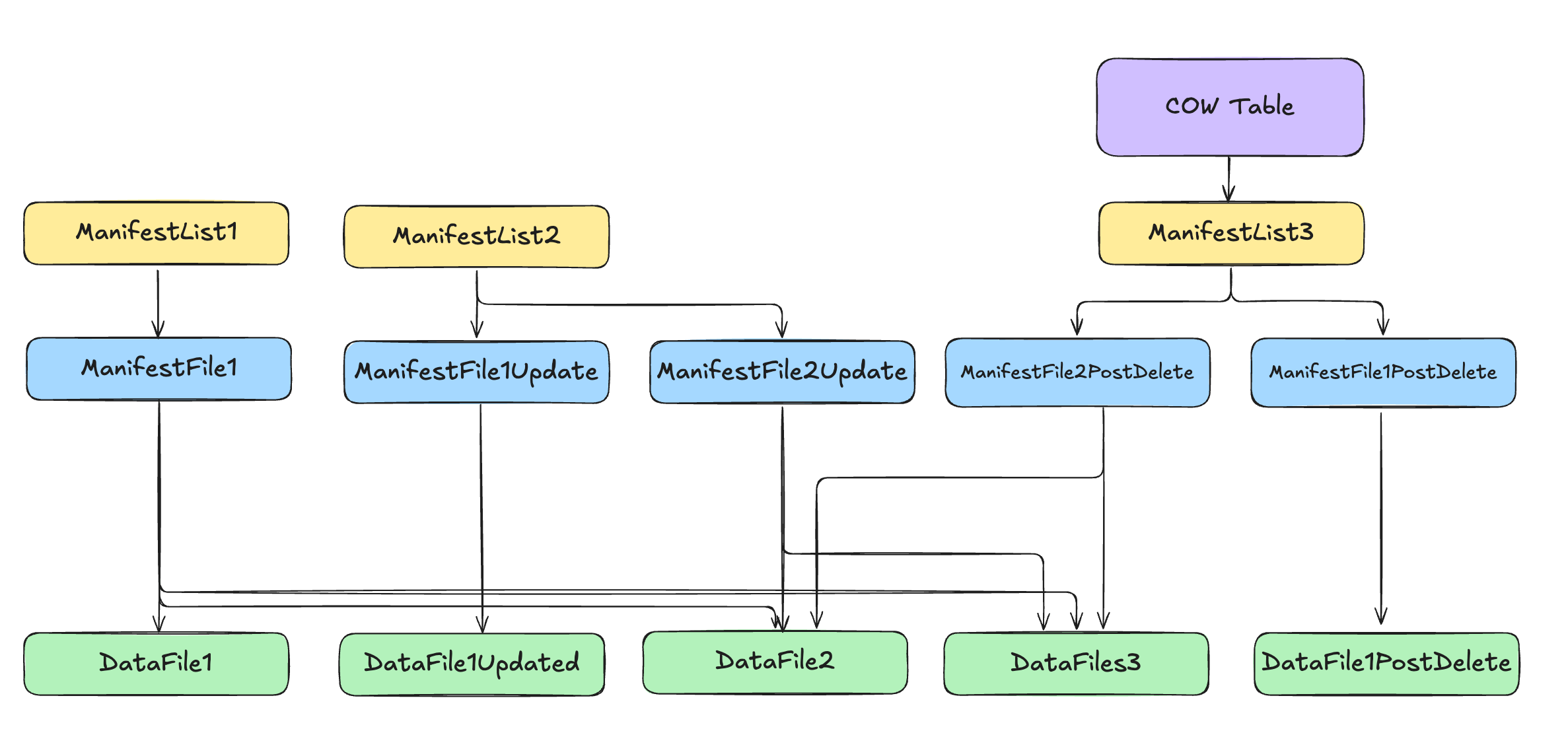
To summarize:
- A new copy of the data file containing the records that were deleted is created. This now contains only 1 record as we deleted 2 records from the data file containing the 3 records.
- Two new manifest files are created in the metadata folder. One that points to the new data file and one that points to the older 2 datafiles that were untouched.
- A new manifest list is created in the metadata folder that points to the two new manifest files.
- The table metadata file is updated to point to the new manifest list.
Key Takeaways
- Data files are never modified in Iceberg. Instead, a new copy of the data file is created when performing an update or delete operation.
- Copy-on-Write (CoW) tables are ideal for usecases where read performance is critical. It is best suited for usecases where we have append heavy workloads and batch processing with infrequent updates.
- Regular maintenance of the table is required to keep the data size in check. This can be done by compacting and removing old snapshots.
In the next part, we'll explore Iceberg's Merge-on-Read table mode, which takes a different approach to handling updates and deletes.