Why We Rebuilt Iceberg Orphan File Cleanup from Scratch



Deleting data is easy. Deleting the right data safely in a distributed lakehouse is much harder.
This is Part 6 of our Apache Iceberg Table Maintenance series. Explore the full series:
- Part 1: The Hidden Debt in Your Lakehouse Tables
- Part 2: What Iceberg Gives You for Table Maintenance
- Part 3: The Iceberg Table Maintenance Landscape
- Part 4: How We Built Automated Table Maintenance
- Part 5: Running Iceberg Maintenance in Production
- Part 6: Why We Rebuilt Orphan File Cleanup from Scratch
In the previous articles of this series, we talked about why table maintenance matters, walked through Iceberg's built-in procedures, and explained how we automated them at IOMETE. One operation, though, kept coming back as a special case.
Orphan file cleanup sounds straightforward. Find files that aren't referenced by the table anymore and delete them. In practice, it's one of the riskiest maintenance operations you can run. One wrong deletion, and you've lost data permanently.
This post covers why we built our own implementation, the production problems that forced our hand, and the safety mechanisms we put in place.
What Are Orphan Files?
Orphan files are data or metadata files sitting in a table's storage location that no snapshot references anymore. They pile up silently and eat storage without doing anything useful.
Here's how they typically show up:
- Failed write operations. A Spark or Flink job writes data files to storage but crashes before committing the snapshot. The files are there, but no metadata points to them.
- Interrupted compaction. Compaction rewrites data files into larger, optimized ones. If the process dies after writing the new files but before the atomic metadata swap, both old and new files exist, but only the old ones are referenced.
- Streaming write failures. Streaming engines like Flink commit at high velocity. A checkpoint failure or executor restart can leave uncommitted files behind.
- External tools writing into table locations. ETL scripts, migration tools, or manual uploads sometimes drop files into an Iceberg table's directory without going through the commit protocol.
In every case, the files are real and cost money, but Iceberg has no record of them. Without cleanup, they just keep growing.
Why Orphan Cleanup Is Harder Than It Looks
At a high level, the algorithm seems simple:
- List every file under the table location.
- Read Iceberg metadata to find referenced files.
- Delete everything else.
Then you try it in production.
Concurrent Writes
Orphan cleanup operates on a moving target. While the cleanup process is scanning storage and building its list of referenced files, other jobs may be actively writing new data. Those files exist in storage but haven't been committed to metadata yet.
A naive implementation sees them as unreferenced and deletes them. The write job then tries to commit, pointing to files that no longer exist. That's data loss.
Retention windows help by only deleting files older than N days, but they're not a complete solution. A long-running batch job might write files that sit uncommitted for hours. A Flink checkpoint might hold references across multiple commit cycles. The window needs to be wide enough to cover the longest possible gap between file creation and metadata commit, and that gap depends entirely on the workload.
Large Object Stores
A production Iceberg table can have millions of files spread across data/ and metadata/ directories. You don't know how many until you start listing, and listing means paginating through the object store's list API, which is both slow and expensive at scale.
On top of that, building the set of referenced files requires reading every snapshot's manifest list, every manifest file, and every metadata file. For tables with hundreds of snapshots and thousands of manifests, that's a lot of I/O.
Doing both in a single pass while keeping memory bounded isn't something Iceberg's default remove_orphan_files procedure accounts for.
Temporary Files from Compute Engines
Not every unreferenced file is truly an orphan. Compute engines leave behind temporary files that serve real purposes:
- Flink writes checkpoint metadata into the table's metadata directory. These files are critical for exactly-once processing guarantees and must not be deleted while the job is running.
- Spark may leave behind temporary files from speculative execution or failed task attempts.
Deleting these while the engine is actively using them can corrupt running pipelines.
Mixed Directory Contents
In many production environments, table directories contain files Iceberg didn't create and doesn't manage, like logs, README files, temporary uploads, and user-created folders. A cleanup process that deletes every unreferenced file risks removing things that have nothing to do with Iceberg.
Why We Didn't Use the Default Implementation
Iceberg's remove_orphan_files procedure is a well-designed starting point. We covered how it works in Part 2 of this series. But for a managed platform running cleanup automatically across hundreds of tables, we needed guarantees the built-in procedure doesn't provide:
- Threshold-based safety. If the orphan ratio is unusually high, something's probably wrong: a misconfigured table location, corrupted metadata, or a bug in the cleanup logic itself. The default procedure doesn't check for this; it just deletes whatever it finds. We needed an automatic abort mechanism.
- Batch deletion with backpressure. Deleting thousands of files in a single API call can overwhelm object storage rate limits or cause cascading failures. The default procedure deletes all identified orphans in one pass without any backpressure. We needed controlled, batched deletion with configurable cooldown periods.
- Engine-aware exclusions. Flink checkpoint files must not be deleted while a streaming job is running. The default procedure has no awareness of compute engine state.
- Operational metrics. The default procedure returns a list of deleted file paths, which can be overwhelming at scale and lacks structured insight. Every run should report what it actually did: files scanned, orphans found, storage reclaimed.
- No Spark dependency. Once we were building our own implementation anyway, we realized orphan cleanup is fundamentally a metadata-plus-storage operation. It reads Iceberg metadata, lists object storage, and deletes files. None of that needs distributed data processing. Dropping Spark eliminated the compute overhead and the scheduling dependency on cluster availability.
The goal was never to replace Iceberg's capabilities. It was to build the production-grade guardrails needed for an automated platform.
How Our Implementation Works
Step 1: Collecting Valid Files with a Bloom Filter
Before we can identify orphans, we need to know which files are valid, meaning referenced by at least one snapshot. Building this set is the most expensive part of the operation.
The naive approach loads every referenced file path into a HashSet. For a table with 10 million data files, that set alone eats hundreds of megabytes of memory. Multiply by the number of tables being cleaned concurrently, and you hit a wall fast.
We use a Bloom filter instead. It's a probabilistic data structure that tells you with certainty when a file is not in the valid set (definitely an orphan), but occasionally reports a false positive — saying a file might be valid when it actually isn't. We tuned ours to a 0.01% false positive rate. In practice, that means roughly one in every 10,000 true orphans could be misidentified as "possibly valid" and skipped instead of deleted. That's the safe direction: we might miss cleaning up a few orphans, but we never accidentally delete a valid file. Any skipped orphan can be caught in a subsequent cleanup run when the filter contents change.
The filter handles up to 10 million data file entries and 10,000 metadata file entries, capped at around 24 MB, a fraction of what a HashSet would need.
Here's how the valid file collection works. We walk through every snapshot in the table:
- Metadata files. All reachable metadata file locations are collected using Iceberg's
ReachableFileUtil. - Manifest list files: Each snapshot's manifest list location gets added.
- Manifest files: Each manifest list is read to extract data file and delete file paths. Since the same manifest can be reachable from multiple snapshots, a manifest cache (LRU, capacity 10,000) avoids redundant reads.
- Statistics files and version hint: Iceberg stores table statistics (like column-level distinct counts and sketches) in files that use the Puffin format. These files, along with the version hint file, go into the metadata set.
To avoid overloading object storage, we pause for 100 milliseconds after every 1,500 files read from manifests. This keeps the I/O rate sustainable on shared storage systems.
We maintain two separate Bloom filters — one for content files (data/) and one for metadata files (metadata/) — because the two directories are scanned independently in Step 2 and have different scale characteristics. Alongside the filters, we also track the total count and size of all valid files, which feeds into the threshold safety check in Step 3.
Step 2: Counting Orphans Before Deleting Anything
With the valid file sets built, we list all files under the table's base location and classify every file. For each file in data/ and metadata/, we check:
- Is it referenced? If the Bloom filter says the file might be valid, we treat it as valid. No further checks needed.
- Is it excluded? Metadata files matching a Flink job ID pattern are excluded from deletion, even if unreferenced. This protects Flink checkpoint files for running streaming jobs.
- Is it old enough? Files newer than the retention window aren't eligible for deletion, regardless of reference status. The retention window is configured as a duration (for example, 3 days), and the system computes the cutoff timestamp from that. This gives in-flight commits, long-running jobs, and delayed cleanup cycles enough time to settle before a file becomes a deletion candidate.
Flink stores its job ID in each snapshot's summary under the key flink.job-id. Our implementation scans every snapshot's summary using the regex pattern flink.job-id*, collects all matching job IDs, and excludes any checkpoint metadata files associated with those IDs from deletion.
Only files that fail all three checks (unreferenced, not excluded, and older than the retention window) get classified as eligible orphans.
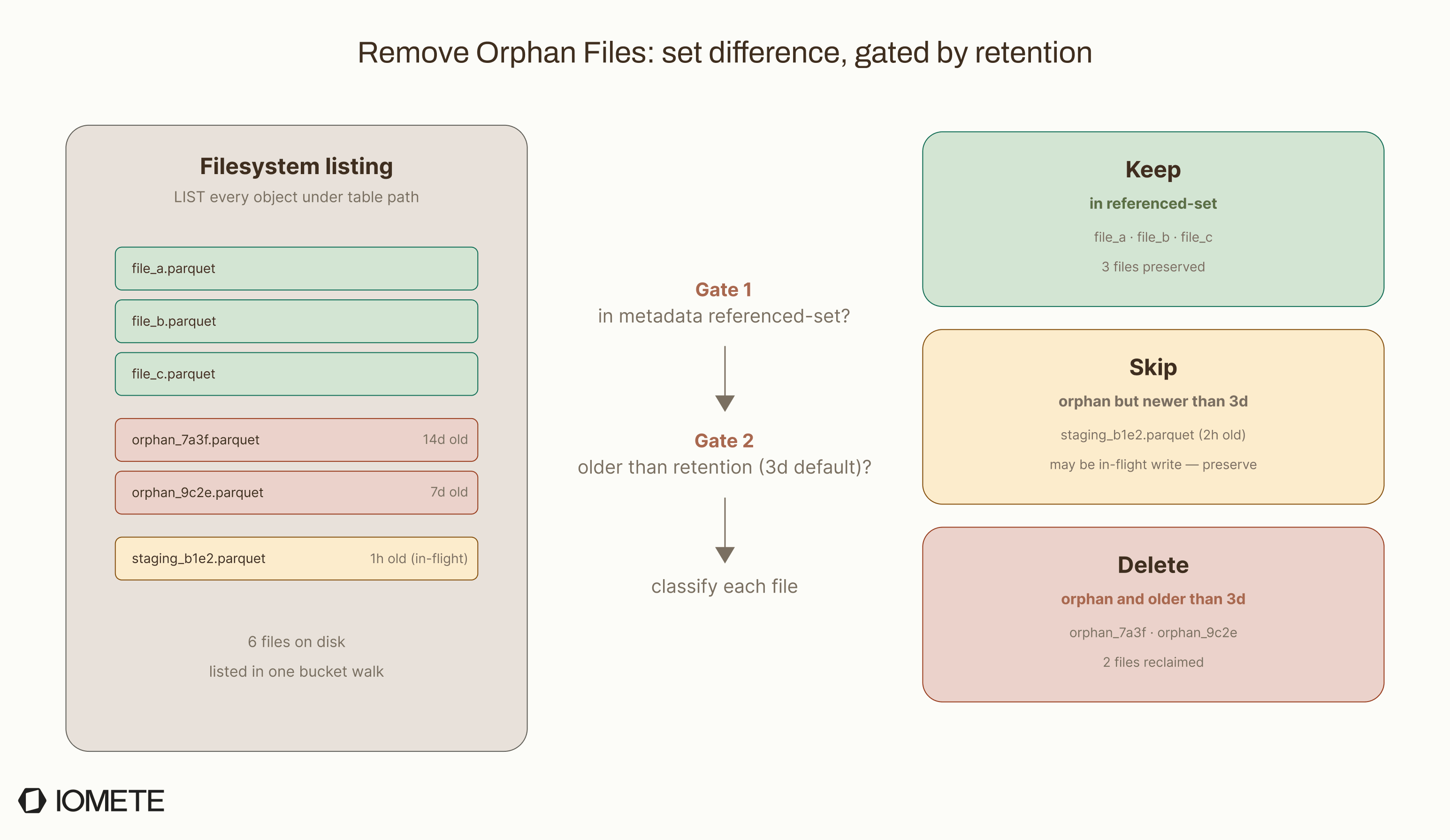
At this point, we've counted the orphans but haven't deleted anything. That separation is deliberate because counting first lets us run a threshold safety check (Step 3) before committing to any deletions, so we can abort early if the numbers look suspicious.
Step 3: Threshold Check: The Safety Net
Before any deletion begins, we calculate the orphan ratio:
orphan ratio = eligible orphans / total files (valid + orphan)
If this ratio exceeds a configurable threshold, the entire operation aborts. No files are deleted. The run gets recorded as aborted with the orphan statistics, so operators can investigate.


This check exists because an unusually high orphan ratio is a strong signal that something's wrong:
- Incorrect table location. The cleanup may be scanning a directory that contains unrelated files.
- Metadata corruption. The table's metadata may not accurately reflect which files should exist.
- Configuration error. The retention window may be set too aggressively, causing recently written files to look like orphans.
In any of these cases, blindly deleting files would cause real damage. The threshold check stops the process when the numbers don't add up, though we protect against false alarms with a minimum file count threshold (see below).
The threshold only kicks in when the total file count exceeds a minimum value. For small tables with few files, orphan ratios can be naturally volatile, and enforcing the threshold would cause unnecessary aborts. Both the orphan ratio threshold and the minimum file count are configurable per deployment.
Step 4: Batch Deletion with Backpressure
Once the threshold check passes, deletion proceeds in controlled batches.
Instead of issuing a single bulk delete for all orphan files, the process:
- Collects orphan files into batches of a configurable size (defaults to 1,000 files).
- Deletes each batch using the object store's bulk deletion API when supported (
SupportsBulkOperations), or falls back to individual file deletion. - Applies a configurable cooldown period between batches to avoid overwhelming the storage API.
If a bulk deletion partially fails (which happens regularly with cloud object storage), the process handles it gracefully. It tracks how many files in the batch succeeded and how many failed, logs the partial failure, and moves on to the next batch. The operation doesn't abort on partial batch failures.
This design limits the blast radius of any single failure. If the process crashes mid-cleanup, only the current batch is affected. The remaining orphan files stay untouched and get picked up on the next orphan cleanup run.
Minimum Retention Enforcement
Beyond the configurable retention window, the executor enforces a hard minimum retention period. If the configured retention falls below this minimum (set at the platform level), the operation gets rejected before any file scanning begins. This is a platform-level safety net that prevents accidental misconfiguration from causing premature deletion, even if a user sets an aggressive retention policy on their table.
What We Track
Every orphan cleanup run records detailed metrics. Here's what the maintenance history looks like in the IOMETE console:
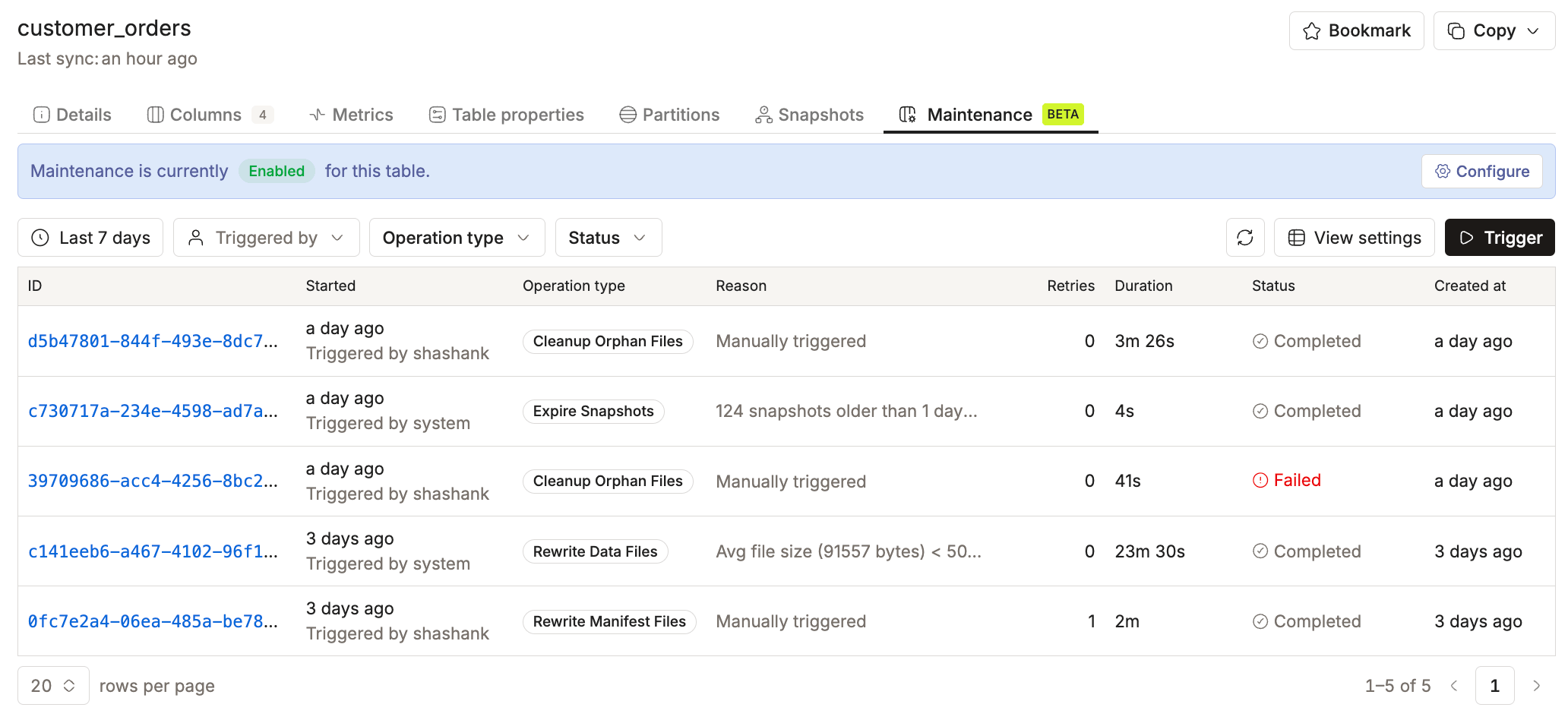
Clicking into a completed orphan cleanup run shows the before/after metrics:
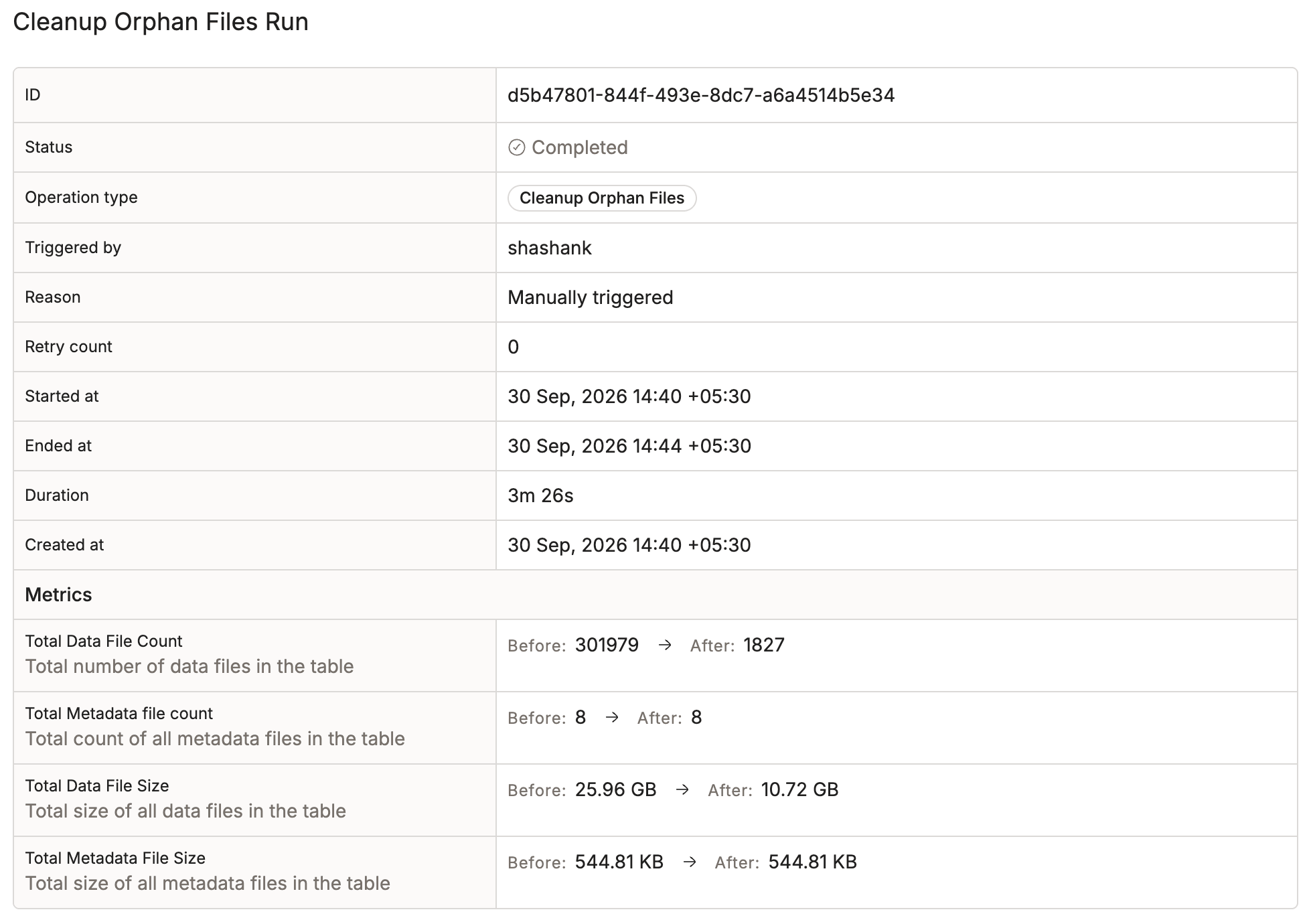
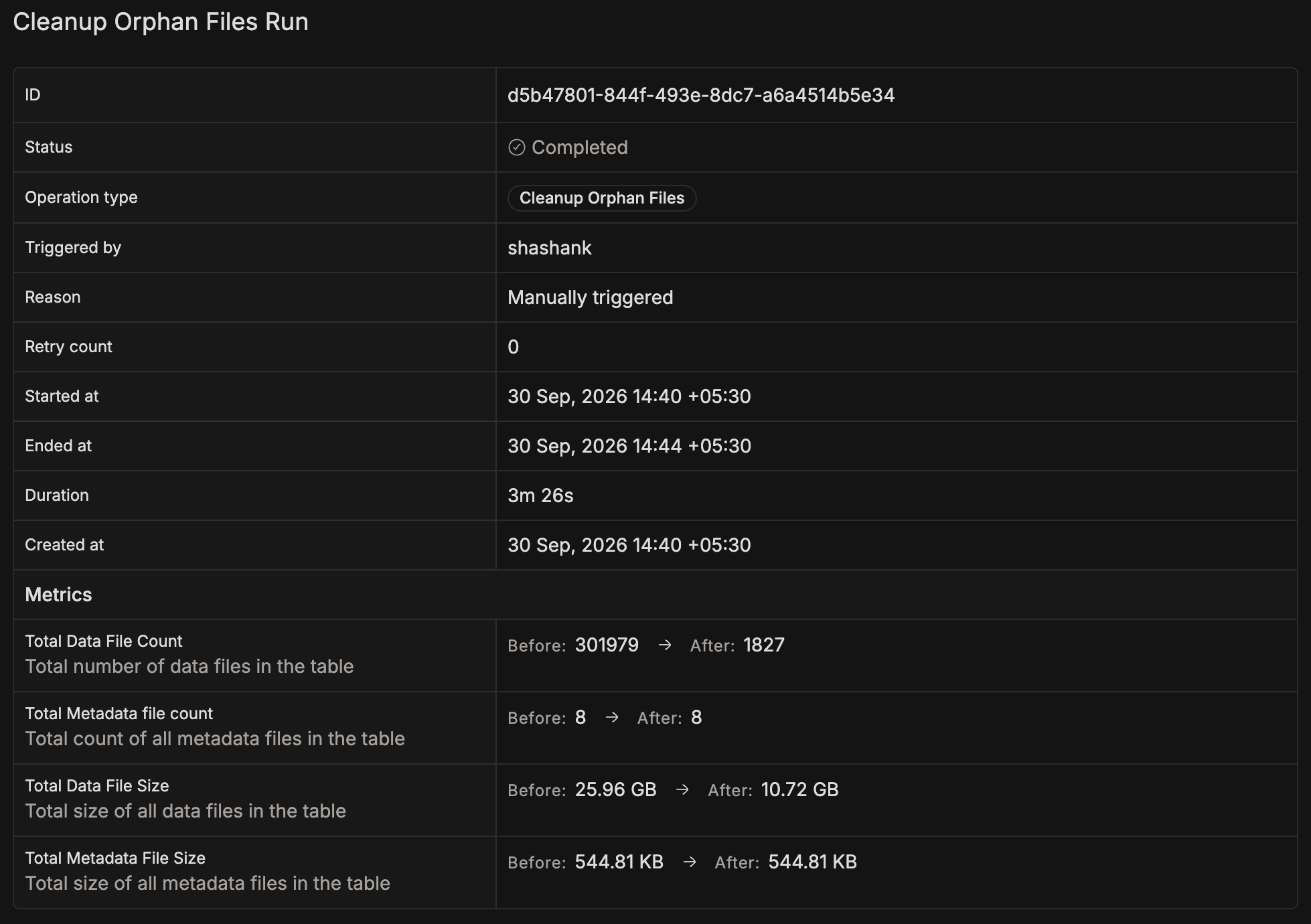
Each run captures the following metrics as before/after pairs, so you can see exactly what changed:
| Metric | Description |
|---|---|
| Total data file count | Number of files in the data/ directory |
| Total metadata file count | Number of files in the metadata/ directory |
| Total data file size | Storage footprint of all data files |
| Total metadata file size | Storage footprint of all metadata files |
The "before" values reflect the state at scan time; the "after" values subtract whatever was deleted. This gives operators and users a clear picture of what each cleanup actually accomplished.
Lessons Learned
Deleting files safely is harder than writing them: A write that fails leaves behind an orphan, annoying but harmless. A delete that targets the wrong file causes data loss. That asymmetry means the cleanup process has to be significantly more careful than the write process that created the mess in the first place.
Probabilistic data structures earn their keep at scale: A Bloom filter with a 0.01% false positive rate and a 24 MB cap replaced what would've been a multi-gigabyte hash set for large tables. The tradeoff of occasionally skipping a real orphan is negligible compared to the memory savings. That orphan gets caught on the next run anyway.
Safety mechanisms matter more than speed: The threshold check, batch deletion, and retention enforcement all add latency. That's the cost of not deleting customer data by accident, and it's a trade we'd make again every time.
Separating counting from deleting changes everything: Counting orphans first and checking the ratio before deleting anything turns a destructive operation into a two-phase process with an explicit go/no-go gate. Most of the edge cases we caught during development would've been invisible in a single-pass implementation. They only showed up because we had that checkpoint in between.
Conclusion
Orphan file cleanup is one of those operations that seems trivial until you're running a lakehouse at scale.
We didn't build our own implementation to replace Iceberg's capabilities. We built it to add the safety, observability, and operational guarantees you need when this stuff runs automatically across hundreds of tables. Bloom filters keep memory bounded. Threshold checks prevent runaway deletions. Batch deletion with backpressure keeps storage APIs healthy. Flink-aware exclusions protect running pipelines.
These guardrails let orphan cleanup run continuously without putting customer data at risk, turning what could be a dangerous maintenance task into a reliable part of everyday lakehouse operations.
Resources & Further Reading
References
- Apache Iceberg
remove_orphan_filesProcedure: Iceberg's built-in Spark procedure for orphan file removal - Bloom Filters by Example: interactive tutorial on how Bloom filters work
- Apache Iceberg Spec: Snapshots: how Iceberg tracks file references through snapshots and manifests