Runtime PII & PHI Masking in the Spark Query Engine

Data masking often sounds simple. Ask almost any platform vendor whether they support it, and the answer will be yes. But the more important question is where that masking is enforced. Some platforms place controls in front of the data through a BI tool, semantic layer, or predefined view. Others enforce them inside the query engine itself, so every query is checked before data is returned.
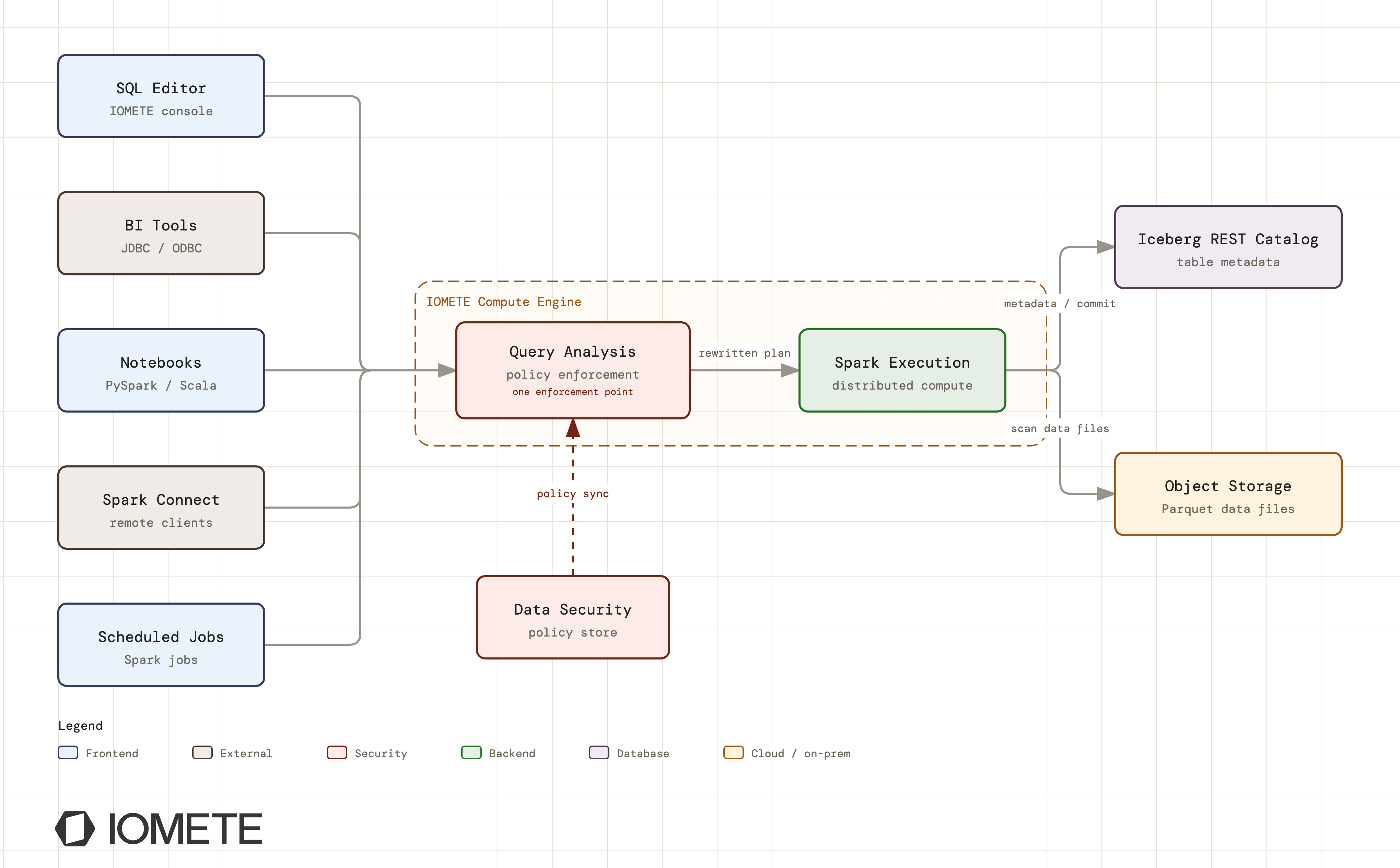
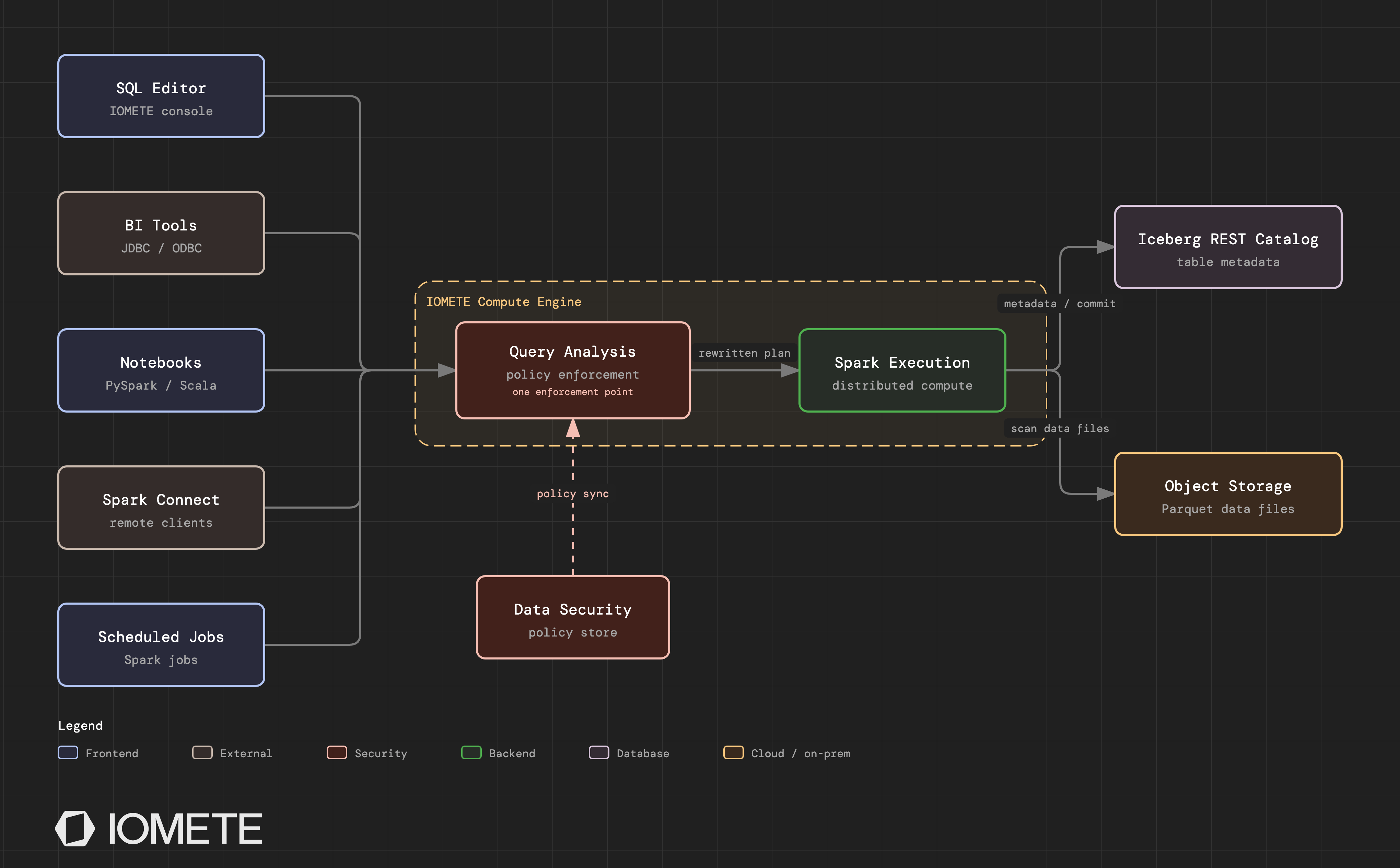
That difference matters when someone uses a different access path. A data scientist may open a Spark notebook, a batch job may read the table directly, or an external tool may connect over JDBC. If masking exists only in the BI layer, those paths may bypass it. If it is enforced in the engine, the same policies apply consistently everywhere.
IOMETE follows the engine-level approach. Data masking and row-level security are enforced during query execution inside the Spark-based compute engine, across every access path supported by the platform. In this post, we will look at how that works, what it means for teams handling PII and PHI, and why enforcement location should be one of the first questions you ask when evaluating a data platform.
What "Runtime" Enforcement Actually Means
When a user submits a query against a table with an active masking or row-filter policy, IOMETE doesn't touch the data on disk and doesn't route the query through a proxy. Instead, the engine rewrites the query plan itself before execution begins.
During query analysis (the phase where Spark resolves table and column references, before any optimization or execution), the engine checks each accessed resource against the active policies for the current user and their groups:
- For a masked column, the plan is rewritten so that every reference to the original column is replaced with the masking expression. The rewrite propagates through the whole plan: joins, subqueries, CTEs, and derived columns all see the masked value, not the original. There is no window where raw data exists in the result path.
- For a row-filter policy, the engine injects the filter predicate directly above the table scan, exactly as if the user had written the WHERE clause themselves. Every downstream operation, from aggregations to joins to exports, operates only on the rows the user is entitled to see.
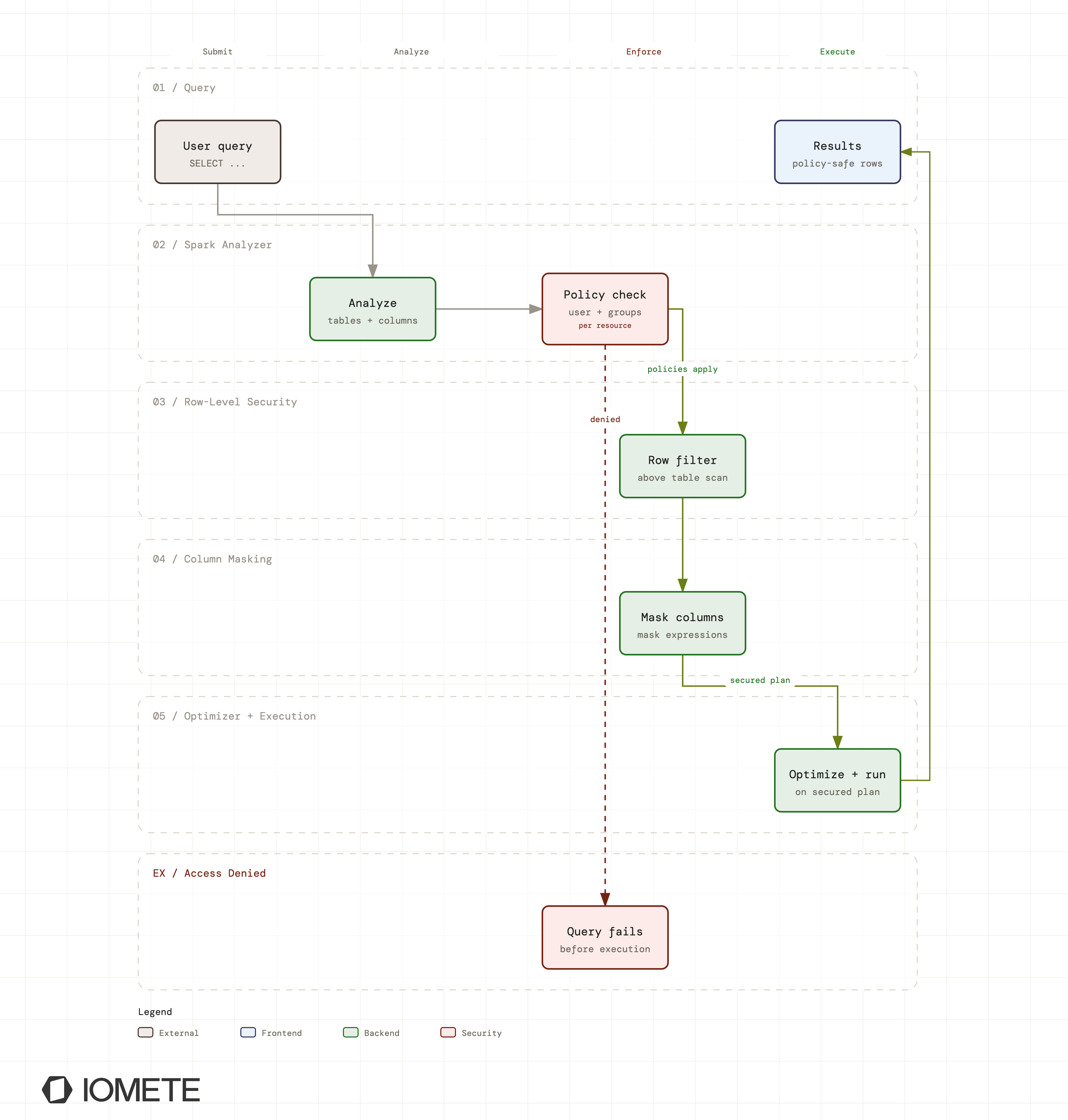
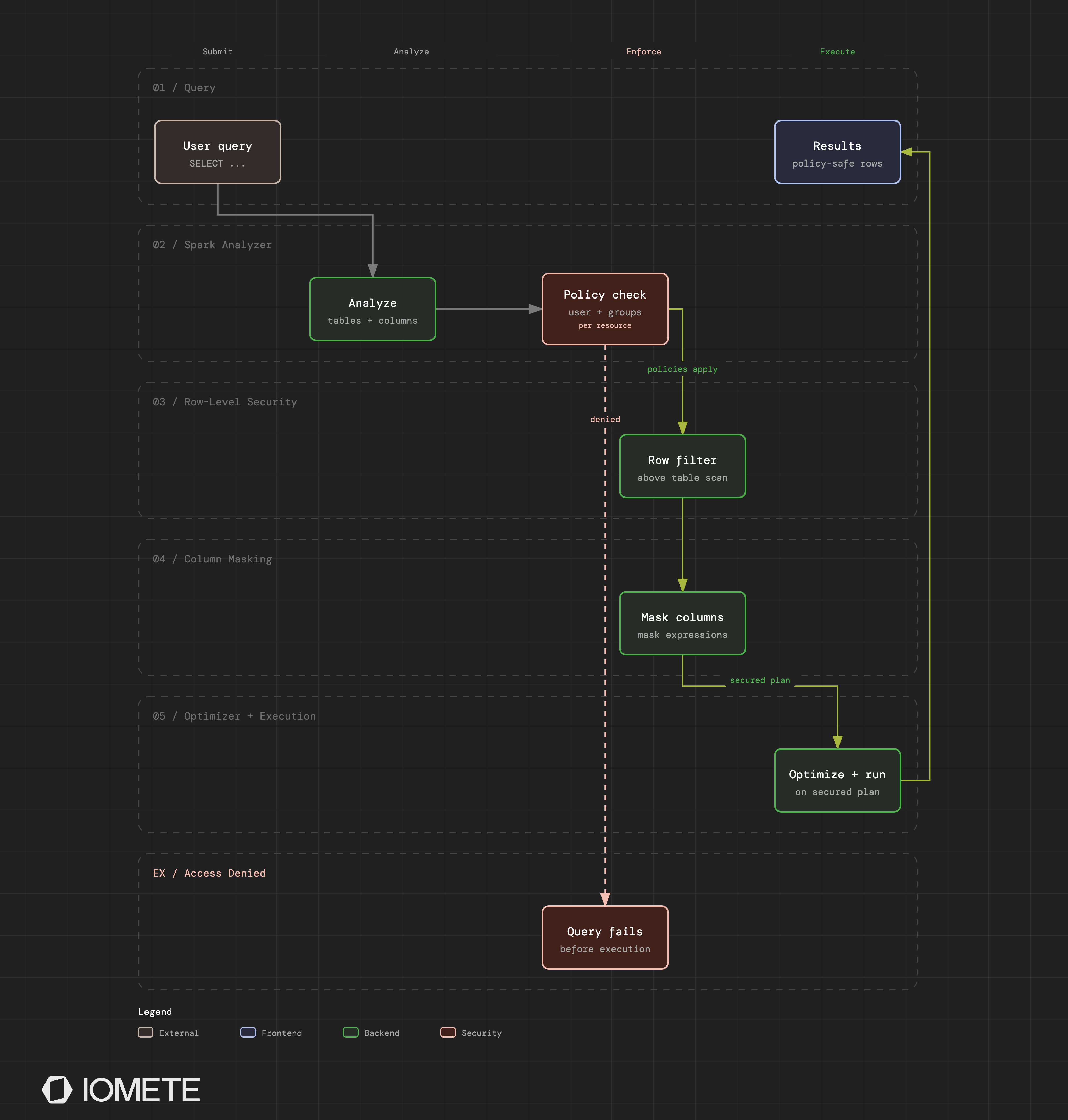
Because the rewrite happens at the plan level, enforcement is invisible to the user. Queries run normally and return normal-looking results. The engine guarantees that the results contain only what the policy allows.
Rewriting the plan, rather than the data, buys you three guarantees:
The stored data never changes. Masking is applied to query output, not to the Iceberg tables underneath. You can apply a policy to a ten-year-old table instantly, change the masking function next week, or remove it entirely. No data rewrites, no de-identified copies to maintain, no drift between the "real" table and the "safe" one.
Every access path is covered by the same code path. SQL Editor queries, scheduled jobs, PySpark and Scala DataFrame code, JDBC connections, and Spark Connect clients all resolve queries through the same analysis phase. There is no separate enforcement implementation per interface, which means there is no interface that was forgotten.
Policies can't be optimized away. The masking expressions and row filters become part of the logical plan before the optimizer runs. Predicate pushdown, projection pruning, and other optimizations operate on the already-secured plan.
Data Masking: From Redaction to Custom SQL
IOMETE ships eight masking options, covering the transformations that PII, PCI, and PHI requirements ask for most often:
| Mask type | Behavior | Typical use |
|---|---|---|
| Mask | Replace letters with x, digits with n | General redaction |
| Show Last 4 | Reveal only the final four characters | Phone numbers, card PANs |
| Show First 4 | Reveal only the first four characters | Account prefixes, routing codes |
| Hash | Replace the value with a one-way hash | Pseudonymization |
| Null | Return NULL | Full suppression |
| Date: Show Year | Keep the year, default month/day to 01/01 | Birth dates under HIPAA |
| None | Pass through unmodified | Exempting privileged groups |
| Custom | Any SQL expression | Everything else |
Two of these deserve a closer look.
Hash masking is deterministic. The same input always produces the same masked output. That sounds like a detail, but it's what keeps analytics workflows alive: a pseudonymized customer ID still joins correctly across tables, still groups correctly in aggregations, and still deduplicates, all without ever exposing the underlying identifier.
Custom masking is full SQL. When the built-in types don't fit, you write the expression yourself, using {col} to reference the target column:
-- Keep the first and last four digits of a card number
substr({col}, 1, 4) || '-XXXX-XXXX-' || substr({col}, -4)

-- Replace all digits
regexp_replace({col}, '[0-9]', 'X')
Custom masks can also carry a condition expression: a WHERE-style predicate that controls when the mask applies. Mask only non-null values, mask only records from certain countries, mask only values matching a pattern. The engine compiles this into a conditional expression in the plan, so a single policy can express "mask this column, but only for these rows."
Policies target specific users and groups, and conditions are evaluated in order, so the same column can be fully visible to a compliance team, hash-masked for analysts, and nulled for everyone else, all within one policy. The dynamic {USER} principal lets a policy reference the current user without hardcoding names.
You can create users and groups directly in IOMETE, or sync them from your identity provider over LDAP or SCIM. Either way, a group like phi_analysts, whether it lives in Active Directory or an IdP like Okta, can drive a masking policy directly, with no parallel user list to maintain.
Row-Level Security: One Table, Many Views of It
You can use row-level filter policies to restrict which rows a user can see using plain SQL predicates. There is no proprietary policy language to learn: a filter is a WHERE clause.
The canonical example is regional data isolation. A customers table serves teams in several countries, and each team should see only its own market:
- Users in the
us_employeesgroup get the filtercountry = 'US'. - Users in
uk_employeesgetcountry = 'UK'. - The compliance group gets no filter and sees everything.
Each user queries the same table with the same SQL, SELECT * FROM customers, and each gets a different, policy-defined slice. No views to maintain per region, no table copies per team, no application logic deciding who gets what.
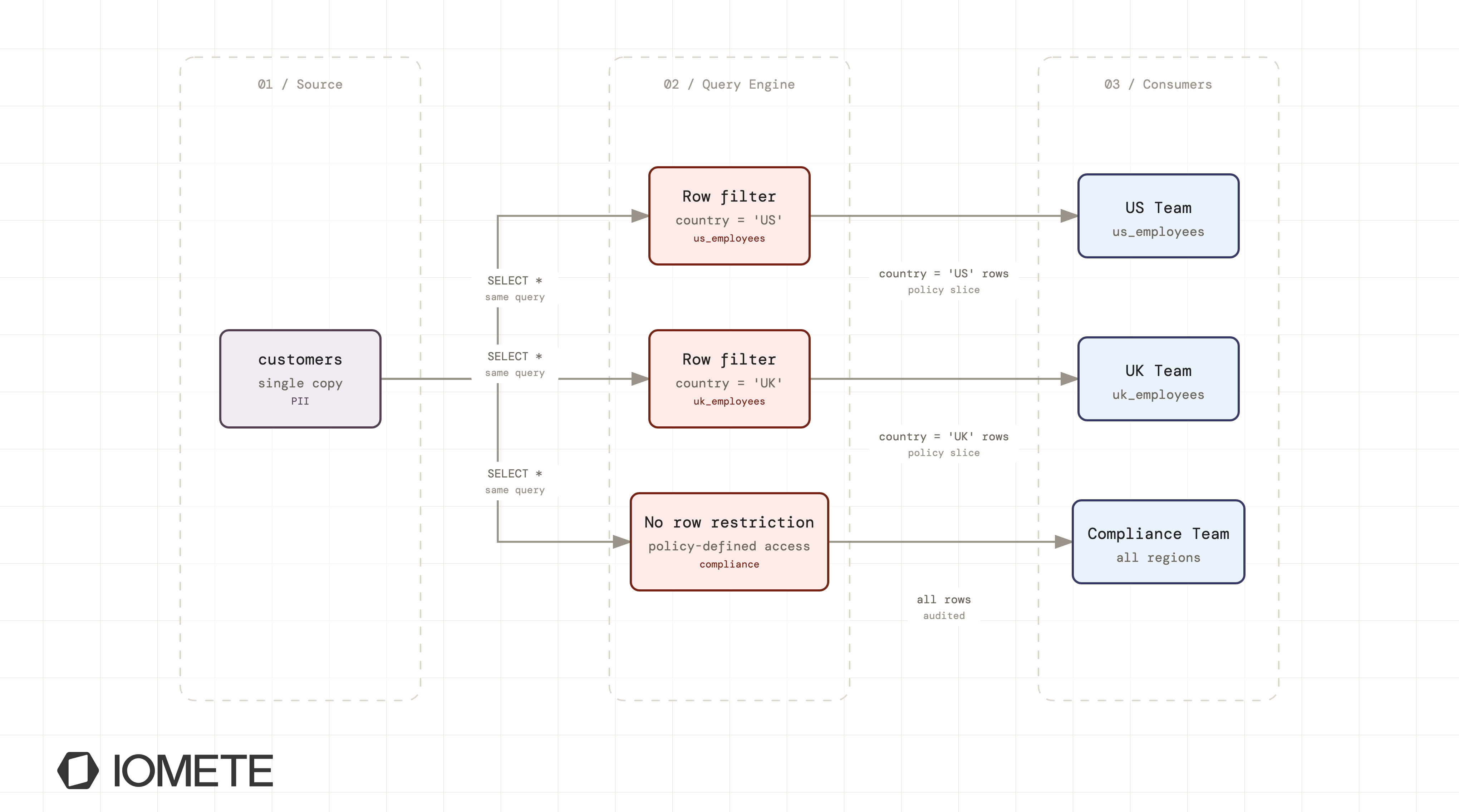
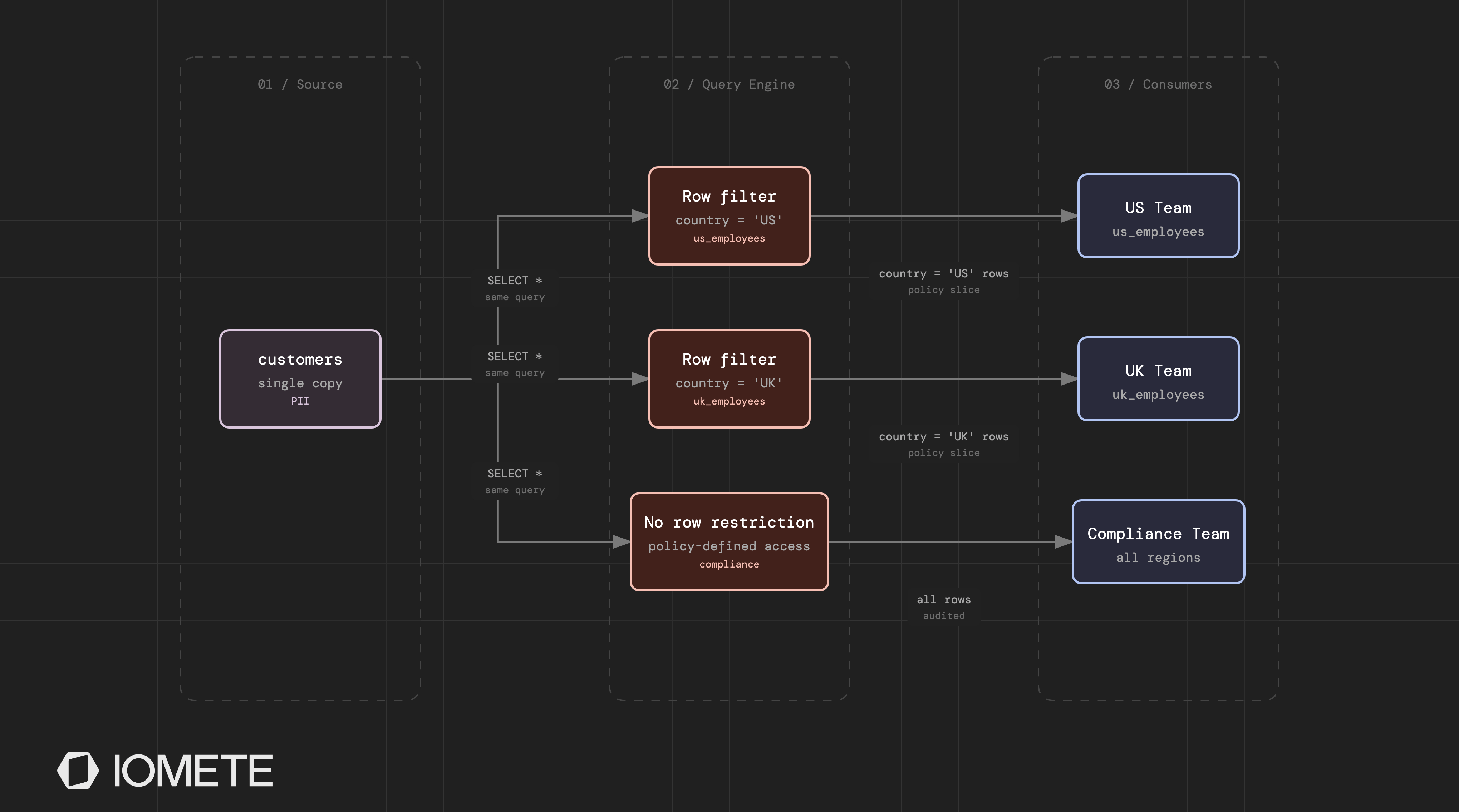
Because the predicate is injected at the table scan, it composes with anything the user builds on top. A JOIN against a filtered table joins only permitted rows. An aggregate over a filtered table counts only permitted rows. A notebook exporting to a file exports only permitted rows. Filters can even contain subqueries, such as region IN (SELECT region FROM user_regions WHERE user = current_user()), enabling entitlement-table patterns where row access is driven by data rather than by policy count.
Like masking conditions, row-filter conditions are evaluated in the order they appear in the policy, and policies support validity periods for time-boxed access, useful for audits, contractors, and temporary investigations that should expire on their own.
Why Enforcement Location Is the Real Security Question
When you evaluate a platform, producing a demo where a masked column shows xxx-xxxx is easy. The harder questions are about coverage:
Does it apply to non-SQL access? If masking is implemented in a SQL gateway or BI integration, DataFrame code and direct engine access bypass it. In IOMETE, a PySpark job reading a PHI-tagged table gets exactly the same masked output as a dashboard query, because both pass through the same plan-rewrite step.
Does it survive derived data? A masked column referenced in a subquery, aliased in a CTE, or carried through a join should stay masked. Plan-level rewriting propagates the mask through all of these, because the rewrite replaces the column at its source rather than patching the final projection.
Can a privileged-looking path skip it? With engine-level enforcement, the policy check is part of query compilation. There is no "raw" mode to fall into, and no secondary engine reading the same tables without the same rules.
What about column access outright? Masking shows a transformed value to users who may query the column. For users who shouldn't see the column at all, even masked, IOMETE's access policies deny column reads entirely, and the query fails with an access error before execution. Masking and access control are separate tools; regulated deployments typically use both.
The Policy Lifecycle: Central Control, Fast Propagation, Full Audit
You manage policies centrally in the IOMETE console under Data Security or programmatically through the Data Security REST API. IOMETE stores them in the platform's control plane. The policy model is built on Apache Ranger's proven framework (see our deeper look at Apache Ranger and data security), fully integrated into IOMETE: there is no separate Ranger installation to deploy, operate, or upgrade.
Running compute clusters synchronize policies on a short interval, so a new or updated policy takes effect across the platform in seconds, without restarting anything. Revoking access is as immediate as granting it.
Every policy change is audit-logged, and every enforcement decision (which user, which resource, which policy applied) is recorded at query time. For compliance teams, this closes the loop: you can show not only that a control exists, but that it fired on real queries.
These records are written to the data_access_audit system table, where compliance teams can investigate access patterns using standard SQL. They can also be exported to SIEM platforms, allowing existing security-monitoring and anomaly-detection rules to identify unusual access to sensitive data such as PII or PHI. Because the audit history is stored as an Iceberg table, the same retention and lifecycle policies used for your data can be applied to it as well.
For teams governing large estates, resource-based policies (this catalog, this table, this column) are complemented by tag-based policies: apply a classification tag like PII or PHI to a column in the data catalog, and a tag-based masking policy covers it automatically, including columns created next quarter. We covered that model in depth in Column-Level Data Masking at Scale.
All of It Inside Your Infrastructure
You deploy IOMETE into your own Kubernetes environment, on-premises or in your cloud account. The policy store, the enforcement engine, and the audit logs all live inside your perimeter. No query, no policy decision, and no access record crosses to a vendor control plane.
For organizations under GDPR, HIPAA, or DORA, this simplifies the story considerably. The technical controls for sensitive data (dynamic masking, row-level security, column denial, audit trails) run where the data runs, and the evidence a regulator asks for is generated inside infrastructure you already govern.
Getting Started
You can create a masking or row-filter policy in a few minutes:
- In the console, go to Data Security and choose Masking or Row Level Filter.
- Pick the catalog, database, table, and (for masking) column.
- Add a condition: select the groups or users, then choose a mask type or enter a filter expression.
- Save. The policy is live on running clusters in seconds, with no restarts and no data rewrites.
Run the same query as two different users and watch the results diverge. That's the whole point: one copy of the data, one engine, and policy-defined truth for every principal.
If you're evaluating how runtime enforcement fits your PII/PHI requirements, get in touch and we'll walk through every path your users take to sensitive data and how engine-level enforcement covers each one.