Multi-Cluster Setup
Overview
Starting from version 3.16.x, IOMETE supports multi-cluster deployments. This allows multiple IOMETE instances — each running in its own Kubernetes cluster — to share a set of common resources through a shared global database.
This is useful when you have IOMETE deployed across multiple data centers or environments and want certain resources (like users, catalogs, and domains) to stay in sync without manually duplicating them.
This implementation does not provide a unified control plane or a single view across instances. Each IOMETE instance is still operated and maintained independently. A true single control plane architecture is planned for a future release. See Roadmap below.
Deployment Models
IOMETE can be deployed in three ways depending on your scale and requirements.
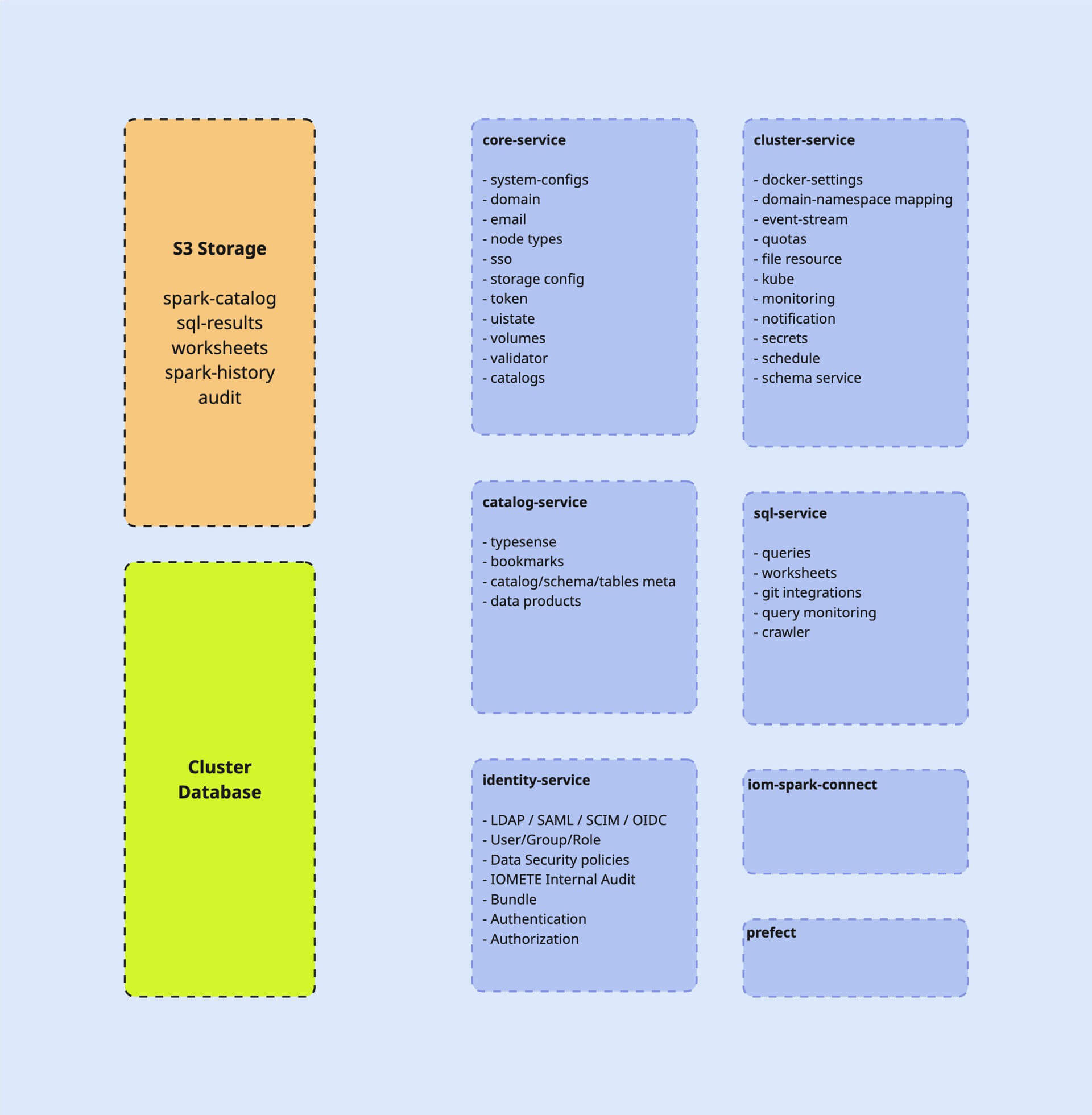
Single Installation
The simplest setup: one IOMETE instance, one Kubernetes cluster, one database. The clusterDatabase is not configured, so IOMETE uses the same database for both global and cluster-scoped data.
This is the default and requires no additional configuration.
Multiple Independent Installations
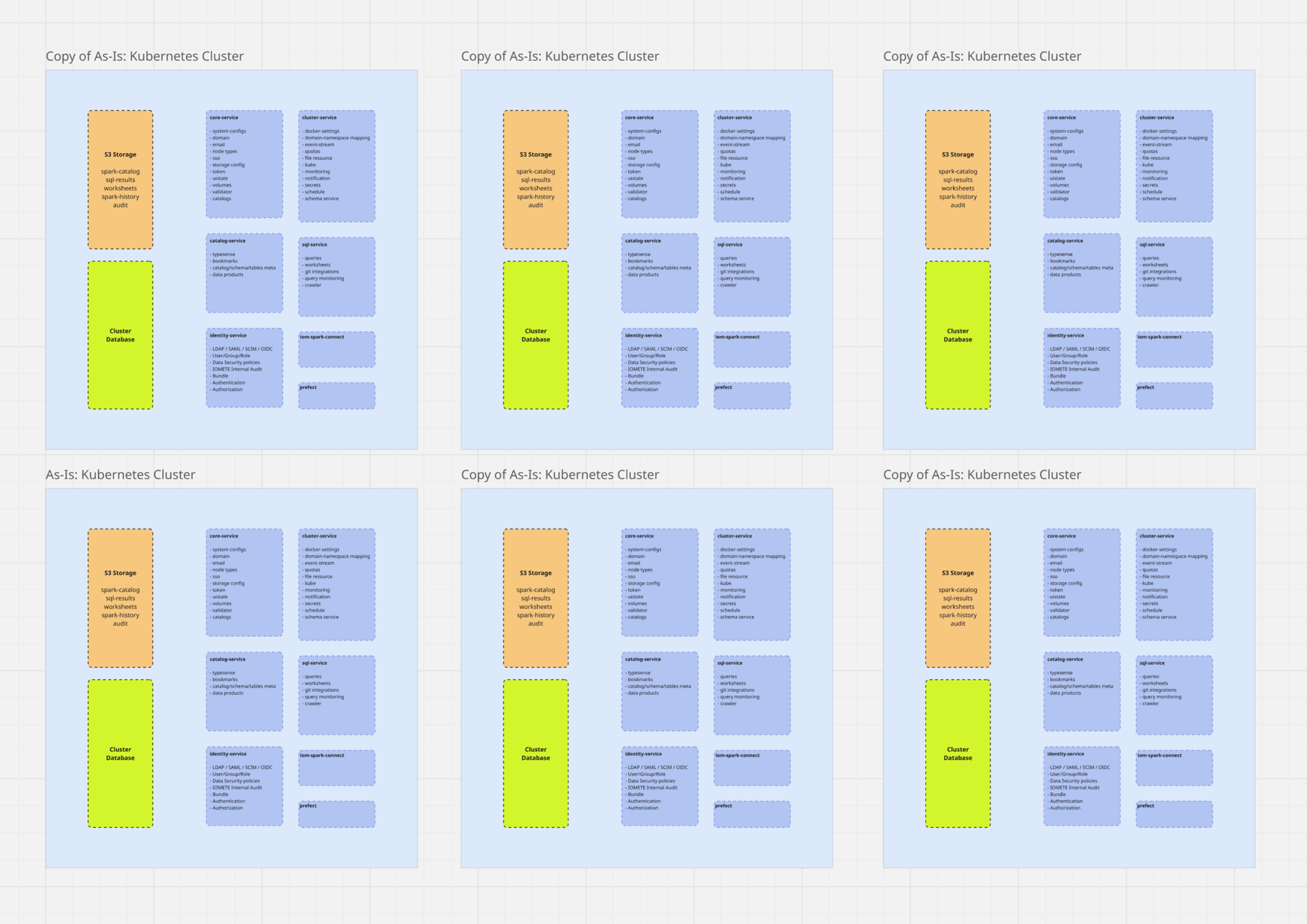
As teams and environments grow, you may run many separate IOMETE instances — each fully independent, with its own database, its own users, and its own workloads. There is no shared state between them.
This is common when different business units, regions, or environments (dev, staging, production) each need their own isolated IOMETE deployment. Each instance is managed separately, and there is no synchronization between them.
Multi-Cluster Setup (Shared Global Database)
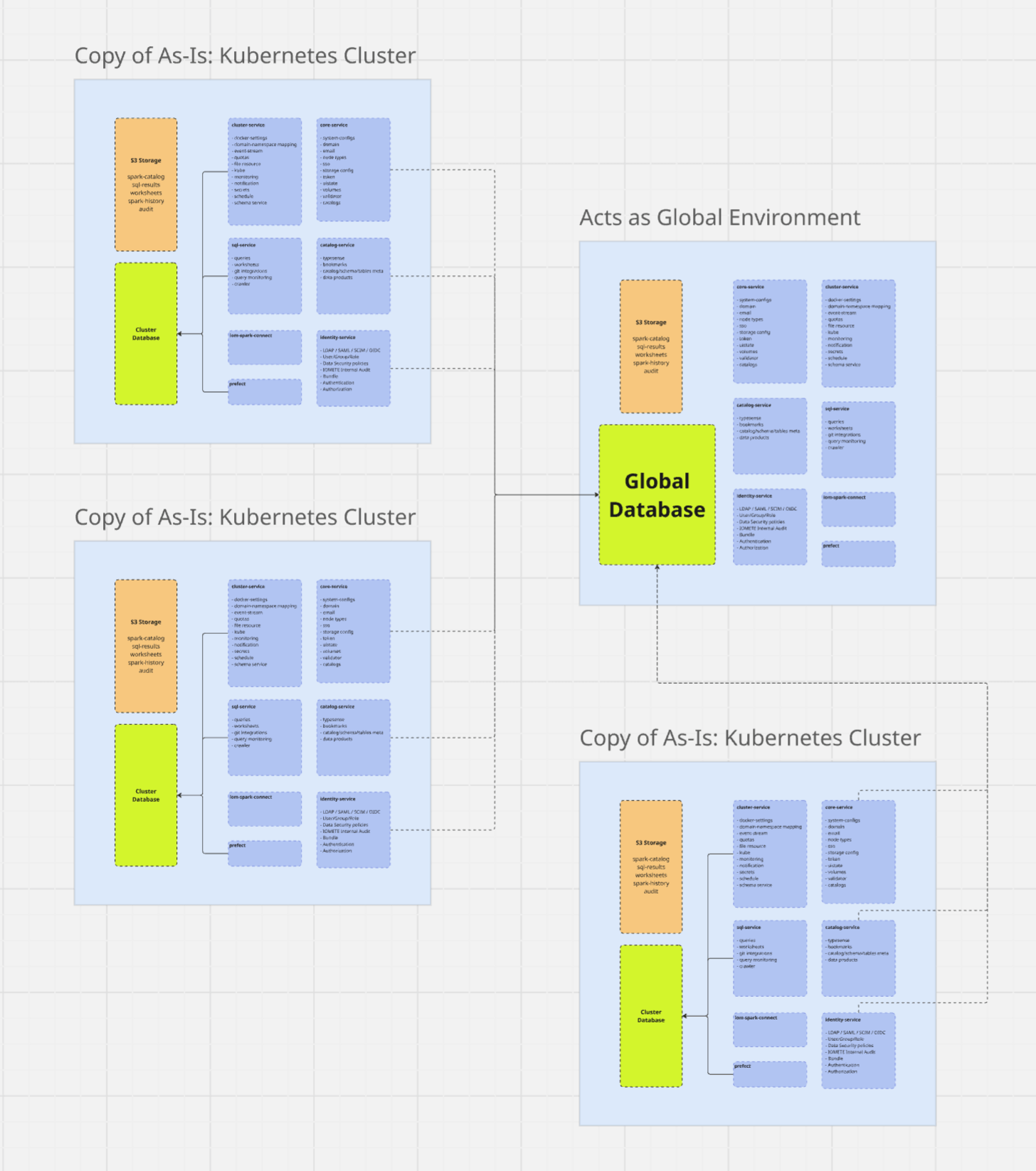
When you need certain resources — users, catalogs, domains — to be consistent across multiple instances, you configure a shared global database. Each instance still runs independently and has its own cluster-local database for Kubernetes and Spark workloads, but all instances read from and write to the same global database for shared resources.
Example: Instance A (data center A) and Instance B (data center B) both point to the same global database. A user created in Instance A is immediately visible in Instance B. Each instance still manages its own Spark jobs and clusters locally.
This is what the clusterDatabase configuration enables. When provided, IOMETE routes cluster-specific, high-volume operations to the local database and uses the global database only for shared resources.
How It Works
Each IOMETE instance uses two databases:
- Global database (
database) — shared across all instances. Stores resources that are common across the fleet, such as users, catalogs, and domains. This is always required. - Cluster database (
clusterDatabase) — local to each instance. Stores Kubernetes and Spark-related data specific to that installation, such as clusters, jobs, and workloads.
When clusterDatabase is not configured, IOMETE treats the deployment as a single-instance setup and uses the same database for both global and cluster-scoped data.
When clusterDatabase is configured, the global database is shared with other instances while high-volume cluster-specific operations are offloaded to the local database.
Global vs. Cluster Resources
The tables below list which databases and services are global (shared across all instances) and which are cluster-local (specific to each instance).
Databases
| Database | Scope | Notes |
|---|---|---|
iomete_catalog_db | Global | |
iomete_core_db | Both | Tables are split — some in global, some in cluster-local |
iomete_iam_db | Global | |
iomete_iceberg_db | Global | |
iomete_metastore_db | Global | |
iomete_prefect_db | Cluster-local | |
iomete_sql_db | Cluster-local |
Services
| Service | Database Scope | Notes |
|---|---|---|
iom-catalog | Global | |
iom-cluster | Cluster-local | |
iom-core | Global | |
data-plane-init | Both | Initializes both global and cluster-local databases |
iom-identity | Global | |
iom-rest-catalog | Global | |
iom-sql | Cluster-local | |
prefect-server + prefect-worker | Cluster-local | |
metastore | Global |
Configuration
Single Instance (Default)
No changes needed. When clusterDatabase is omitted, both the global and cluster-scoped data go into the same database.
database:
  type: postgresql
  host: "postgresql"
  port: "5432"
  user: "iomete_user"
  password: "iomete_pass"
  prefix: "iomete_"
Multi-Cluster Setup
Add the clusterDatabase section alongside the main database block. The database section becomes the shared global database; clusterDatabase is the instance-local database.
# Global database — shared across all IOMETE instances.
# Stores users, catalogs, domains, and other cross-instance resources.
database:
  type: postgresql
  host: "postgresql-global.shared.internal"
  port: "5432"
  user: "iomete_user"
  password: "iomete_pass"
  prefix: "iomete_"
  adminCredentials:
    user: "postgres"
    password: "password"
  ssl:
    enabled: false
    mode: "disable"

# Cluster-local database — specific to this IOMETE instance.
# Stores Kubernetes and Spark operational data for this control plane.
# Offloads high-volume operations from the global database.
clusterDatabase:
  type: postgresql
  host: "postgresql-local.datacenter-a.internal"
  port: "5432"
  user: "iomete_user"
  password: "iomete_pass"
  prefix: "iomete_cluster_"
  adminCredentials:
    user: "postgres"
    password: "password"
  ssl:
    enabled: false
    mode: "disable"
Repeat this on every IOMETE instance, each with its own clusterDatabase host, all pointing to the same database (global) host.
The global database must be reachable from every participating Kubernetes cluster. Verify firewall rules and network policies allow connectivity from each cluster to the global database host before deployment.
Applying the Configuration
helm upgrade --install -n iomete-system data-plane \
  iomete/iomete-data-plane-enterprise \
  -f data-plane-values.yaml
Run this on each instance after updating its values file.
Behavior and Expectations
- Changes to global resources (users, catalogs, domains) on any instance are immediately visible on all connected instances.
- Each instance has its own UI and access endpoint. There is no aggregated view across instances.
- Instances can be upgraded independently, as long as all connected instances remain compatible with the global database schema.
- If the global database becomes unavailable, operations that depend on global resources will be affected across all instances.
Roadmap
The current multi-cluster implementation is a first step. In upcoming releases, IOMETE plans to introduce a single control plane architecture:
- One main control plane managing configuration and global state.
- Multiple lightweight data planes (B, C, …) running in separate environments with a reduced set of services.
- A unified view across all data planes from the control plane UI.
This will replace the shared-database approach with a proper distributed control model.