Scaling Machine Learning: From Your Laptop to the IOMETE Lakehouse

We’ve all been there: You write a scikit-learn script on your laptop, it works beautifully on a sample of data, and then - BAM - you try to run it on the full dataset and see the dreaded out of memory error.
In this guide, we’ll explore how to move your Machine Learning (ML) workloads from a single-node environment to a Distributed Spark Cluster using IOMETE. We'll also be honest about the "Spark Tax" and when it’s actually worth paying. All codes referenced below are publicly available at IOMETE ML Quickstart Repo.
📊 The Experiment: Synthetic Data at Scale
To demo the power of ML training on IOMETE, we generate synthetic data including three feature columns (x’s below) using a random uniform distribution, and a "Target" (the label we want to predict) using a non-linear mathematical function:

(Where epsilon is random Gaussian noise to make the target a little bit stochastic)
Here is a code snippet:
def generate_spark_data(spark, rows=10_000_000):
    print(f"Generating {rows} rows across the cluster...")

    # 1. Create an empty DataFrame with the desired number of rows
    # Spark distributes these rows across all workers immediately
    df = spark.range(0, rows)

    # 2. Use Spark SQL functions to generate random data in parallel
    df = df.withColumn("feature_col1", F.rand() * 100) \
           .withColumn("feature_col2", F.rand() * 100) \
           .withColumn("feature_col3", F.rand() * 100) \
           .withColumn("noise", F.randn() * 30)

    # 3. Apply your formula (y = 2x1 + 3x2^2 - sqrt(x3) + noise)
    # This calculation happens on the workers, not the driver!
    df = df.withColumn("target_col",
        (F.col("feature_col1") * 2) +
        (F.pow(F.col("feature_col2"), 2) * 3) -
        (F.sqrt(F.col("feature_col3"))) +
        F.col("noise")
    )

    # Drop the helper 'id' and 'noise' columns as we don't need them for ML training
    df = df.drop("id", "noise")
    return df
The Portable Path: You can choose to generate this on the fly or generate separately, upload to your S3 bucket and read it directly from there. A test data is also provided here: https://github.com/iomete/iomete-ml-quickstart/tree/main/test_data
⚖️ The Big Trade-off: When should you use Spark?
Before we dive into the code, let’s talk about the elephant in the room: Spark isn't always faster for small data.
⚖️ The "Spark Tax": Understanding the Overhead
Think of starting a Spark cluster like launching a commercial flight. Even if the flight itself is short, you still have to go through security, board the passengers, and taxi to the runway. On IOMETE, we’ve made this "boarding process" as smooth as possible, but in the world of distributed computing, there is always a baseline "tax" to pay.
Why does it take a moment to start?
- Pod Startup Latency: Kubernetes has to pull your Docker image and "spin up" the containers.
- JVM Initialization: Spark runs on the Java Virtual Machine. Each worker (Executor) needs a few seconds to wake up its JVM and say "I'm ready!" to the Driver.
- K8s API Handshake: The Spark Driver and the Kubernetes API have a quick conversation to coordinate exactly where those worker pods should live.
- The Game Plan (DAG): Spark doesn't just "do" math; it builds a Directed Acyclic Graph (DAG) - a complex map of how to split your data and serialize the tasks to the workers/executors.
📈 Finding Your "Crossover Point"
Is Spark always faster? Not necessarily. It depends on the size of the mountain you’re trying to move.
1. Small Data (< 1M rows): The "Laptop Sprint"
If your data fits easily in your laptop's RAM, a simple Python script will likely beat Spark. Why? Because your laptop doesn't have to "talk" to a network or wait for pods to start. It just does the math. At this scale, the "Spark Tax" is more expensive than the work itself.
2. Medium Data (1M - 10M rows): The "Crossover Point"
This is where things get interesting. You’ll notice Spark takes a bit longer to get started, but once it’s moving, it’s incredibly efficient. This is the sweet spot where you stop worrying about your laptop fan spinning like a jet engine and start enjoying the stability of the IOMETE.
3. Large Data (> 100M rows): The "Spark Victory"
This is where Spark truly wins. While a single-node Python script will hit the "Memory Ceiling" and crash (OOM), Spark simply spreads the load. It breaks that 100-million-row giant into bite-sized chunks and processes them in parallel across the cluster.
The Bottom Line
We use Spark not just for speed, but for reliability. Even if a job takes a few minutes longer to "warm up" on a medium dataset, you have the peace of mind knowing it will never crash due to memory limits, a guarantee your laptop simply can't make.
Performance Comparison
Here are some tests we run using the code in the repo.
| Dataset Size | Single-Node (10 CPU / 24GB RAM) | IOMETE Cluster (20 Executors) 2 CPU/ 8GB RAM per Executor |
|---|---|---|
| 1 Million Rows | ⚡ ~27 seconds | 🐢 ~2.8 mins (Overhead) |
| 10 Million Rows | ❌ CRASH (OOM) | ✅ ~8.8 mins (Steady) |
| 100 Million Rows | 💀 Impossible | Pending |
🚀 Running the Job on IOMETE
We've made deployment as simple as possible. The repository includes a pre-configured job.py that you can submit via the IOMETE console.
Two Ways to Deploy
See details in the IOMETE Developer Guide on how to submit a Spark job. Running ML training process is just submitting another Spark job. Note that here you have two options for "Main application file":
-
The Container Way: Set it to
local:///app/job.py. The code is "baked" into your Docker image.# Dockerfile...COPY job.py /app/job.py... -
The S3 Way: Upload
job.pyto your bucket and set the path tos3a://<your-bucket>/job.py. This way Dockerfile is independent ofjob.py.
📈 Real-Time Monitoring: The 10 Million Row Test
What does it actually look like when model is training? We ran the 10 Million Row test and captured the heartbeat of the training process.
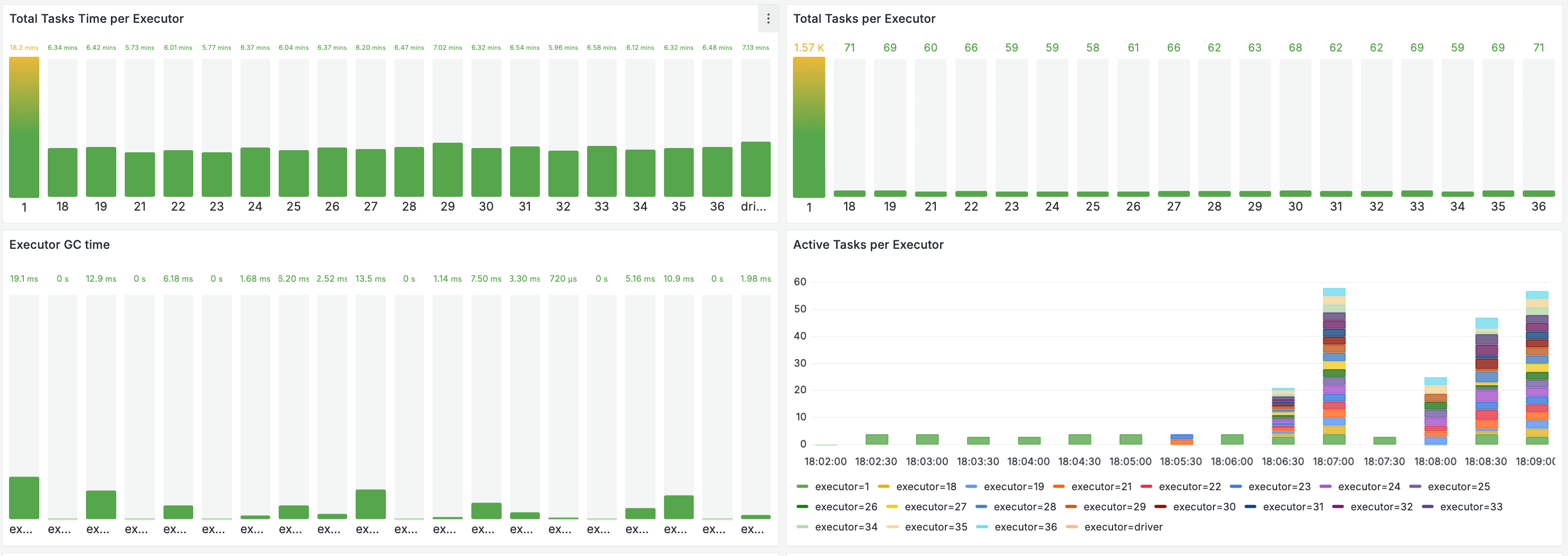
1. Resource Utilization
When the training starts, you'll see a massive spike in CPU and Memory across all executors. Unlike a local run where one CPU hits 100% and stays there, Spark orchestrates the load across the entire cluster.
2. Parallel Execution
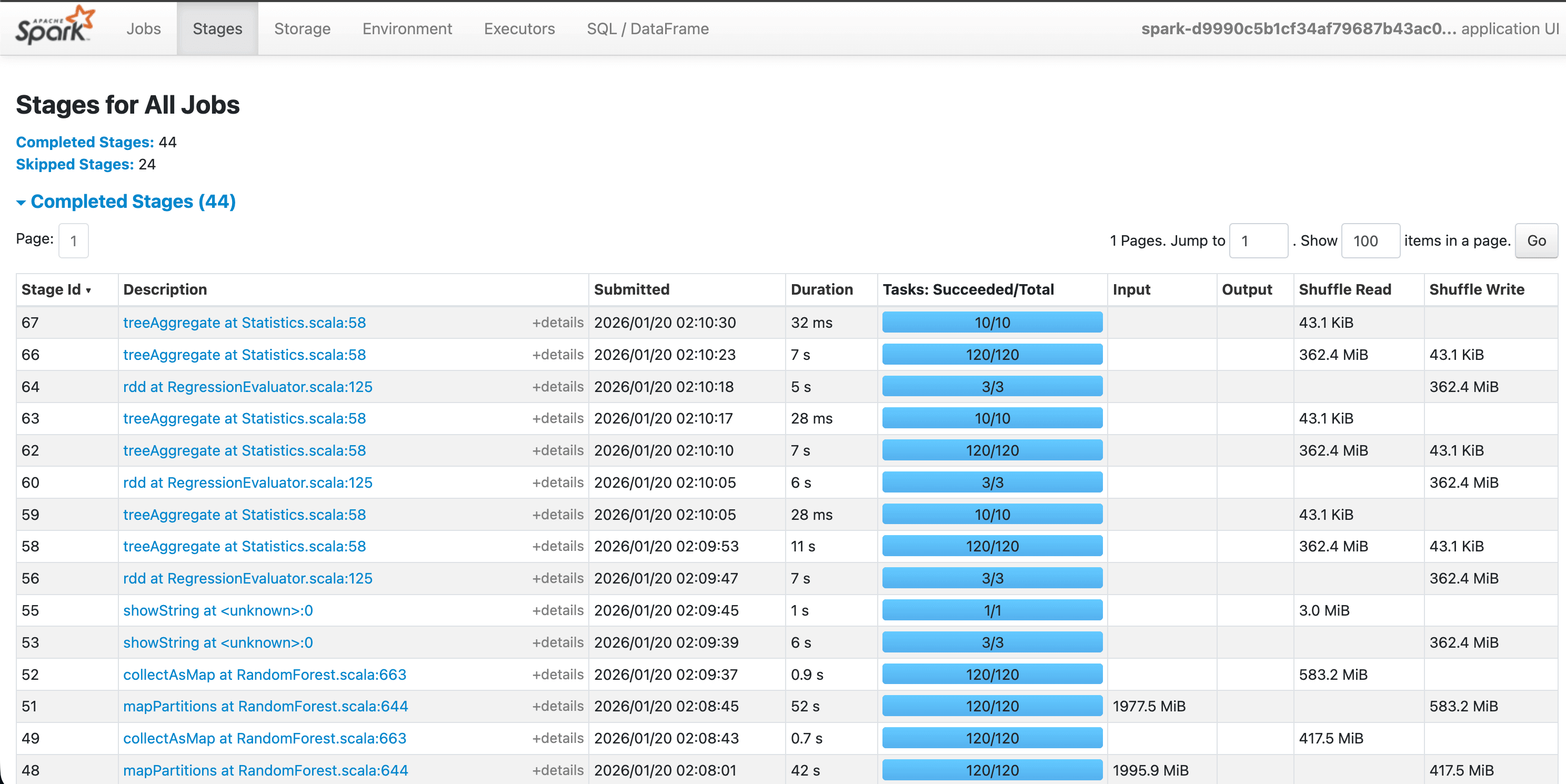
In the Spark UI, you can see the "Stages" of the job. Notice how the data is split into many small tasks. If one worker finishes early, it immediately grabs another task, ensuring no CPU time is wasted.
3. Distributed Training Metrics
Once finished, the logs will print various cost/loss metrics. Because Spark's RandomForestRegressor is distributed, it aggregates the "wisdom" of hundreds of trees built on different executors to give you one final, highly accurate model.

🏗️ Project Structure & Next Steps
| File | Description |
|---|---|
job.py | The ML Core. SparkSession logic and Random Forest training. |
Dockerfile | IOMETE base python image with additional python packages |
Makefile | One-command utilities to build and push your images. |
Ready to Scale?
- Clone the IOMETE ML Quickstart Repo.
- Follow the IOMETE Developer Guide to submit your first job.
- Watch the Spark UI, and witness the power of distributed ML!