Modern Secrets Management for Data Platforms


Data platforms accumulate credentials fast. Database passwords, API keys, cloud storage access keys, and service account tokens all end up in Spark job configs, notebooks, storage connections, and integration endpoints. Every credential pasted into a config file or a UI form is an exposure you'll eventually have to track down.
The failure mode is always the same. The same AWS key lives in a Spark job config, three notebooks, and a storage connection. When that key needs rotation, someone hunts through every config, every environment variable field, every integration, hoping they don't miss one. Compliance audits flag the plaintext secrets sitting in the database. There's no central inventory, no audit trail, no obvious fix.
IOMETE's secrets management addresses this by centralizing credentials into a single catalog that every component (Spark jobs, notebooks, storage configs, integrations) references at runtime. Credentials are stored once, referenced by key, and rotated in one place.
References instead of values
The key design choice: configurations never hold actual secret values. They store a key name and a source indicator. When a Spark job starts, a notebook launches, or a storage connection is tested, the platform resolves the reference: fetches the real value from the backend and injects it into the runtime environment. That value exists only in memory for the duration of the workload. It never gets persisted to the database, never shows up in logs, never comes back through an API response.
| Traditional approach | IOMETE secrets management | |
|---|---|---|
| Secret storage | Hardcoded in configs, notebooks, database columns | Stored once in a domain or global catalog (Vault or IOMETE-managed) |
| Rotation | Update every workload manually and hope nothing is missed | Update one entry, redeploy on your schedule |
| Cross-team isolation | Manual trust and naming conventions | Enforced domain scopes backed by separate storage |
| Logs and debugging | Credential values leak into logs and error output | Only references stored; values masked by Spark's redaction regex |
| Audit | No centralized view of which credentials exist or who uses them | Per-domain dashboard with last-modified timestamps |
| Backend flexibility | Tied to one storage mechanism | Vault and IOMETE-managed side by side, per domain |
Scopes and isolation
Secrets live in two tiers.
Domain scopes hold team-specific credentials. The analytics team's S3 key lives in the analytics domain scope, isolated in its own backing store. The finance team, working in a different domain, cannot see it, list it, or reference it. This isn't a convention; it's enforced at the platform and storage level with separate backing per domain.
Global scopes hold credentials shared across the platform: SMTP servers, shared data lake keys, centralized logging endpoints. Any domain can reference global secrets, but only platform administrators can create or modify them. Domain users see them as read-only entries in the secret selector.
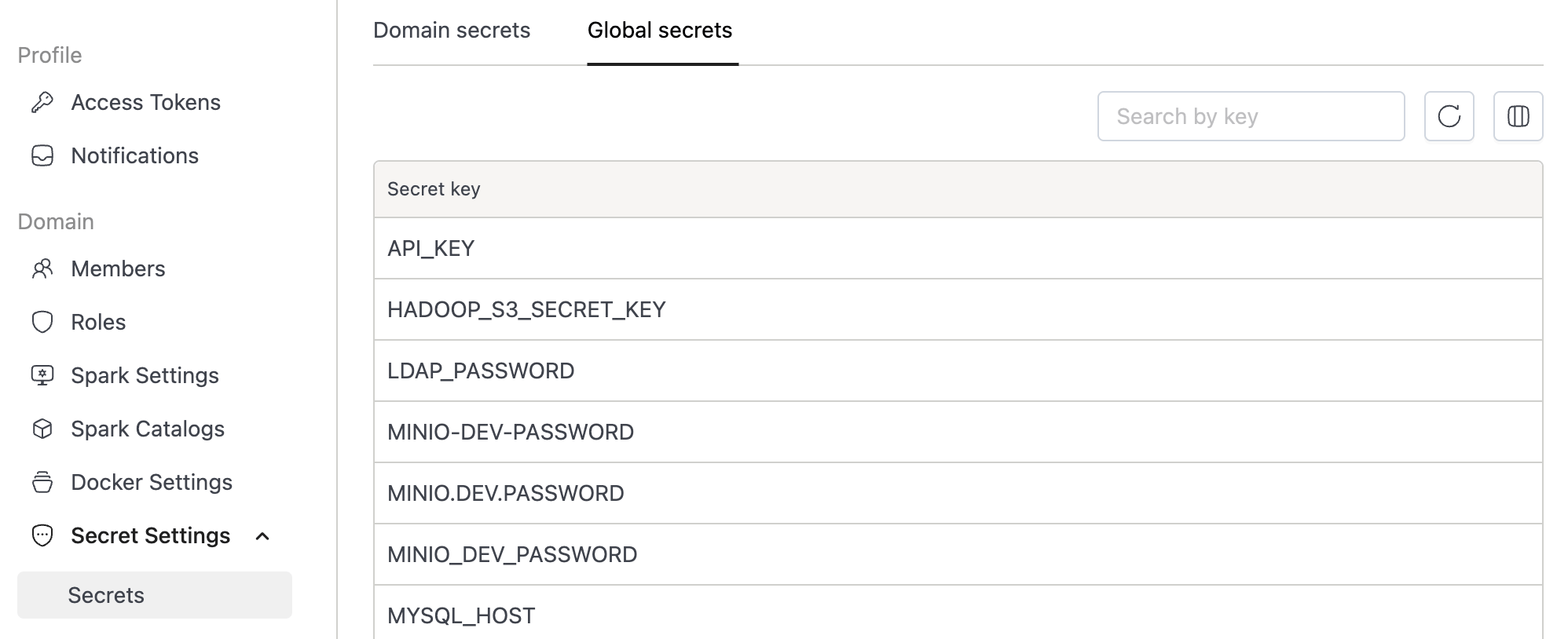
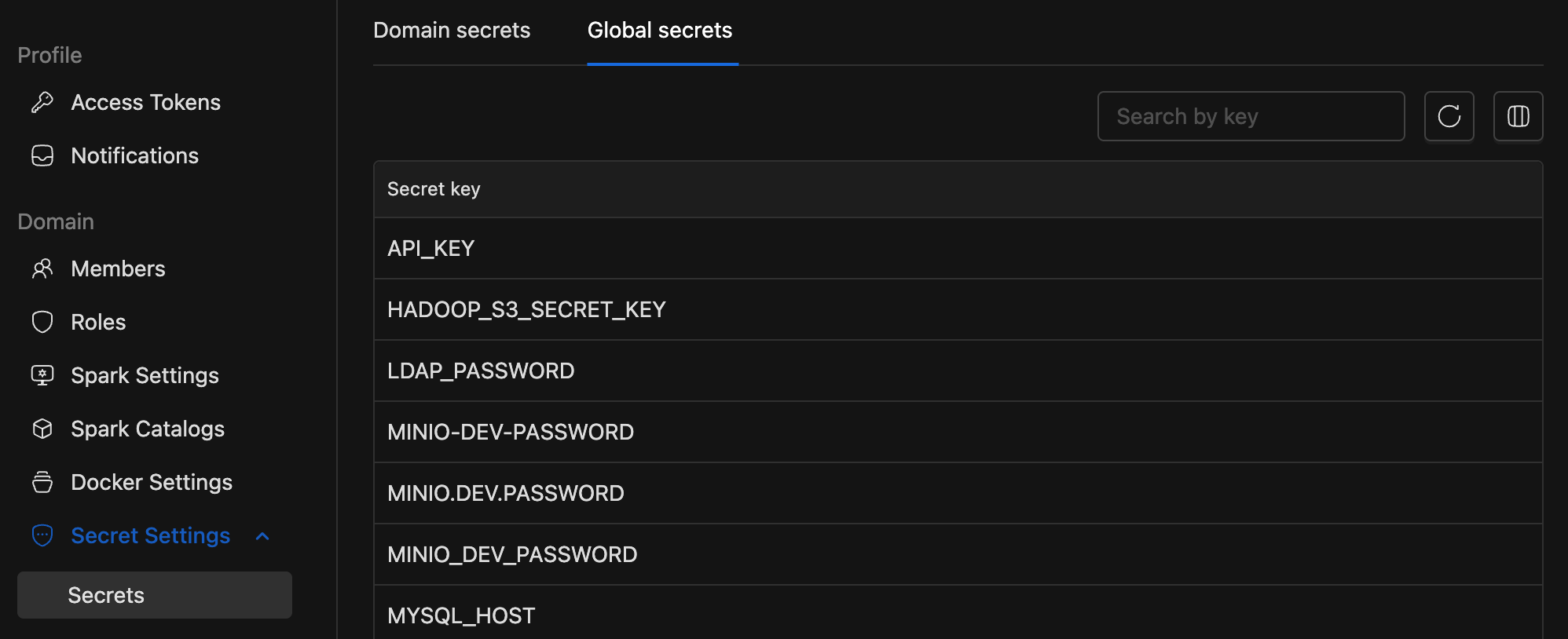
| Scope | Who manages | Who can reference |
|---|---|---|
| Domain | Domain admins and maintainers | Users within that domain only |
| Global | Platform administrators | All domains (read-only) |
Storage backends
Two options, usable independently or together.
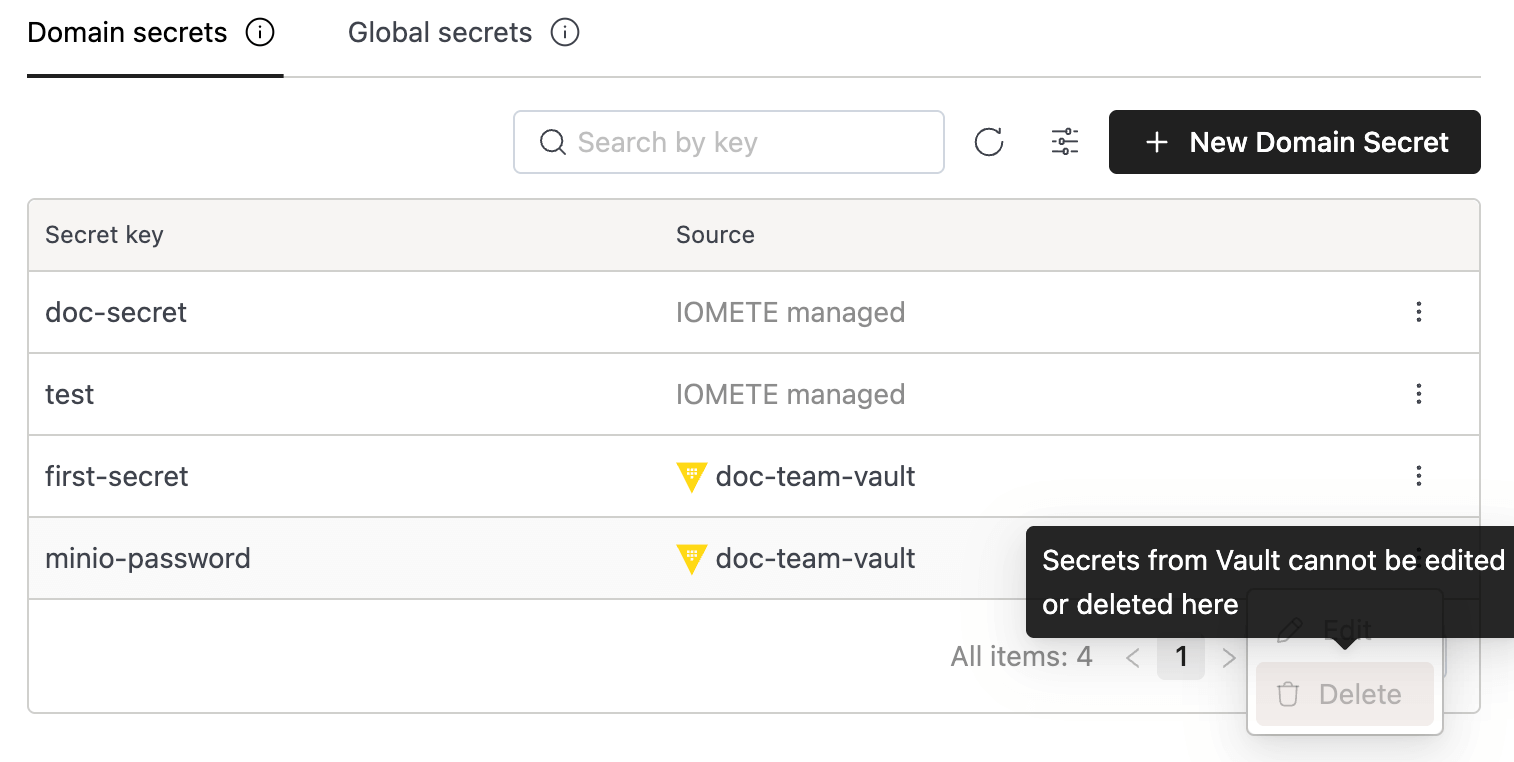
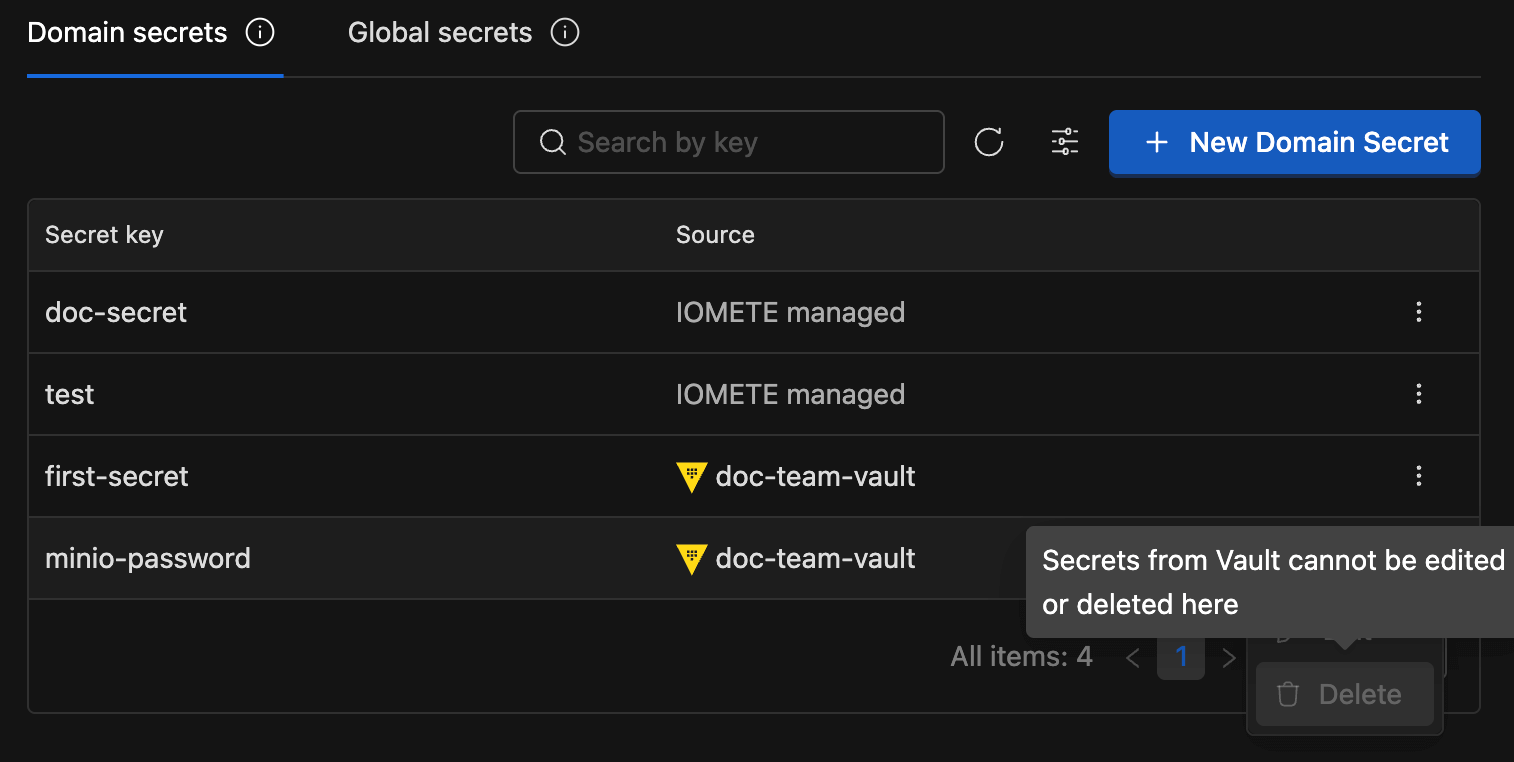
HashiCorp Vault is the natural fit for organizations that already operate a centralized secrets infrastructure. IOMETE integrates with Vault's KV Secrets Engine v2, supports both token and AppRole authentication, and maintains strictly read-only access. IOMETE never creates, modifies, or deletes anything in your Vault instance. Your existing policies, namespaces, rotation schedules, and audit logging remain fully in effect. Vault Enterprise namespaces are supported for multi-tenant setups. For enterprises with established security postures, this means IOMETE plugs into your existing secrets lifecycle rather than replacing it.
IOMETE-managed storage provides a built-in option for teams that don't need an external secrets manager or want a simpler path for non-production credentials. Secrets are managed through the IOMETE dashboard with encryption at rest handled by the underlying infrastructure. No external dependencies required.
Both backends surface through the same secret selector. When configuring a workload, the dropdown shows all available secrets: Vault entries tagged with the integration name, IOMETE-managed entries labeled accordingly. The person picking a secret doesn't need to care which backend it lives in.
Resolution and rotation
Secrets resolve at deployment time, not continuously. When a Spark job's driver pod starts, the platform contacts the relevant backend, retrieves the values, and injects them as environment variables or Spark configuration properties. Notebooks receive secrets when their container launches. Storage configs fetch credentials during connection tests.
The resolved values exist only in the runtime environment. Spark logs get an additional layer of protection via a built-in redaction regex that masks values matching patterns like secret, password, and token in log output.
Rotation follows an explicit pattern: update the secret value in the catalog (or in Vault directly), then redeploy affected workloads. The next deployment picks up the new value automatically. This is a deliberate trade-off: running jobs never break from an upstream credential rotation. You control when new values take effect.
Access control
Access to secrets is governed through IOMETE's Resource Authorization System (RAS), which layers platform-level controls on top of whatever policies your backend already enforces.
For Vault integrations, RAS provides granular control over who can even see that a connection exists:
| Permission | What it controls |
|---|---|
| View | See the Vault configuration details (endpoint, path) |
| Update | Modify the configuration (host, path, auth credentials) |
| Use | List and select Vault secrets in workload configurations |
Without Use permission on a Vault integration, its secrets don't show up in the selector, even if you know the key names. A team might have View to audit what's connected but need explicit Use granted before they can wire secrets into their jobs. This is in addition to whatever Vault policies govern the underlying paths.
For IOMETE-managed secrets, MANAGE_SECRETS and LIST_SECRETS permissions govern who can create, modify, delete, and view secrets within a domain. Cross-domain access doesn't exist; there's no API path for it.
Global secrets add another boundary: domain users can reference them, but creation and modification is restricted to platform administrators.
For creating, referencing, and rotating secrets (including Vault integration setup), see the secrets management documentation.
Best practices
Name secrets descriptively. A convention like {team}-{service}-{credential} scales well: finance-stripe-api-key, analytics-s3-secret-key. Six months from now, descriptive names save you from guessing what key-1 was for.
Default to domain scope. Global scope makes secrets available to every domain. Reserve it for credentials that genuinely need platform-wide sharing (shared SMTP, cross-domain data lake access). Everything else belongs in the owning team's domain.
Rotate on a schedule. For high-value credentials (database passwords, cloud access keys), establish a cadence (30 to 90 days depending on your compliance requirements). The single-update-then-redeploy workflow makes this practical.
Review inventory periodically. The secrets dashboard shows every key in a domain with last-modified timestamps. A quarterly pass catches stale credentials and forgotten test keys that should have been removed.
Use Vault for production, IOMETE-managed for the rest. If your organization already runs Vault, connect it for production and compliance-sensitive credentials. IOMETE respects your existing policies and audit trails. IOMETE-managed secrets can handle development or internal-only credentials where a lighter-weight path makes sense. Both backends work simultaneously within the same domain.
Known constraints
Worth being upfront about what the system doesn't do:
- Vault integration is read-only. IOMETE reads from your Vault but cannot write to, modify, or delete secrets. Secret lifecycle management (creation, rotation policies, expiration) stays with your existing Vault tooling and processes.
- Rotation requires redeployment. Workloads must restart to pick up new secret values. This is by design (it prevents running jobs from breaking mid-execution), but it means coordinating a maintenance window for sensitive rotations.
- Global secret management via UI is limited. Creation and editing of global secrets currently requires infrastructure tooling; dashboard support is planned.
- Size limits follow backend defaults. Vault's per-secret size limit depends on your storage backend configuration. For IOMETE-managed secrets, the underlying infrastructure enforces its own limits. Large artifacts like certificates or keystores are better stored in object storage, referenced by a smaller secret.
Beyond static credentials
Not every credential needs to be stored at all. For object storage access, IOMETE's Iceberg REST Catalog supports credential vending and remote signing, issuing short-lived, table-scoped tokens instead of requiring long-lived S3 or GCS keys in the secrets catalog. Fewer static credentials means fewer secrets to rotate, fewer to audit, and a smaller blast radius if something goes wrong.
Frequently Asked Questions
How are secret values protected from ending up in logs or metadata?
Configurations store only key references, never actual values. The platform resolves secrets at deployment time and injects them into the runtime environment only. They never reach the database, API responses, or control-plane logs.
Spark logs are additionally protected by a built-in redaction regex that masks values matching patterns like secret, password, and token. And since the dashboard enforces write-only secret values, there's no way to read them back after creation.
Can I use both Vault and IOMETE-managed backends at the same time?
Yes. Each domain can have one or more Vault integrations alongside IOMETE-managed secrets simultaneously. The secret selector shows entries from all backends, clearly labeled by source.
A common pattern in enterprise deployments: Vault for production and compliance-sensitive credentials (leveraging your existing audit trails and rotation policies), IOMETE-managed for development or internal-only secrets where a lighter-weight path is sufficient.
What happens to running Spark jobs when I rotate a secret?
Nothing. Running jobs keep the value they received at startup. Secrets resolve once at deployment time, not continuously. After updating a secret, redeploy affected workloads to pick up the change.
This avoids the failure mode where a credential rotation mid-flight causes unexpected job failures. You choose when the new value takes effect.
Does IOMETE write to or modify anything in my Vault?
No. The Vault integration is strictly read-only. IOMETE authenticates, lists keys, and reads values. Nothing more. Your existing Vault policies, namespaces, and audit logging stay fully under your control.
Can one domain access another domain's secrets?
No. Each domain's secrets live in a separate backing store. There is no API endpoint or UI flow that allows one domain to see, list, or reference another domain's secrets.
If teams need to share a credential, the right approach is to place it in global scope, where all domains can reference it as a read-only entry.
How does this relate to SOC 2, GDPR, or HIPAA compliance?
Several properties align with common compliance frameworks: secrets encrypted at rest (Kubernetes encryption layer or Vault's storage backend), access controlled per domain with RAS permissions, no plaintext credential storage alongside application data, and write-only values that prevent unauthorized reading.
For SOC 2, the centralized per-domain inventory and permission model provide documented access controls. For GDPR, domain isolation keeps credential access within team boundaries. Vault integration adds enterprise audit logging for regulated workloads. The exact compliance mapping depends on your deployment and policies, but these properties give you the building blocks.
What Vault authentication methods are supported?
Two methods: token-based and AppRole.
Token auth is the simpler option: provide a Vault token with read permissions on your configured path. AppRole is better for production environments: it uses role IDs and secret IDs for machine-to-machine authentication, avoiding long-lived tokens. IOMETE handles the login flow and caches resulting tokens briefly to reduce round-trips.