IOMETE and Wasabi: A Reference Architecture for a Self-Hosted Lakehouse

When you expand an on-premises lakehouse, storage requirements can vary by dataset. As you add capacity, your teams still need to query those datasets together and work under consistent access controls.
With IOMETE and Wasabi, you can expand storage by combining local object storage with Wasabi Hot Cloud Storage. IOMETE runs the Spark compute, catalog service and governance in your environment, so your teams can query tables across both storage locations through the same platform.
The reference architecture below explains how the components work together, how a query uses tables from both locations, and which workloads are a good fit.
Why Combine Local Storage With Wasabi?
Adding local storage involves hardware purchases and ongoing operations. That remains a sensible choice for datasets that need to stay local or serve queries with tight latency requirements. For other datasets, cloud object storage gives you another way to grow capacity without expanding your own storage hardware.
The hybrid design lets you make that decision by dataset. You keep running queries on infrastructure you control, while an IOMETE catalog determines the default storage location for its tables. Some catalogs use local object storage; others use Wasabi. Analysts access both through IOMETE, so adding a storage location does not require them to switch to a separate analytics platform.
Wasabi's capacity-based pricing has no separate egress or API request fees, subject to its usage policies. For a lakehouse whose compute reads data from outside the storage provider's network, those terms are part of the storage decision. The sizing section below explains how to account for read volume and file retention when evaluating the joint solution.
Wasabi's IOMETE integration guide confirms: "IOMETE is validated for use with Wasabi." The guide walks through connecting a Wasabi bucket and creating, querying and updating Iceberg tables through IOMETE.
The reference architecture below uses that integration alongside an on-premises catalog.
How the Reference Architecture Works
Queries Run in Your Environment
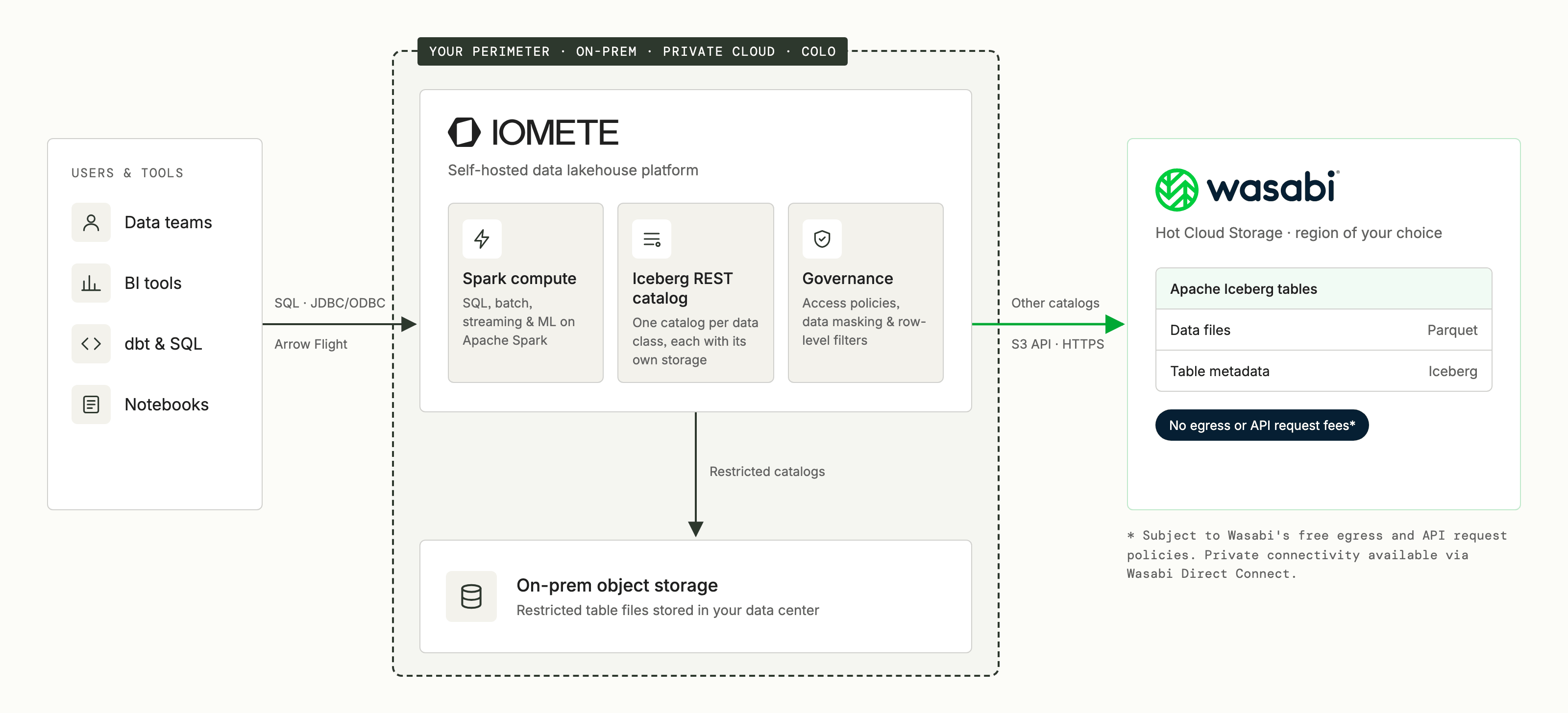
You deploy IOMETE on your infrastructure, with Spark compute and the Iceberg REST catalog service inside your environment. BI tools and SQL clients connect to IOMETE over JDBC/ODBC or Arrow Flight, while teams can also work through the IOMETE Console. Spark executes the queries, reading table files from local storage or Wasabi as needed. Wasabi supplies storage; it does not execute the SQL.
For Wasabi-backed tables, both Parquet data files and Iceberg metadata files live in the Wasabi bucket. The catalog service keeps the pointer to each table's current metadata location in its PostgreSQL database. This distinction matters when planning storage placement: hosting the catalog service locally does not mean that all table metadata stays local. Our deployment architecture describes the IOMETE components in more detail.
Catalogs Determine Default Storage Placement
Each managed Iceberg REST catalog has a warehouse location and storage credentials. A local catalog points to your on-premises object store. A Wasabi-backed catalog points to a Wasabi bucket, with storage traffic using the S3 API over HTTPS to that bucket's regional endpoint.
You can organize catalogs around your data classes, as the diagram illustrates, and grant teams access to the catalogs they need. The warehouse is the default location for new tables. Adding a Wasabi catalog does not automatically move existing tables or balance data between storage locations; moving a table remains a planned migration. Also review explicit table-location overrides and scope storage credentials to the approved buckets so placement follows your design.
Governance Applies Across Both Storage Locations
IOMETE applies access policies, data masking and row-level filters to queries through its governed engine. Administrators use the same controls for local and Wasabi-backed tables, with policies scoped to the relevant catalogs, databases, tables and columns. A new storage location does not require a separate governance system.
Analysts should access the tables through IOMETE rather than receive bucket credentials. Someone who reads a Parquet file directly from object storage does not pass through the query engine, so engine-level masking and row filters cannot apply to that read. Keep query results and exports in approved locations too, and grant permission to write cloud-backed tables separately from permission to read local data.
A Worked Example: Customer Records and Order History
Consider a hypothetical enterprise that keeps its customer master records on-premises. Its order history is growing, and its data owners have approved selected order fields, including a shared customer key, for storage in a Wasabi region. The analytics team wants to count orders by customer segment without maintaining another customer master table in the cloud.
The team defines two catalogs and their storage locations:
| Dataset | Table | Storage |
|---|---|---|
Customer master, including customer_key and segment | restricted.crm.customers | On-premises object storage |
Approved order history, including customer_key and order_date | internal.sales.orders | Wasabi Hot Cloud Storage |
Here, restricted and internal reflect this organization's placement decisions. Your own classification rules determine which datasets belong in each catalog.
For this example, the analyst can read both tables and see the customer_key values needed to match orders to customers:
SELECT c.segment, COUNT(*) AS order_count
FROM restricted.crm.customers c
JOIN internal.sales.orders o ON o.customer_key = c.customer_key
WHERE o.order_date >= DATE '2026-09-01'
  AND o.order_date < DATE '2026-10-01'
GROUP BY c.segment;
Spark reads the relevant order data from Wasabi and joins it with the local customer table on your compute. The result contains September order counts by segment, subject to the analyst's configured row filters and other access policies. The customer master table stays on local storage, while the order table uses cloud capacity.
The same arrangement supports ongoing ingestion: a pipeline writes approved order data to the Wasabi-backed catalog, and analysts continue querying it through IOMETE. Access to write that table should belong to the appropriate pipeline role, rather than automatically accompany every analyst's read access.
Who This Architecture Fits
This architecture is worth evaluating when you already operate on-premises infrastructure and want to keep control of your analytics compute while adding cloud storage. The strongest fit is an organization with growing datasets that it has approved for cloud placement, alongside datasets it intends to keep local. The reason for keeping data local can be an internal policy, a contractual requirement or application performance; the design does not depend on a particular industry.
Longer-lived operational history and analytical datasets with selective reads are useful starting points for a pilot. They let you evaluate cloud capacity against real query patterns, while keeping frequently scanned or latency-sensitive tables close to compute. These are queryable Iceberg tables: you can include them in analytics alongside local tables, as the example shows.
Existing IOMETE customers can add a Wasabi-backed catalog to their deployment. If you are evaluating IOMETE for the first time, this gives you a target architecture for the combined platform; include your existing queries, pipelines and access policies in the adoption plan. Connecting cloud storage and adopting a new lakehouse platform are separate pieces of that work.
Sizing the Joint Solution
Choose the cloud-backed datasets using their access patterns as well as their storage requirements. During a pilot, measure representative queries and maintenance jobs over the network connection you intend to use. Three considerations affect that design:
| Consideration | What to Account For |
|---|---|
| Connectivity | Reads from Wasabi to on-premises compute across your network connection. Choose a nearby Wasabi storage region and measure latency and throughput; internet connectivity and paid private connections have their own costs. |
| Read volume | Wasabi's free-egress policy describes workloads with monthly downloads no greater than active stored volume as a good fit. Estimate account-wide downloads, including queries and maintenance, after caching and query pruning. Regularly exceeding the guideline can lead to service restrictions, so confirm higher-volume workloads with Wasabi before production. |
| File lifetime | Wasabi's Pay as You Go plan has a default 90-day minimum storage duration per object. Deleting files sooner incurs charges for the remaining period, so include file replacements from compaction and updates in the storage budget. |
These measurements help you decide which tables to put in Wasabi and which to retain locally. Keep Iceberg maintenance aligned with your recovery and performance needs, while accounting for how often it replaces files. Wasabi's integration guide also specifies disabling bucket versioning and Object Lock for live table buckets; follow those settings when configuring the pilot.
Exploring IOMETE With Wasabi
To evaluate this architecture, start with one dataset approved for cloud storage and a representative query that also uses local data. Compare query performance and projected storage costs, then verify access policies with the roles that will use the tables. This gives you a practical basis for deciding what to place in each catalog.
Wasabi's IOMETE with Wasabi guide walks through bucket permissions, catalog creation and a complete table write-and-query cycle. If you are planning a hybrid lakehouse or evaluating IOMETE for your on-premises platform, talk to our team about dataset placement, workload sizing and a pilot with Wasabi.